How We Plan a Cloud Migration: Assess, Plan, Migrate, Verify


AI Chatbots and Assistants


- 18 Oct, 2026
- 12 Views
- 0 Comment
By the LaunchLen Web Solutions Team · Kitchener, Ontario · Last updated: October 18, 2026
If you’ve used an AI chatbot, you’ve probably seen it give a confident answer that turned out to be wrong. That’s called a hallucination. For a casual question it’s a nuisance. For a business chatbot answering customers about refunds, warranties or service areas, it’s a real risk.
The good news: you can’t eliminate hallucinations completely, but you can reduce them meaningfully with the right setup. This guide covers how to reduce AI hallucinations in practical terms: what they are, why they happen and the safeguards that help most.
What a hallucination is
An AI hallucination is an answer that sounds plausible but isn’t true or isn’t supported by the information the AI was given. The US National Institute of Standards and Technology (NIST) uses the term “confabulation” for the same risk.
These are illustrative examples of what a hallucination can look like in a business setting:
- A chatbot tells a customer you offer a longer return window than your policy actually allows.
- An assistant invents a product feature, a phone extension or a staff member’s name.
- A summary of a long document includes a “fact” that isn’t in the document.
- An AI cites a source, page or article that doesn’t exist.
The tricky part is tone. A hallucinated answer usually sounds just as confident as a correct one.
Why language models hallucinate
Large language models generate text by predicting what’s likely to come next, based on patterns learned from huge amounts of training data. They’re very good at producing fluent, plausible text. They don’t automatically check that text against a trusted source.
A few common causes:
- Missing knowledge. The model has never seen your policies, prices or procedures, so it fills gaps with something that sounds right.
- Rare or specific facts. Details that appear rarely in training data, like a specific person’s birthday or a small company’s hours, are easy to get wrong.
- Guessing is rewarded. A 2025 research paper, “Why Language Models Hallucinate”, argues that models hallucinate partly “because the training and evaluation procedures reward guessing over acknowledging uncertainty.”
- Unclear questions. Vague or ambiguous questions invite the model to assume.
- Bad or outdated source content. If the AI is given wrong information, it will repeat it confidently.
Grounding answers in your own content
One of the most effective steps for a business chatbot is grounding: making the AI answer from a specific, approved set of information rather than from general knowledge. The most common way to do this is retrieval-augmented generation (RAG), where the system looks up the relevant passages in your content before answering.
Grounding works best when you also:
- Keep the source content accurate and current. Outdated pages produce outdated answers.
- Limit the AI to that content for business-specific questions, rather than letting it fill gaps from general knowledge.
- Show sources. Linking each answer to the page or document it came from makes errors easier to spot and lets customers check.
- Ask for quotes first on long documents. Having the AI pull the exact supporting text before it answers keeps it closer to what the document actually says.
Grounding reduces made-up answers, but it doesn’t remove them. Security guidance such as OWASP’s lists it as a mitigation alongside human oversight and fact-checking, not a guarantee. That’s why the remaining steps matter.
Prompting and refusal: teaching the AI to say ‘I don’t know’
Many hallucinations happen because the AI tries to answer everything. You can change that with clear instructions in the system prompt, the standing instructions sent with every request:
- Give explicit permission to say “I don’t know.” Published guidance from at least one major AI provider recommends this as a basic step.
- Define what’s in scope. For example: answer questions about our services, hours and policies; for anything else, offer to connect the person with our team.
- Set a fallback response. Decide exactly what the chatbot says when it can’t find an answer, such as offering a contact form or a callback request.
- Ask clarifying questions. If a question is ambiguous, the chatbot can ask which location, product or date the person means.
- Avoid pressure to be complete. Instructions like “give a full answer to every question” can push the model to invent details.
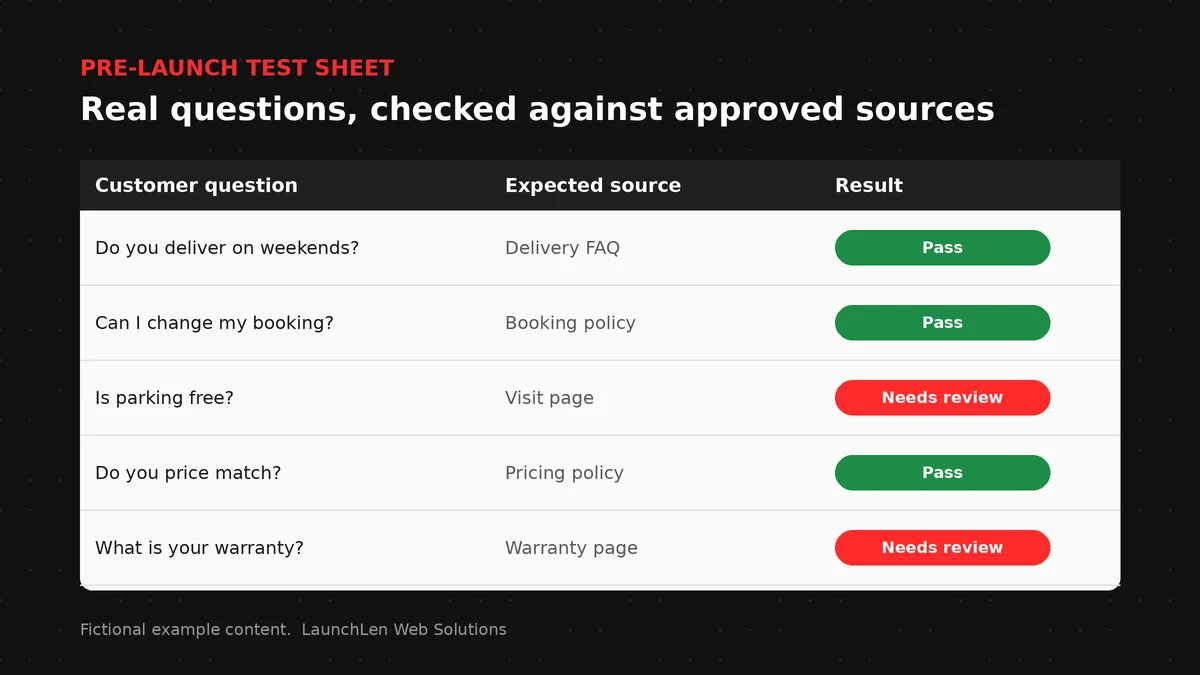
Testing with real questions before launch
You won’t know how a chatbot behaves until you test it with the questions people actually ask.
- Collect real questions from emails, calls, contact forms and front-desk staff, including awkward and unusual ones.
- Write down the expected answer and source for each.
- Include questions it shouldn’t answer, such as topics outside your content or requests for advice it shouldn’t give, and check that it declines politely.
- Re-test after changes. New content, new instructions or a model update can change behaviour, so keep your test set and run it again.
- Review real conversations after launch to spot new gaps and update the content.
When we work on chatbot projects, testing can include building a question set with your team, agreeing what “good enough” looks like together, and reviewing results before anything goes live.
Human review and handoff
Some answers matter too much to leave to AI alone.
- Hand off when unsure. A good chatbot passes the conversation to a person, with the context, when it can’t find a grounded answer or the customer asks for help.
- Keep people in the loop for high-stakes topics, such as refunds, legal or medical questions, safety issues or anything involving money.
- Review AI drafts before they’re sent. For emails, quotes or documents, treat AI output as a first draft.
- Watch automated actions closely. In agentic AI workflows, where AI takes steps across systems, a hallucinated detail can trigger the wrong action, so human checkpoints matter even more.
Your business remains responsible for what its chatbot tells customers, so plan oversight from the start.
FAQ
Can AI hallucinations be eliminated completely?
No. Current language models can still produce wrong answers, even with good safeguards. Grounding, clear instructions, testing and human handoff can reduce hallucinations, but a person should still review anything high-stakes.
Does RAG stop AI from hallucinating?
It helps by giving the AI the right information to answer from, but it doesn’t stop hallucinations entirely. The search can retrieve the wrong passage, or the AI can misread the right one.
Are newer AI models less likely to hallucinate?
Newer models may improve on some tasks, but results vary by task and setup. Don’t rely on the model alone. Test your own chatbot with your own questions, and test again whenever the model changes.
Let’s work together on your project
Want an AI chatbot your customers can trust? We’re LaunchLen Web Solutions Inc., based in Kitchener, serving Waterloo Region and businesses across Ontario. Our AI Solutions page explains how we approach AI projects, and we’re happy to talk through your goals with you. Book a free consultation to get started.
Sources
- Kalai, Nachum, Vempala and Zhang, “Why Language Models Hallucinate” (2025), abstract quote “because the training and evaluation procedures reward guessing over acknowledging uncertainty”: https://arxiv.org/abs/2509.04664
- NIST AI 600-1, Artificial Intelligence Risk Management Framework: Generative AI Profile (“confabulation”): https://nvlpubs.nist.gov/nistpubs/ai/NIST.AI.600-1.pdf
- OWASP GenAI Security Project, LLM09:2025 Misinformation (RAG and human oversight as mitigations, not guarantees): https://genai.owasp.org/llmrisk/llm092025-misinformation/
- Anthropic, Reduce hallucinations (example of a provider’s guidance: allow “I don’t know”, use direct quotes, verify with citations): https://platform.claude.com/docs/en/test-and-evaluate/strengthen-guardrails/reduce-hallucinations

DROP US A LINE
Connect with LaunchLen Web Solutions Inc.
Ready to take the first step towards unlocking opportunities, realizing goals, and embracing innovation? We're here and eager to connect.

To More Inquiry
+1 226 899 4813

To Send Mail