Prompt Engineering for Business: Getting Reliable Results From AI


AI Chatbots and Assistants


- 21 Oct, 2026
- 6 Views
- 0 Comment
By LaunchLen Web Solutions Team
Chatbot content preparation is a key part of an AI chatbot project. Before anything is built, we can ask you for content, a few decisions and some rules. This post explains what that list can include, why each item matters, and what LaunchLen Web Solutions Inc. can do with it.
You don’t need to have everything ready on day one. Part of the work is finding what’s missing together.
Why the chatbot is only as good as its sources
A chatbot we build can use retrieval-augmented generation, or RAG. Instead of answering only from what an AI model learned in training, a RAG system first searches a set of documents for passages related to the question, then hands those passages to the model to write an answer. The paper that introduced the approach pairs a language model with a searchable document index that can be updated without retraining the model (Lewis et al., arXiv). Our plain-English guide, what is RAG?, walks through it.
That design is the reason we can ask for so much content. If the source material is outdated, incomplete or contradictory, the answers can be too. Security guidance from the OWASP Gen AI Security Project lists RAG as a way to improve the reliability of answers and help reduce the risk of made-up information, and still recommends human oversight and fact-checking for critical or sensitive information (OWASP LLM09).
OWASP’s same page points to a case in which an airline’s chatbot gave travellers wrong information and the airline was successfully sued. If a chatbot speaks for your business, its answers are your answers.
The content we ask for: pages, FAQs, policies, documents
The content we ask for can include:
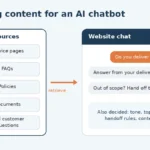
- Website pages. Service, product, location and “about” pages that describe what you do and where.
- FAQs. Any written answers you already have, even rough ones from an internal document or old email replies.
- Policies. Returns, cancellations, bookings, warranties, privacy and anything else customers ask about.
- Documents. PDFs, product sheets, intake requirements, guides or manuals you’re comfortable having the chatbot quote.
- Other sources in scope. Your existing knowledge base, help desk, shared drives or databases you choose to include.
- Real questions. A sample of the questions your team actually receives, pulled from emails, forms or messages, with personal details removed.
- Access. None to start. Documents and details are uploaded through our secure portal as the standard path, and the chatbot picks up from what you choose to upload. You control what you upload. Credentials are needed only if we’re integrating an existing codebase, micro-SaaS or servers.
Real questions are one of the most useful items: in customers’ own words, they can show gaps in your written content and become the pilot’s test questions. Our post on how we build an AI chatbot, step by step shows where this content review sits in the wider project.
As we review the material with you, we can flag conflicting pages, outdated answers and common questions with no written answer. You can decide what gets fixed, rewritten or left out before anything goes into the knowledge base.
Deciding what the chatbot must never answer
What stays out matters as much as what goes in. We can ask you to decide, topic by topic, what the chatbot shouldn’t answer and what should go straight to a person. That list can include legal, medical, financial or account-specific questions, complaints, and anything where a wrong answer could cause real harm.
We can also ask what should never enter the knowledge base at all. Internal notes, staff details, unpublished internal figures and customer records can be left out. OWASP warns that applications built on AI models risk exposing sensitive data through their output, and recommends limiting access to sensitive data on a least-privilege basis and restricting the data sources a model can reach (OWASP LLM02). Its RAG guidance adds that weak access controls can lead to unauthorized access, and that knowledge sources should be accepted only from trusted sources (OWASP LLM08).
Privacy law points the same way. The Office of the Privacy Commissioner of Canada (OPC) says organizations using generative AI should limit the personal information they collect and use to what the purpose needs, and that prompts shouldn’t be retained, used for secondary purposes or disclosed unless otherwise required (OPC generative AI principles). For advice specific to your business, check with a qualified privacy adviser.
Tone, handoff rules and contact routes
A chatbot also needs to sound like you and know when to step aside. Before building, we can agree with you on:
- Tone. Formal or friendly, words you prefer or avoid, and how it refers to your business.
- Handoff rules. A build can include a handoff to a real person: which topics, phrases or situations should pass the conversation to a person, and what the chatbot says when it can’t find an answer in your content.
- Contact routes. The main path is the bottom-right website widget (like on our site). If the chatbot can’t resolve something, it can create a ticket that a specialist escalates and handles. Phone, email and live-chat handoff aren’t offered.
- AI disclosure. How visitors will know they’re talking to an AI tool. The OPC says public-facing generative AI tools should make that clear and tell people about privacy risks, such as not entering personal information unless necessary (OPC generative AI principles).
These rules can be tested in the pilot. Your team can try off-limits topics on purpose to check the chatbot declines and offers a person instead.
Keeping content current after launch
When your hours, services or policies change, the chatbot’s answers need to change too. With RAG, that means updating the source content rather than retraining a model. So the last item on the list can be a decision: who owns the knowledge base after launch?
That owner can be someone on your team who updates sources when the business changes and reviews questions the chatbot couldn’t answer. After launch, we provide full technical support and ongoing updates, and keep improving speed, accuracy, guardrails and hallucination reduction. The chatbot is SaaS-based, so you run the latest version. You can read more about what a build can include on our AI solutions service page.
FAQ
Do we need perfect content before we start?
Not necessarily. Part of the content review can be finding gaps, conflicts and outdated answers, then deciding together what to fix.
Can the chatbot use our internal documents?
It can, if you choose to include them and they’re safe to share with the people using the chatbot. Anything confidential or personal can be left out of the knowledge base entirely.
What happens when our information changes?
You can update the source content, and the chatbot can then answer from the new version. Who owns those updates can be agreed with you as part of planning the project.
Working with LaunchLen
We’re LaunchLen Web Solutions Inc., based in Kitchener, serving Waterloo Region and businesses across Ontario.
If you’re thinking about an AI chatbot, start with what your team already knows: the questions customers ask and the answers you trust. We can help you work out what’s ready, what’s missing and whether a chatbot is the right fit.

DROP US A LINE
Connect with LaunchLen Web Solutions Inc.
Ready to take the first step towards unlocking opportunities, realizing goals, and embracing innovation? We're here and eager to connect.

To More Inquiry
+1 226 899 4813

To Send Mail