Building Accessible Websites From Day One: How We Approach AODA


AI Chatbots and Assistants

- 21 Oct, 2026
- 7 Views
- 0 Comment
By the LaunchLen Web Solutions Team · Kitchener, Ontario · Last updated: October 21, 2026
Ask an AI tool the same question twice and you might get two different answers. Ask it a vague question and you’ll usually get a vague answer. For casual use that’s fine. For a business process, such as drafting customer replies or summarizing service requests, you need output that’s useful and consistent.
That’s what prompt engineering for business is about: writing instructions that get dependable results from AI. This guide covers the parts of a good prompt, how system prompts work, how to test prompts, and when prompting isn’t enough.
What prompt engineering is (and isn’t)
A prompt is the input you give an AI model: the question, the instructions and any information it needs. Prompt engineering is the practice of designing and refining that input so the output meets a clear standard.
It isn’t a bag of magic phrases. Most of it is ordinary good communication: say what you want, give the context, show an example and describe what “done” looks like. Clear writing for people and clear writing for AI have a lot in common.
It also isn’t a one-off task. Prompts behave differently across models and can change when a model is updated, so a prompt your business relies on needs testing and occasional upkeep, like any other part of a process.
The parts of a good prompt
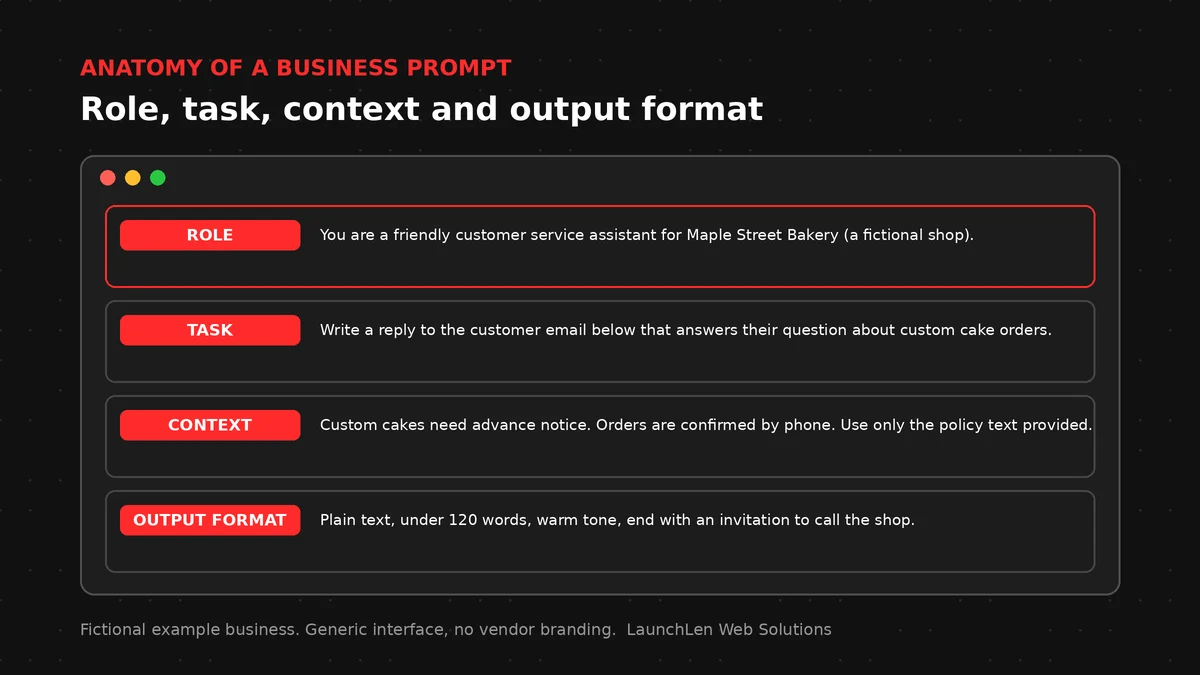
A reliable business prompt usually includes these parts:
- Role. Who the AI should act as, for example “You’re a helpful assistant for a home renovation company’s front desk.”
- Task. What you want done, stated plainly: “Draft a reply to the customer email below.”
- Context. The information it needs: your policies, the customer’s message, relevant product details.
- Constraints. What to avoid or include: “Don’t promise dates. If the email asks about pricing, say a team member will follow up.”
- Output format. How the answer should look: a short email, a bulleted summary, a table with set column names.
- Tone. Friendly, formal, plain-language.
Here’s an illustrative example of a weak prompt and a stronger one:
- Weak: “Write a reply to this customer.”
- Stronger: “You’re the front-desk assistant for a renovation company. Draft a short, friendly reply to the customer email below. Thank them, confirm we received their request, and say a project coordinator will contact them. Don’t mention prices or dates. End with our standard sign-off.”
The second version leaves far less to guesswork.
System prompts vs user prompts
Business AI tools often use two layers of instructions.
The system prompt is the standing set of instructions sent with every request, usually set by whoever builds the tool. It defines the role, scope, tone and rules, such as which topics to stick to and what to do when the answer isn’t in the provided content.
The user prompt is what changes each time: a customer’s question, a document to summarize, a form submission.
Two cautions about system prompts:
- Don’t put secrets in them. OWASP’s guidance on system prompt leakage says a system prompt shouldn’t be treated as a secret or used as a security control. Keep passwords, API keys and access rules out of it.
- Don’t rely on them for security. Permissions and checks belong in the software around the AI, not in instructions the AI is asked to follow.
Using examples and output formats
One of the most useful techniques is showing, not just telling. Including a few examples of good output, sometimes called few-shot prompting, helps the model match the format, phrasing and scope you want. At least one major AI provider’s prompting guide recommends including examples in prompts.
A few practical tips:
- Use realistic examples that reflect the variety of inputs you’ll see, not just the easy cases.
- Keep examples consistent in format, so the model doesn’t mix styles.
- Specify the output format explicitly, especially when another system reads the result. A fixed structure, like labelled fields, is easier to check and process.
- Separate instructions from content. Clear labels or sections for “instructions,” “policy text” and “customer message” help the model tell them apart.
Testing prompts before you rely on them
A prompt that works on one example might fail on the next. Before a prompt goes into a real workflow, test it.
- Define success first. Decide what a good output looks like: accurate, on-brand, in the right format, free of promises you can’t keep.
- Build a test set of real inputs, including unusual, messy and off-topic ones.
- Compare outputs to expectations and note where they fall short.
- Change one thing at a time so you know what helped.
- Re-test after changes. A new model version can change behaviour. One provider’s guide recommends pinning production apps to specific model versions so behaviour stays consistent.
- Keep a person in the loop for anything customer-facing or consequential, at least until the results have earned trust.
If accuracy is the main concern, our guide on how to reduce AI hallucinations goes further.

Prompts vs RAG vs fine-tuning
Prompting is the first lever, but it isn’t the only one.
- Prompting shapes how the model responds. It’s quick to change and is often the right starting point.
- Retrieval-augmented generation (RAG) gives the model the right information to answer from, by looking up relevant passages in your own content first. It’s useful when answers depend on your policies, products or documents.
- Fine-tuning further trains a model on examples to adjust its style or behaviour on a specific task. It takes more effort and suits narrower cases where prompting and RAG fall short.
Many business tools combine prompting with RAG, and those tools often connect to a model through an LLM API. If you’re still deciding where AI fits, our guide on where to start with AI is a good first read.
When we help with AI projects, we agree the use cases, success criteria and review steps with you before anything goes live.
FAQ
Do I need to learn prompt engineering to use AI at work?
Not formally, but the basics help. Being clear about the task, the context and the format you want will improve results in almost any AI tool. For tools your whole team relies on, it’s worth building and testing standard prompts.
Should my business create prompt templates?
Templates can help for repeated tasks such as summarizing meetings, drafting replies or writing product descriptions. Store approved versions in one place, note what each is for, and review them when your tools or policies change.
Can a good prompt stop AI from making mistakes?
No. Clear prompts reduce errors, but they don’t remove them. For important outputs, combine good prompts with grounded content, testing and human review.
Let’s work together on your project
Want AI output your team can rely on? We’re LaunchLen Web Solutions Inc., based in Kitchener, serving Waterloo Region and businesses across Ontario. Our AI Solutions page explains how we approach AI projects, and we’re happy to talk through your goals with you. Book a free consultation to get started.

DROP US A LINE
Connect with LaunchLen Web Solutions Inc.
Ready to take the first step towards unlocking opportunities, realizing goals, and embracing innovation? We're here and eager to connect.

To More Inquiry
+1 226 899 4813

To Send Mail