How we build native iOS and Android apps with Kitchener-Waterloo businesses


AI Automation and Agents

- 13 Oct, 2026
- 22 Views
- 0 Comment
By the LaunchLen Web Solutions Team · Kitchener, Ontario · Last updated: October 13, 2026
Most people meet AI through a chat app: you type a question, it types back. But when a business wants AI inside its own website, app or internal tools, it usually connects through an LLM API. This guide explains what an LLM API is, how it differs from a chat app, how a request works, what to ask a model provider, common business uses and the risks to plan for.
LLM APIs in plain English
An LLM is a large language model, the kind of AI that reads and writes text. An API (application programming interface) is a defined way for one piece of software to talk to another.
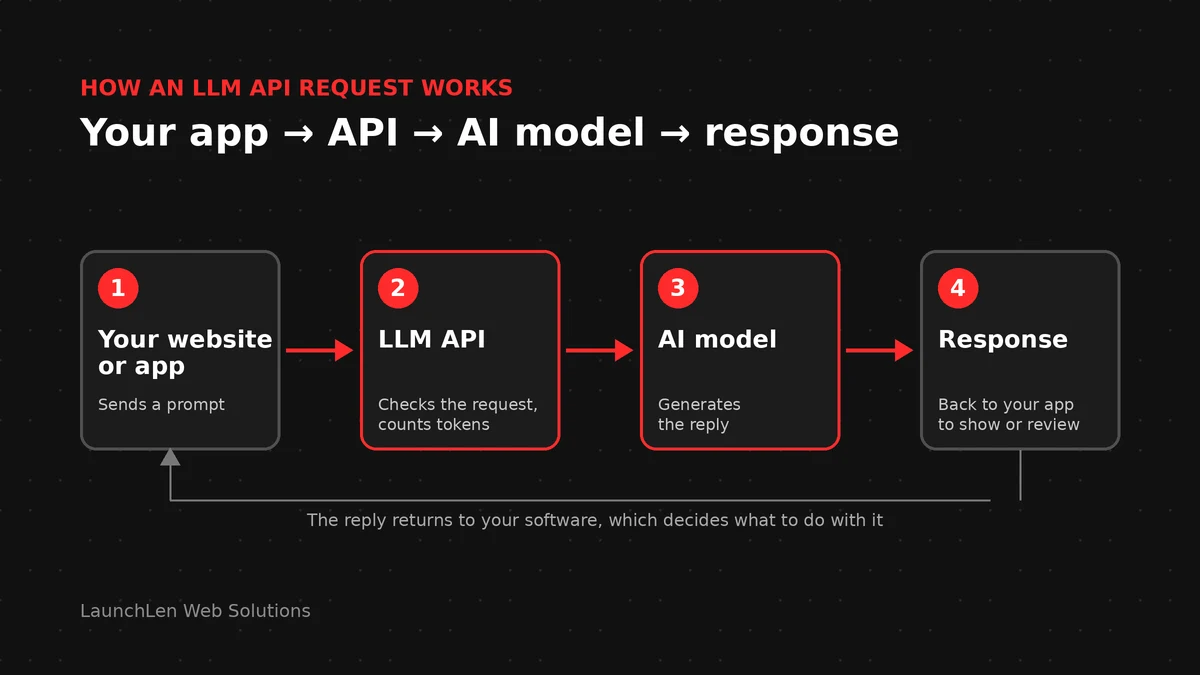
Put together, an LLM API lets your software send text to an AI model and get a reply back, automatically, without anyone opening a chat window. Your website, customer portal, native mobile app or back-office system sends a request. The model processes it. Your software receives the answer and decides what to do with it: show it to a customer, save it to a record or pass it to a person for review.
API vs chat app: what changes when you build on an API
A chat app is a finished product. Someone else has decided the screen, the settings and how conversations are stored. With an API, those decisions come back to you:
- You control the experience. The AI appears where it’s useful, such as a help panel on your site or a “summarize” button in your job software, styled like the rest of your product.
- You control the instructions. Your software can send the same carefully written instructions with every request, so answers follow your tone and rules.
- You can connect your own information. An API call can include content from your systems, which is how techniques like retrieval-augmented generation (RAG) let AI answer from your documents.
- You take on responsibility. Error handling, security, privacy, logging and testing become part of your project rather than someone else’s.
That last point is why building on an API is a software project, not just a sign-up. It’s the kind of work covered by software development.
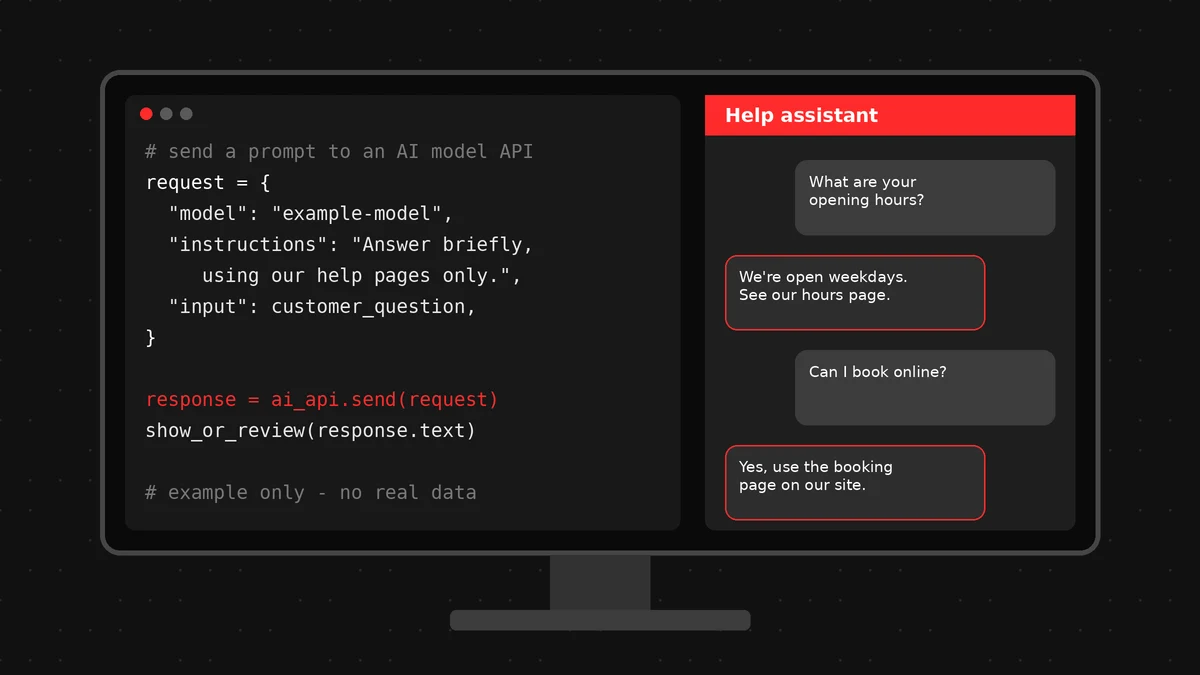
How a request works: prompt, model, response, tokens
Every LLM API call follows roughly the same pattern:
- Prompt. Your software sends text to the API. This usually combines fixed instructions (“You are a helpful assistant for a home-services company. Answer briefly.”), any reference content and the user’s actual question.
- Model. The request names which model to use. Providers typically offer several, from larger, more capable models to smaller, faster ones.
- Response. The model generates a reply and the API sends it back. Your software can show it, store it or check it before anyone sees it.
- Tokens. Models read and write in “tokens”, small chunks of text that are often parts of words. Tokens matter because they limit how much text fits in one request and they’re usually how API usage is measured and billed.
Usage-based billing is one reason the running cost of an AI feature depends on how it’s used. Our guide to what drives the cost of AI automation covers the cost factors without guesswork.
Choosing a model provider: questions to ask (data use, retention, regions)
Major model providers publish documentation on how they handle API data. Before connecting any business or customer information, read it and ask:
- Data use. Is data sent through the API used to train the provider’s models? For example, OpenAI’s data controls page states that API data isn’t used for training unless the customer opts in. Check the current terms of any provider you consider.
- Retention. How long are prompts and responses kept, for what purpose, and can that be reduced?
- Regions. Where is data processed and stored, and does that meet your obligations and your customers’ expectations?
- Model lifecycle. How much notice is given before a model is retired?
- Reliability and support. Is there a status page, and what support comes with your account?
The best fit depends on the task, the data involved and your own policies.
Common business uses: chat, summaries, extraction, drafting
These are examples of where an LLM API is often used, not client projects or promised results:
- Chat. A website or in-app assistant that answers routine questions, ideally grounded in your own content and with a handoff to a person.
- Summaries. Condensing long emails, call notes or reports into a few lines for a busy team.
- Extraction. Pulling names, dates, amounts or order numbers out of unstructured text such as forms or emails, then placing them into the right fields for someone to check.
- Drafting. Preparing first drafts of replies, product descriptions or internal documents that a person edits before anything is sent or published.
In each case, the API does the language work and your software handles the rules around it.
Risks: outages, model retirement, data handling
An LLM API is a dependency on someone else’s service, so plan for:
- Outages and slowdowns. Any online service can go down or slow down. Your software should fail gracefully, for example by showing a contact option instead of an error.
- Model retirement. Providers retire older models and publish deprecation schedules. A model you build on today may need replacing later, which means re-testing your prompts.
- Changing behaviour. A newer model may answer differently. Keep a set of test questions to check results after any change.
- Data handling. Only send what’s needed, avoid unnecessary personal information and respect your privacy obligations.
- Wrong answers. LLMs can produce confident mistakes. Use human review where accuracy matters.
When we work on projects like this, we agree the scope, deliverables and reporting with you up front, including how these risks will be handled.
FAQ
Do I need an LLM API, or is a chat app enough?
If your team just needs help writing or brainstorming, a business chat app may be enough. An LLM API makes sense when you want AI built into your own website, app or workflow, working with your data and following your rules.
Is my data safe when I use an LLM API?
It depends on the provider’s terms, your settings and what you send. Read the provider’s data-use, retention and region documentation, send only the data the task needs and follow your privacy obligations.
Can I switch AI providers later?
Usually, yes, if the software is designed with that in mind. Keeping prompts and provider-specific code separate from the rest of your application makes a later switch easier, though you’ll still need to re-test the results.
Let’s work together on your project
Thinking about adding AI to your website, app or internal software? We’re LaunchLen Web Solutions Inc., based in Kitchener, serving Waterloo Region and businesses across Ontario. We’ll talk through your goals with you and whether an LLM API is the right fit. Book a free consultation to get started.
Sources
- OpenAI, Data controls in the OpenAI platform (example of a provider’s data-use documentation): https://platform.openai.com/docs/guides/your-data
- OpenAI, Deprecations (example of a published model retirement schedule): https://platform.openai.com/docs/deprecations
- Anthropic, Model deprecations (example of a published model retirement schedule): https://docs.anthropic.com/en/docs/about-claude/model-deprecations

DROP US A LINE
Connect with LaunchLen Web Solutions Inc.
Ready to take the first step towards unlocking opportunities, realizing goals, and embracing innovation? We're here and eager to connect.

To More Inquiry
+1 226 899 4813

To Send Mail