AI Agent Frameworks Compared: What Developers Use to Build Agents


SEO and Growth Marketing

- 22 Oct, 2026
- 1 Views
- 0 Comment
By LaunchLen Web Solutions Team
A new website can look better and be easier to edit, and still lose search traffic if the move is handled carelessly: pages vanish and old links break. A WordPress migration planned around your existing content and URLs can reduce that risk.
This post explains how LaunchLen Web Solutions Inc. approaches a move to WordPress with you: the inventory, redirect mapping, the rebuild, launch-day checks and what to watch in the weeks after. No one can promise rankings won’t move, but careful planning can reduce the risk.
What can go wrong in a WordPress migration
Migration problems can come from things that are easy to overlook:
- Missing pages. Content that ranked or earned links isn’t carried over.
- Changed URLs without redirects. Visitors and search engines land on “not found” pages.
- Redirects to the wrong place. Google warns against redirecting many old URLs to one irrelevant page, such as the home page, which “might be treated as a soft 404 error” (Google Search Central, site moves with URL changes).
- Leftover blocks. Rules used to keep a development site out of search are left on after launch.
- Lost details. Titles, meta descriptions, image alt text and structured data don’t make the trip.
Google also advises changing one thing at a time. Its example is a site that wants a new domain, a new content management system and a new layout: do them one after the other, not all at once (same source). A platform change is already a big change, so where we can, we’d keep a new domain separate.
Content and URL inventory
Before anything is rebuilt, we need to know what exists today. Google’s guidance suggests starting with your important URLs, found in places such as your sitemaps, analytics, server logs and the pages other sites link to (same source). It also reminds site owners to include embedded content such as images and videos.
The inventory can include:
- Pages and posts: every URL, its title, meta description and main heading
- Media and documents: images, videos and downloadable files that may already get traffic
- Performance: which pages bring in search visitors and which earn links
- Forms and features: contact forms, booking tools, search and anything interactive
- Technical details: structured data, canonical tags and any rules that keep pages out of search
This is where your knowledge matters: you know which pages customers ask about, even if you’ve never looked at a sitemap.
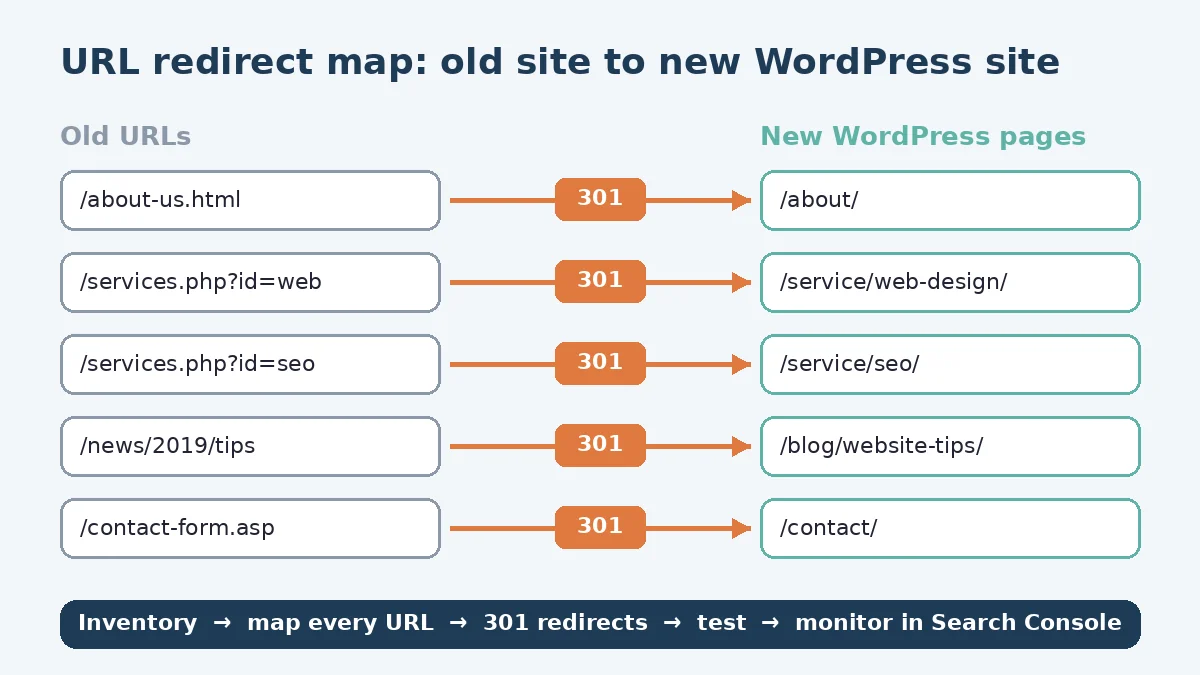
Redirect mapping and 301s
Once the inventory is done, each old URL gets a destination. Google’s site-move guidance recommends preparing a mapping from your current URLs to their new format, using server-side permanent redirects if technically possible, and redirecting to the final destination directly rather than through a chain. It also notes that permanent redirects “don’t cause a loss in PageRank” (Google Search Central, site moves with URL changes). Its redirects guide recommends a permanent server-side redirect “whenever possible” when a page’s URL changes in search results (Google Search Central, redirects and Google Search).
Mapping decisions can include:
- Keep the URL where WordPress can match the old address, which avoids a redirect altogether
- Redirect one to one where a page moves to a new address
- Redirect to a consolidated page where several old pages are merged into one, which Google’s guidance allows
- Let a page go where content is deliberately removed, returning a proper “not found” or “gone” response rather than redirecting it somewhere unrelated
As an illustrative example, a service business might merge separate old location pages into a single service-area page. Each old page can redirect to the new one, which keeps the content that made the old pages useful.
Our WordPress development service page puts it this way: “A careful migration maps every old URL to its new home with permanent (301) redirects, keeps valuable content, and is checked in Google Search Console afterward.”
Rebuilding on WordPress: theme, content, forms
The rebuild is where the new site takes shape. It can include:
- Theme and layout: built around your content, with one main heading per page and a logical structure
- Content: moved and cleaned up, keeping the text and headings that already work
- SEO details: titles, meta descriptions, alt text and structured data carried over or improved
- Internal links: updated to point straight to the new URLs, as Google recommends, rather than relying on redirects
- Forms and integrations: rebuilt and tested so enquiries still reach the right inbox or system
During the build, the new site is kept out of search. Google notes that if you block crawling or use noindex rules during development, you should prepare to remove them when the move starts.
Launch-day checks
Launch is when redirects go live. Google’s order is to prepare and test the new site, prepare the URL mapping, turn on the redirects and then monitor traffic on both old and new URLs (same source). Launch-day checks can include:
- redirects tested for the mapped URLs, with no chains or loops
- development blocks and noindex rules removed
- canonical tags pointing to the new URLs
- forms, downloads and key pages tested on desktop and mobile
- an updated sitemap with the new URLs submitted in Search Console
The first weeks after launch: Search Console monitoring
Google says to “expect temporary fluctuation in site ranking during the move” while it recrawls and reindexes your site. Monitoring after launch can include:
- Errors: watching for unexpected “not found” errors and fixing redirects that point to the wrong place
- Indexing: checking that new URLs are being indexed as old ones drop out
- Search queries: seeing new URLs pick up impressions and clicks
- Links: asking important sites that link to you to update their links, and keeping redirects in place for as long as possible
We can agree the scope, deliverables and reporting with you, including how long monitoring runs after launch. For a deeper look at site health, our post on the technical SEO audit explains what an audit can check. If you’re also changing hosts, our cloud migration checklist covers that move.
FAQ
Will I lose my Google rankings when I move to WordPress?
Rankings can fluctuate during any site move while search engines recrawl your site. Keeping valuable content, mapping old URLs to new ones with permanent redirects and monitoring after launch can reduce the risk, but no one can promise rankings won’t change.
Do I need 301 redirects if my URLs stay the same?
No redirect is needed for a page whose address doesn’t change. Redirects are needed for every URL that moves, and pages you remove on purpose should return a proper “not found” or “gone” response.
Can I change my domain at the same time as moving to WordPress?
You can, but Google advises changing one thing at a time. Where possible, we’d move the platform and the domain as separate steps so any issues are easier to trace.
Working with LaunchLen
Based in Kitchener, serving Waterloo Region and businesses across Ontario.
If you’re planning a WordPress migration, start with the inventory. Tell us what your site runs on today and which pages matter to your business.


DROP US A LINE
Connect with LaunchLen Web Solutions Inc.
Ready to take the first step towards unlocking opportunities, realizing goals, and embracing innovation? We're here and eager to connect.

To More Inquiry
+1 226 899 4813

To Send Mail