AI Hallucinations: Why Chatbots Make Things Up and How to Reduce It


Web Design and Development

- 19 Oct, 2026
- 8 Views
- 0 Comment
By the LaunchLen Web Solutions Team · Kitchener, Ontario · Last updated: October 19, 2026
You’ve got a web app planned, or one that’s outgrown its current home, and someone asks: “Serverless or a VPS?” Both are reasonable ways to run software in the cloud. They just split the work differently between you and the platform.
This guide compares serverless vs VPS hosting in plain terms: what each one means, where each fits, and how to choose without getting lost in jargon.
Two ways to run your app
Think of a VPS as renting an apartment. You get a defined space, you furnish it how you like, and you’re responsible for what happens inside it.
Serverless is closer to a hotel. You use a room when you need one, and the hotel handles cleaning, staffing and capacity.
Neither is better in general. The right choice depends on how your app behaves, who will look after it and how much control you need.
What serverless means (and doesn’t)
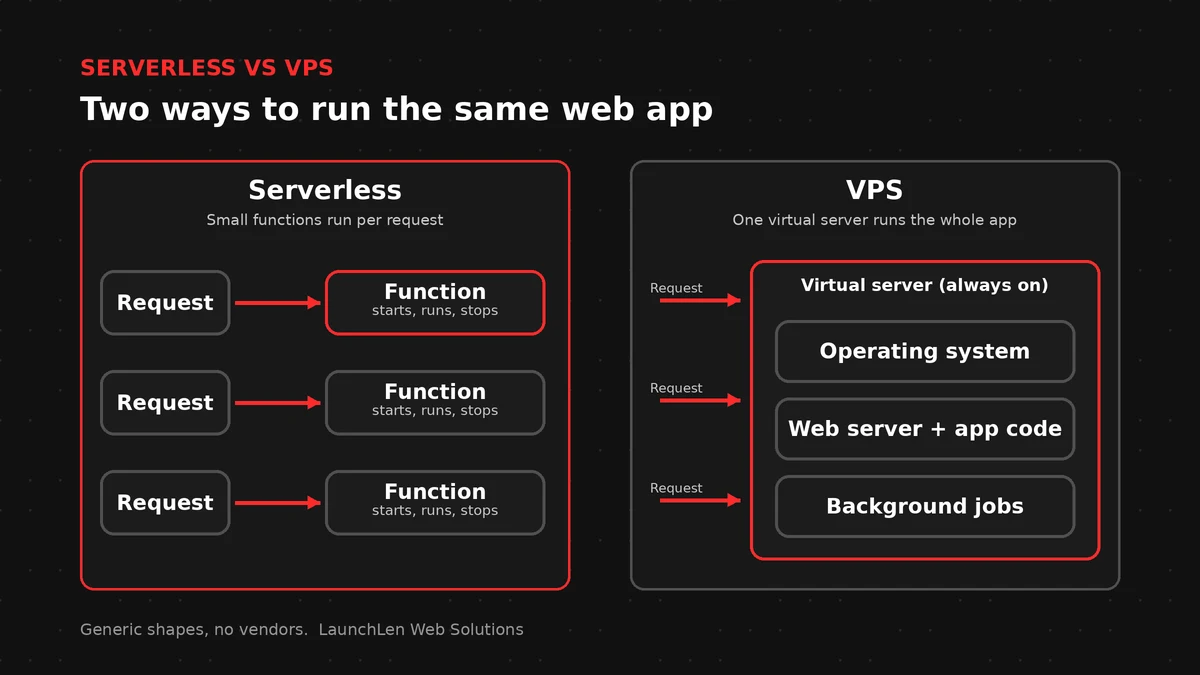
The Cloud Native Computing Foundation (CNCF), in its 2018 serverless whitepaper, describes serverless computing as building and running applications that don’t require server management. Your code is packaged as one or more functions, uploaded to a platform, and run and scaled as requests come in.
“Serverless” doesn’t mean there are no servers. It means you don’t provision, patch or size them yourself. The platform handles that, and you focus on the application logic.
Serverless platforms are often event-driven: a function runs when something happens, such as a form submission, a file upload or a scheduled task.
What a VPS gives you
A virtual private server (VPS) is a virtual machine on shared physical hardware, with its own operating system and resources set aside for you. It fits what the US National Institute of Standards and Technology (NIST) calls Infrastructure as a Service: you don’t control the underlying cloud infrastructure, but you do control the operating system, storage and the applications you deploy.
That control is the main appeal. You can install the software you need, run long background jobs and configure the server exactly as the app requires.
The trade-off is responsibility. Someone has to apply security updates, monitor disk space and memory, manage backups and plan for growth.
Scaling, maintenance and security compared
Scaling. Serverless platforms scale automatically with demand, which suits traffic that’s unpredictable or spiky. A VPS has a fixed size, so you upgrade it or add servers when you need more capacity, and you plan that ahead.
Cold starts. Because serverless functions start on demand, the first request after a quiet period can be slower while the platform prepares the function. The 2018 CNCF whitepaper notes this “cold start” could be a performance issue on some serverless runtimes. Providers offer ways to reduce it, but test it if your app needs consistently fast responses.
Maintenance. With serverless, the platform patches the operating system and runtime. With a VPS, that’s your job (or your provider’s, if you’ve arranged managed care).
Security. Neither option is secure by default. With serverless, much of the server-level work is handled for you, but you still manage permissions, secrets and the code itself, and each function should have only the access it needs. With a VPS, you also own the server: updates, firewall rules, login security and removing services you don’t use.
Lock-in. Serverless apps often rely on a platform’s own triggers, services and ways of structuring code. The CNCF lists potential platform lock-in among serverless drawbacks, so moving later can mean rewriting parts of the app. A VPS app running standard software is usually easier to move between providers.
Limits. Serverless platforms commonly limit how long a single function can run, which matters for long reports or large file processing. A VPS doesn’t impose a per-request time limit in the same way.
Running AI features on each
Many web apps now include AI features: a chatbot, document summaries or a search tool over your own content. Most of these call an LLM API, which means the heavy AI work happens on the provider’s side and your app sends requests and handles responses.
- Serverless suits short, occasional AI tasks, such as summarizing a submitted form or classifying an incoming email. Plan for slow or failed AI responses.
- A VPS suits AI features that run continuously or for a long time, such as background processing of document batches, or tools that keep connections open while streaming responses.
- Either way, plan where data goes. Check which region your platform and AI provider process data in, and what their terms say. Our guide to data residency covers the questions to ask.
A decision guide
There’s no universal answer, but these questions usually point the way.
Serverless may suit you if:
– Your traffic is irregular, seasonal or hard to predict.
– Your app is made of separate tasks triggered by events, like forms, uploads or schedules.
– You’d rather not maintain servers, and you’re comfortable working within a platform’s way of doing things.
A VPS may suit you if:
– Your app runs long tasks or needs to stay running continuously.
– You need specific software or control over the operating system.
– You want an app that’s easier to move between providers later.
– Someone is available to handle updates and monitoring, in-house or through a support arrangement.
A mix is common too. Many apps run on a server and use serverless functions for specific jobs, such as image processing.
Here’s an illustrative example. A trades business with a booking form that gets busy in some seasons and quiet in others might suit serverless for handling bookings. A firm that processes large document uploads overnight might suit a VPS. If you’re moving an existing app, our cloud migration checklist walks through the planning steps.
Costs vary by provider, usage and setup, so compare them for your own workload rather than relying on general rules. When we help with hosting decisions, we agree the requirements, trade-offs and support needs with you before anything is set up.
FAQ
Is serverless cheaper than a VPS?
It depends on the workload. Serverless platforms commonly bill by usage, which can suit apps that sit idle much of the time. A VPS is usually billed for the server whether it’s busy or not. Compare both for your actual traffic and tasks.
Can I move from a VPS to serverless later, or the other way around?
Usually, but it takes work. Moving to serverless often means restructuring the app into functions. Moving off serverless can mean replacing platform-specific services. Planning for portability early makes either move easier.
Is a VPS less secure than serverless?
Not necessarily. Each option puts different security tasks on you.
With a VPS, you or your provider handle the server itself. With serverless, you still own permissions, secrets and code. Either can be secure if it’s set up and maintained well.
Let’s work together on your project
Not sure which hosting approach fits your app? We’re LaunchLen Web Solutions Inc., based in Kitchener, serving Waterloo Region and businesses across Ontario. Our cloud and hosting page explains how we approach hosting projects, and we’re happy to talk through your app with you. Book a free consultation to get started.

DROP US A LINE
Connect with LaunchLen Web Solutions Inc.
Ready to take the first step towards unlocking opportunities, realizing goals, and embracing innovation? We're here and eager to connect.

To More Inquiry
+1 226 899 4813

To Send Mail