Why Our Software Projects Start With a Discovery Phase


Web Design and Development

- 20 Oct, 2026
- 7 Views
- 0 Comment
By the LaunchLen Web Solutions Team · Kitchener, Ontario · Last updated: October 20, 2026
If you’ve talked to a developer about a web app, you’ve probably heard “we’d build the back end in Node.js.” It sounds technical, but the idea is simple, and knowing it helps you ask better questions about your project.
This guide explains what Node.js is used for, where it’s a strong choice, where it isn’t, and how it fits with AI features and the tools your business already uses.
Node.js in plain English
Most websites and apps have two halves. The front end is what people see and click in the browser. The back end is the behind-the-scenes part that stores data, checks logins, sends emails and talks to other systems.
JavaScript has long been the language that runs in the browser. Node.js lets that same language run on a server too. The official Node.js site describes it as a free, open-source, cross-platform JavaScript runtime that lets developers create servers, web apps, command line tools and scripts.
A few things worth knowing:
- It isn’t a programming language. The language is JavaScript. Node.js is the environment that runs it outside the browser.
- It isn’t a framework. It’s a foundation. Developers often add libraries on top to speed up common tasks.
- It’s open source, with a large ecosystem of reusable packages.
What Node.js is good at
Node.js is built around an event-driven, non-blocking model. In plain terms, while it’s waiting for something, like a database lookup or a reply from another service, it can keep handling other requests instead of sitting idle. The Node.js project’s own guidance says it excels at this kind of input/output work.
That makes it a common choice for:
- APIs. The back-end services that a website, mobile app or partner system calls to fetch or save data.
- Real-time features. Live chat, notifications, dashboards that update as things happen, and order or job status tracking.
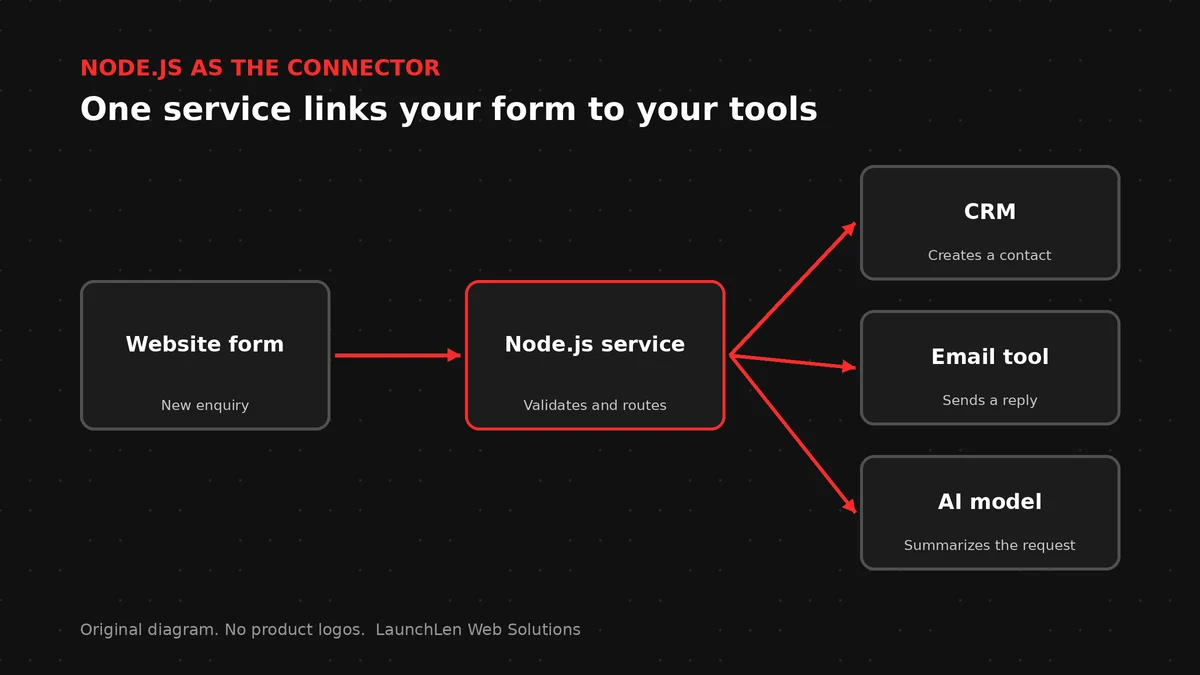
- Integrations. Connecting your website, CRM, accounting, booking and inventory tools so data flows between them without retyping.
- Web applications and portals. Customer portals, quoting tools and internal dashboards, often paired with a JavaScript front end.
- Automation scripts and tools. Scheduled jobs, data imports and command-line tools.
There’s a practical benefit too. When the front end and back end both use JavaScript, a team can share knowledge, and sometimes code, across both halves of the app.
Where it’s a weaker fit
Node.js isn’t the right tool for everything.
- Heavy computation. The Node.js documentation notes that if a server relies heavily on complex calculations, Node.js might not be the best option. Large-scale number crunching, video processing or scientific modelling may suit other approaches, or a separate service.
- Content-led websites. If you mainly need pages your team can edit, a content management system may be simpler. Our React vs WordPress guide covers that trade-off.
- Package sprawl. The package ecosystem is a strength, but each package is a dependency someone has to review and keep updated. As the Node.js docs note, most are written by third-party developers and released with only best-effort guarantees.
- Upkeep. Like any platform, Node.js needs regular updates. The project recommends that production apps use its long-term support (LTS) releases, so plan for upgrades over the life of the app.
Good design matters too. Because Node.js handles many requests on a small number of threads, one slow, heavy task can hold up others if the app isn’t structured well.
Node.js with React: a common pairing
React is a JavaScript library for building user interfaces out of reusable components, such as the screens of a web app. Node.js runs JavaScript on the server. Together, they let a team build both halves of a web app in one language.
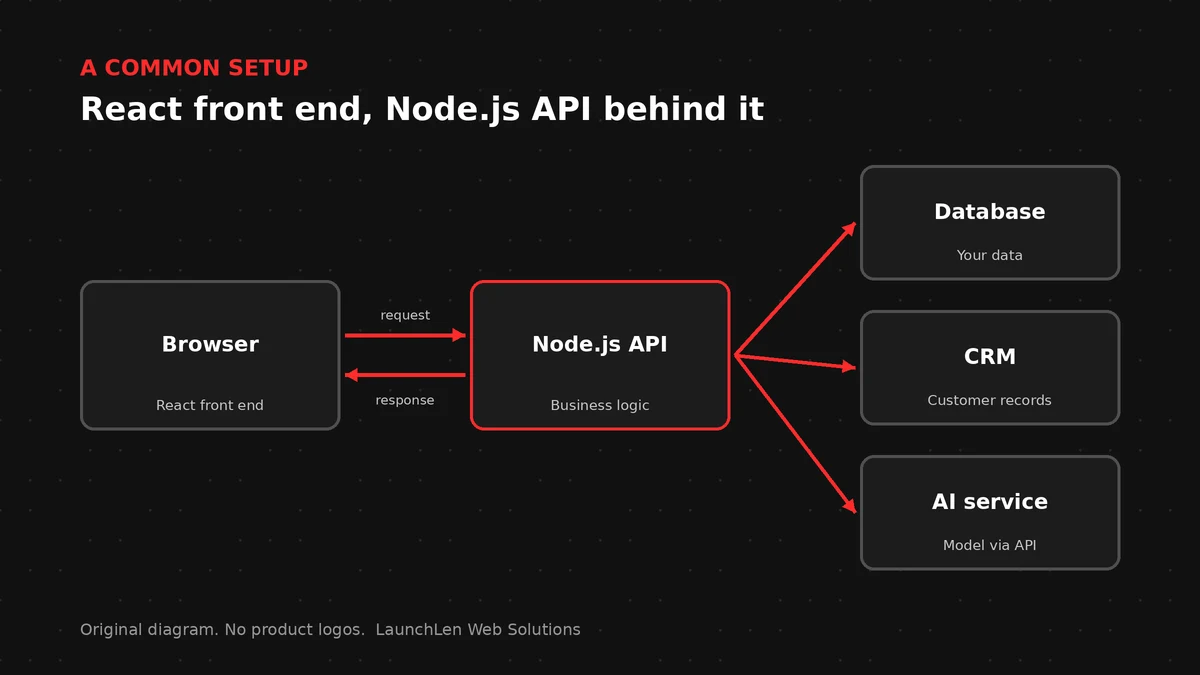
A typical setup looks like this:
- React handles the screens: forms, dashboards, search results and buttons.
- A Node.js API receives requests from those screens, checks permissions, applies business rules and reads or writes data.
- Other systems, like your database, CRM or payment processor, connect through that API.
Here’s an illustrative example. A service business might use a React portal where customers book appointments and check job status, with a Node.js back end that syncs bookings to the team’s calendar and sends confirmation emails.
React and Node.js are among the technologies we can work with. Whether they suit your project depends on your goals, your team and how the app will be maintained. For how AI and modern builds fit together, see our guide to AI-powered web development.
Node.js for AI features and integrations
Most business AI features don’t run the AI model on your own server. They call a model through an LLM API, and the back end handles everything around that call. Node.js is a common choice for this layer because so much of the work is waiting on other services.
A Node.js back end can:
- Send requests to an AI model and stream the response back to a chat window as it’s generated.
- Gather context first, such as pulling the relevant help article or customer record before asking the model a question.
- Keep keys and data secure by holding API keys on the server, never in the browser, and sending only the data each task needs.
- Connect AI to your tools, for example through the Model Context Protocol, with limits on what the AI can read or change.
- Log and review what the AI did, with human approval steps for anything consequential.
When we work on projects like this, we agree the scope, data handling and review steps with you before anything is built.
FAQ
Is Node.js a programming language?
No. Node.js is a runtime environment that runs JavaScript outside the browser, mostly on servers. The programming language is JavaScript.
Is Node.js front end or back end?
Node.js runs on the back end, on a server. It’s often paired with a front-end library like React, which runs in the browser. Developers also use Node.js tools while building front ends.
Should my business choose Node.js or PHP?
Both are widely used for websites and web apps. PHP powers WordPress, so it’s a natural fit for many content-led sites. Node.js is a common choice for APIs, real-time features and apps with a JavaScript front end. The right choice depends on what you’re building, the systems you already use and who will maintain it.
Let’s work together on your project
Thinking about a web app, an integration or an AI feature? We’re LaunchLen Web Solutions Inc., based in Kitchener, serving Waterloo Region and businesses across Ontario. Our custom software development page explains how we approach projects like these, and we’re happy to talk through your goals with you. Book a free consultation to get started.

DROP US A LINE
Connect with LaunchLen Web Solutions Inc.
Ready to take the first step towards unlocking opportunities, realizing goals, and embracing innovation? We're here and eager to connect.

To More Inquiry
+1 226 899 4813

To Send Mail