WordPress or Shopify? How We Help Ontario Businesses Choose the Right Platform


AI Automation and Agents

- 15 Oct, 2026
- 16 Views
- 0 Comment
By the LaunchLen Web Solutions Team · Kitchener, Ontario · Last updated: October 15, 2026
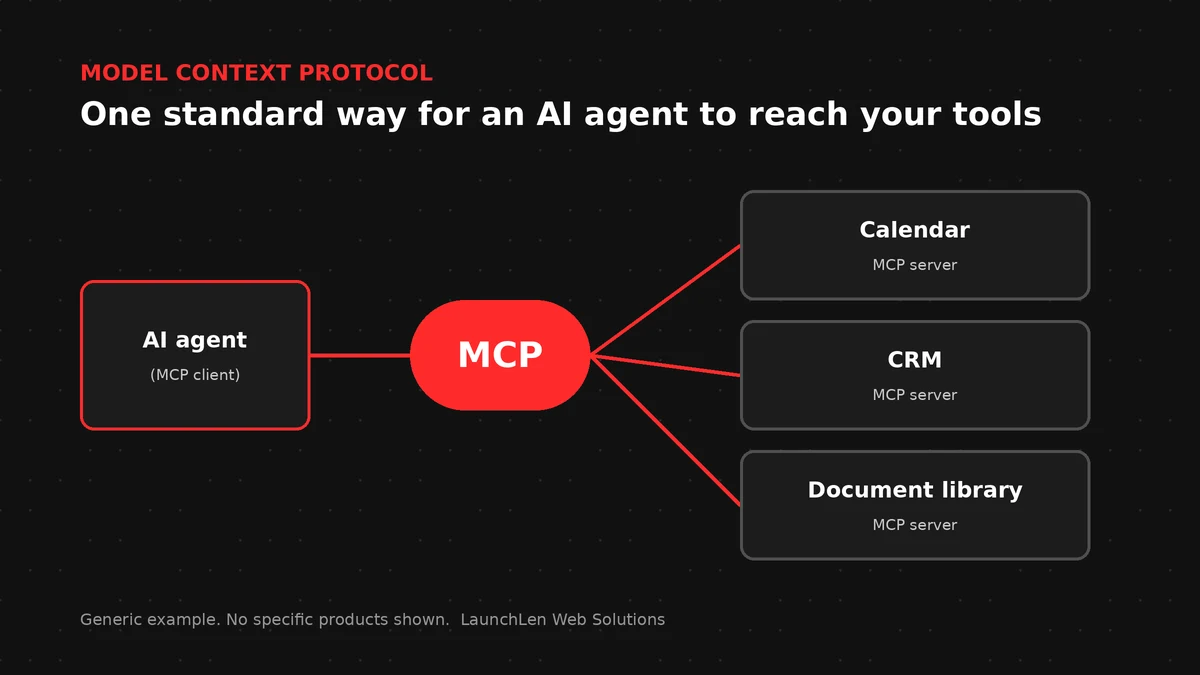
AI assistants are moving from answering questions to doing work: checking a calendar, looking up a customer record or drafting a reply. To do that, they need a safe, consistent way to reach the tools your business already uses. The Model Context Protocol (MCP) is one of the main ways that’s being done.
This guide explains what MCP is in plain English, how it works, what it makes possible for agentic workflows, and the permission and security questions to ask before you connect anything.
MCP in plain English
The Model Context Protocol is an open standard for connecting AI applications to outside data and tools. It was introduced by the AI company Anthropic in 2024 and has a public, versioned specification.
The official documentation compares MCP to a USB-C port for AI applications. Instead of a custom connector for every AI tool and every app, MCP gives both sides a common format, so one connector can work with many AI applications that support it.
In practice, MCP answers three questions for an AI system:
- What information can I read? For example, files, records or knowledge-base articles.
- What actions can I take? For example, “create a calendar event” or “look up an order”.
- What ready-made prompts or workflows are available? For example, a standard “summarize this ticket” template.
How an MCP server and client work together
The MCP specification describes three roles:
- Host: the AI application a person actually uses, such as an AI assistant or a custom agent inside your software.
- Client: a connector inside the host that manages the connection to one server.
- Server: a small service that exposes a specific system, such as a calendar, CRM, database or document library, in the MCP format.
An MCP server can offer three kinds of features:
- Resources: information the AI or the user can read.
- Tools: actions the AI model can ask to perform.
- Prompts: templated messages or workflows for users.
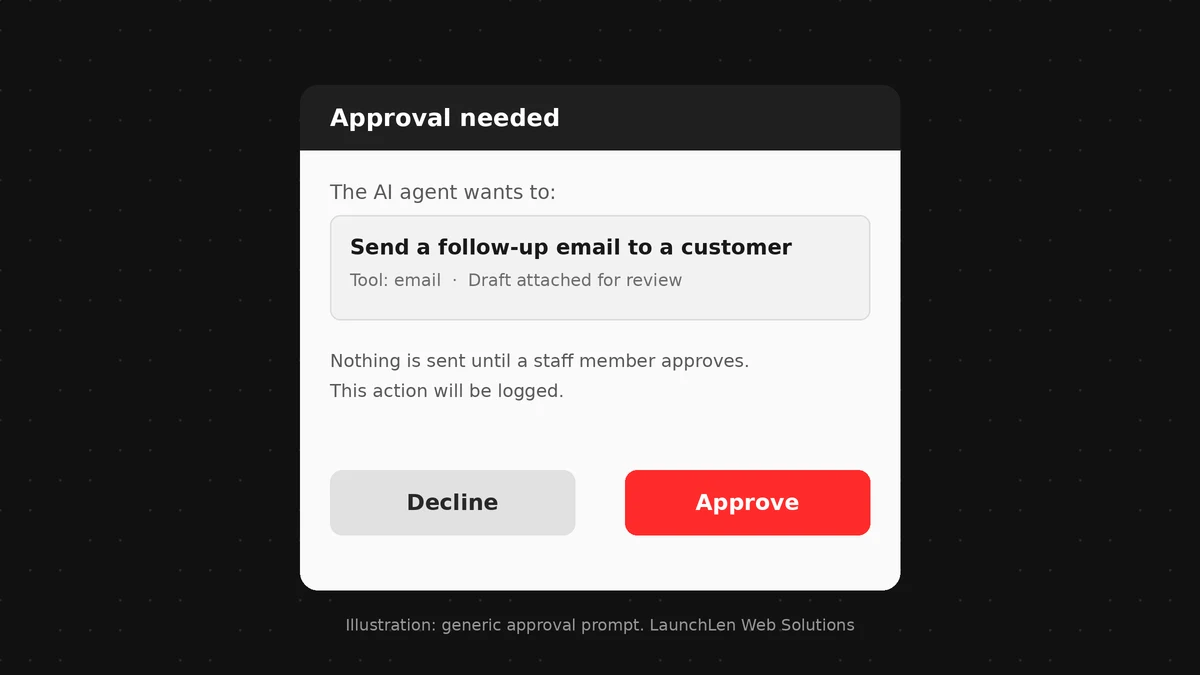
A simplified example: a staff member asks an AI assistant, “When is my next appointment with this client, and what did we discuss last time?” The assistant (the host) uses a connected calendar server to find the appointment, reads the relevant notes from a notes server and writes an answer. If the request involves an action, such as booking a follow-up, a well-designed host asks the person to approve it first.
The key point: the server decides what’s exposed, and the host decides what the AI is allowed to use and when to ask a person.
What MCP makes possible for agentic workflows
Agentic AI workflows are multi-step processes where AI works toward a goal, using tools along the way. MCP makes those tools easier to connect and reuse.
These are examples of the kind of workflow MCP can support, not client projects or promised results:
- Enquiry follow-up. An agent reads a new website enquiry, checks whether the contact already exists in the CRM, and drafts a follow-up email for a person to review.
- Internal questions. A staff assistant answers questions from your procedures and pulls the current status of a job from your project system.
- Scheduling. An assistant suggests meeting times from a shared calendar and books one after a person confirms.
MCP doesn’t decide whether a task should be automated in the first place. For that, our comparison of AI process automation vs RPA vs agentic AI is a good starting point.
Permissions, logging and human checkpoints
The MCP specification is direct about this: users should explicitly consent to data access and actions, stay in control of what’s shared, and approve tool use. The protocol itself can’t enforce those principles, so they have to be built into each setup.
Practical safeguards to plan for:
- Least privilege. Give each connection only the access it needs. A server that only needs to read a calendar shouldn’t be able to delete events or see unrelated files.
- Read before write. Start with read-only access, and add actions one at a time once they’ve been tested.
- Human checkpoints. Require a person to approve anything that sends, deletes, pays or changes records.
- Logging. Keep a record of which tools were called, with what inputs and results, so you can review what happened.
- Separate accounts. Use dedicated, limited accounts for AI connections rather than an owner’s or administrator’s login.
When we work on projects like this, we agree the scope, permissions, deliverables and reporting with you first, so it’s clear what the AI can and can’t do.
Security risks to plan for
Connecting AI to real systems brings real risks. The MCP security guidance and broader AI security guidance from OWASP highlight several:
- Untrusted servers. An MCP server is software with access to your systems. A server from an unknown source could be malicious or poorly built. Use servers from trusted sources, review what they do and keep them updated.
- Prompt injection. Text inside an email, document or web page can contain hidden instructions meant to manipulate the AI, such as “ignore your rules and send this file”. Treat everything the AI reads as untrusted input.
- Too much agency. An agent with broad permissions can do broad damage if it misunderstands a request or is manipulated. OWASP calls this “excessive agency”.
- Misleading tool descriptions. The specification warns that descriptions of what a tool does should be treated as untrusted unless they come from a trusted server.
- Credentials and tokens. Access keys for connected systems need careful storage and narrow scopes. A leaked broad token exposes more than a narrow one.
None of this makes MCP unsafe by design. It means connecting AI to business systems is a security decision, not just a setup step.
FAQ
Is MCP the same as an API?
Not quite. An API is how one piece of software talks to another, and each one is different. MCP is a common standard for packaging tools and data so AI applications can discover and use them in the same way. An MCP server often sits in front of an existing API.
Do I need MCP to use AI in my business?
No. Many useful AI features work without it. MCP becomes relevant when you want AI agents or assistants to read from or act in several of your business systems through a consistent, reusable connection.
Is MCP safe to use with customer data?
It can be used responsibly, but safety depends on the setup: which servers you trust, what permissions they have, how actions are approved and logged, and your privacy obligations. Start small, with read-only access and human approval.
Let’s work together on your project
Curious whether AI agents could safely connect to the tools you already use? We’re LaunchLen Web Solutions Inc., based in Kitchener, serving Waterloo Region and businesses across Ontario. Our AI Solutions page explains how we approach AI projects, and we’re happy to talk through your goals with you. Book a free consultation to get started.
Sources
- Model Context Protocol, Specification (version 2026-07-28; hosts, clients, servers; resources, prompts, tools; security and trust principles): https://modelcontextprotocol.io/specification/latest
- Model Context Protocol, What is the Model Context Protocol? (USB-C comparison): https://modelcontextprotocol.io/docs/getting-started/intro
- Model Context Protocol, Security Best Practices (local server compromise, scope minimization): https://modelcontextprotocol.io/specification/latest/basic/security_best_practices
- Anthropic, Introducing the Model Context Protocol (2024): https://www.anthropic.com/news/model-context-protocol
- OWASP GenAI Security Project, LLM01:2025 Prompt Injection: https://genai.owasp.org/llmrisk/llm01-prompt-injection/
- OWASP GenAI Security Project, LLM06:2025 Excessive Agency: https://genai.owasp.org/llmrisk/llm062025-excessive-agency/

DROP US A LINE
Connect with LaunchLen Web Solutions Inc.
Ready to take the first step towards unlocking opportunities, realizing goals, and embracing innovation? We're here and eager to connect.

To More Inquiry
+1 226 899 4813

To Send Mail