AI Lead Qualification Chatbot: How We Build One for Your Website


Web Design and Development

- 17 Nov, 2026
- 13 Views
- 0 Comment
By the LaunchLen Web Solutions Team · Last updated: November 17, 2026
Your website, booking tool, accounting software and email platform all hold pieces of the same business. When they share information without anyone copying it across by hand, an API is usually doing the work.
This guide explains what an API is in plain English, how APIs work, where businesses use them and what to check before you connect two systems.
What is an API, in plain English?
API stands for application programming interface. MDN’s glossary describes an API as “a set of features and rules that exist inside a software program (the application) enabling interaction with it through software – as opposed to a human user interface.”
Put simply, people use a screen with buttons and forms, while software uses an API. The same MDN page describes an API as a simple contract between the application offering it and the software that uses it.
That contract idea is the key. The API says what you can ask for, how to ask and what you’ll get back, so two systems built by different teams can still work together.
How an API works: requests and responses
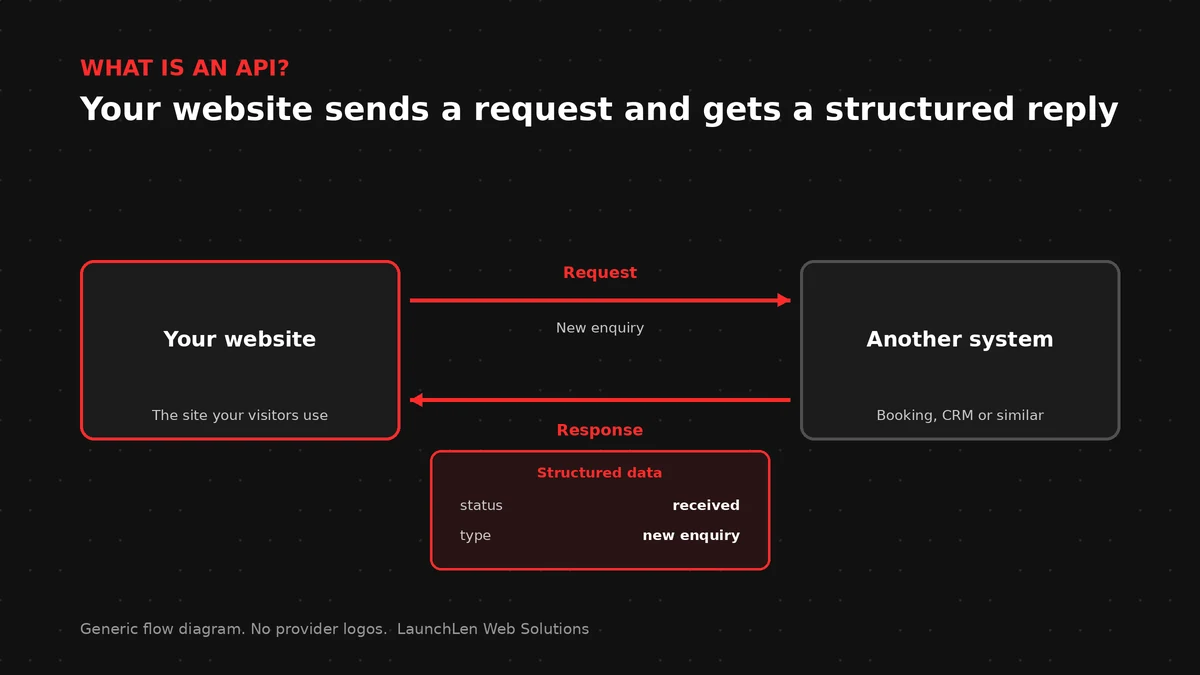
Most APIs that business tools use work over the web. One system sends a request, and the other sends back a response.
- The request. Your website asks another system for something, such as the list of available booking times, or sends it something, such as a new enquiry.
- The response. The other system answers with the data or a short message saying whether the request worked.
These requests travel over HTTP, the same protocol your browser uses. MDN’s overview of HTTP calls it “the foundation of any data exchange on the Web” and explains that clients and servers communicate by exchanging individual messages.
The data in a response is commonly formatted as JSON. MDN’s guide to working with JSON describes it as “a standard text-based format for representing structured data”. It’s easy for software to read, and fairly easy for people to read too.
Common types of APIs you’ll come across
The word API covers a few different things:
- Third-party APIs. These come from another company’s platform. MDN’s introduction to web APIs gives map APIs as an example, which let you display a map on your own web pages.
- Browser APIs. These are built into web browsers and help websites do things like store small amounts of data or play audio.
- Your own APIs. A custom app can have its own API, so your website, staff tools and other systems can all use the same data.
AI models are offered through APIs too. Our guide to what an LLM API is covers that case, and our post on REST vs GraphQL compares two popular API styles.
API documentation: the instructions that come with an API
An API is only as useful as its documentation. Good documentation lists what you can request, which details each request needs and what the responses look like.
One way teams describe their APIs is the OpenAPI Specification. Its published specification says it defines “a standard, programming language-agnostic interface description for HTTP APIs”, so people and computers can understand what a service does without reading its source code.
For a business owner, the practical question is simpler: does the tool you rely on have an API, and does its documentation cover the information you want to move?
How businesses use API integrations
API integration for business usually means connecting tools you already pay for, so information is entered once. Common examples include:
- Sending website enquiries into your customer records.
- Showing live availability from a booking tool on your website.
- Passing online orders to accounting or inventory software.
Some tools also send updates the moment something happens, rather than waiting to be asked. Our post on what a webhook is explains how that push style differs from a regular API request.
What to check before connecting two systems
Before planning an integration, it helps to check:
- Whether both tools offer an API. Some plans or versions include API access, and some don’t.
- What the API can do. Reading data and changing data are different abilities, and an API may support only one.
- The provider’s limits and terms. An API may limit how often you can send requests, and the provider’s terms explain what’s allowed.
- Who owns the connection. Your team or IT contact should set up the accounts and connection settings, so control stays with your business.
- What happens when it fails. A plan for retries, alerts or a manual fallback keeps work moving if one side is down.
FAQ
Do all business tools have an API?
No. Some do, some offer API access only on certain plans, and some don’t offer one at all. The tool’s documentation is the place to check.
Is an API the same as an integration?
Not quite. The API is the interface a tool offers. An integration is the connection built on top of one or more APIs to move information between tools.
Who should set up the connection between our tools?
Your team or IT contact, with guidance from whoever builds the integration. Keeping the accounts with your business means you stay in control.
Let’s work together on your project
Want your tools to share information instead of relying on copy and paste? We’re LaunchLen Web Solutions Inc.
Our Software Development page covers custom APIs and connectors that let your website, CRM, accounting, inventory and other systems exchange data reliably, so information is entered once and shows up wherever it’s needed.
Serving local businesses across Canada and the US, delivered remotely.
Book a free consultation to get started.
DROP US A LINE
Connect with LaunchLen Web Solutions Inc.
Ready to take the first step towards unlocking opportunities, realizing goals, and embracing innovation? We're here and eager to connect.

To More Inquiry
+1 226 899 4813

To Send Mail