An AI Knowledge Assistant for Your Staff: How We Scope and Build One


Web Design and Development

- 29 Oct, 2026
- 15 Views
- 0 Comment
By the LaunchLen Web Solutions Team · Kitchener, Ontario · Last updated: October 29, 2026
REST vs GraphQL is a choice about how your web app talks to a server. Both can power a business site, a customer portal or a mobile-friendly front end. They answer the same need in different ways.
This guide explains what an API style is, how REST and GraphQL each work, how they differ on performance and caching, how either can work with React and Node, and how to choose.
What an API style is
An API (application programming interface) is the agreed way one program asks another for data or actions. An API style is the set of conventions for those requests: how URLs look, how responses are shaped, and how clients ask for what they need.
Your website or app is the client. Your back end is the server. The style you pick shapes how easy it is to build features, cache responses and keep the system understandable as it grows.
How REST works
REST (Representational State Transfer) is a common style for web APIs. In practice, a REST API usually:
- Uses HTTP methods such as GET to read, POST to create, PUT or PATCH to update, and DELETE to remove.
- Treats resources as the main idea: customers, orders, products, each at its own URL.
- Returns a representation of that resource, often as JSON.
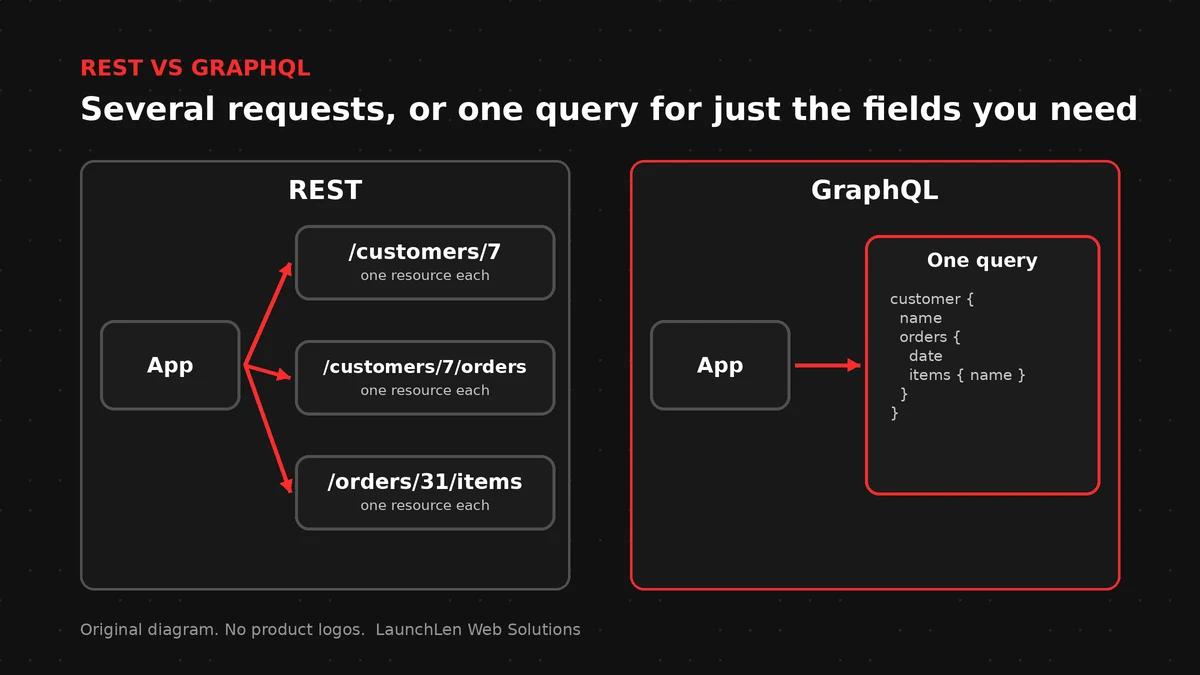
The HTTP specification defines the methods and status codes browsers and servers already understand. A typical REST flow for a product page might call one endpoint for the product, another for reviews and another for related items.
REST’s strengths for business apps include clear resource URLs, wide tooling support and caching that can use ordinary HTTP cache headers. The trade-off is that a screen needing several kinds of data can need several requests, or a custom endpoint that returns a fixed bundle.
How GraphQL works
GraphQL is a query language and runtime for APIs. The client sends a single query that describes the fields it wants. The server returns JSON that matches that shape.
Instead of many resource URLs, a GraphQL API usually exposes one endpoint. The client asks for a product’s name, price and a short list of reviews in one query, and gets only those fields back.
GraphQL’s documentation describes queries for reading data, mutations for changing it and a schema that defines what can be asked. That schema is useful when several front ends (web, mobile, admin) need different slices of the same data.
The trade-off is complexity on the server: you need to design the schema, resolve each field and plan for caching, because a single URL no longer maps neatly to one cached response.
Performance, caching and tooling
Neither style is automatically faster. Performance depends on how the API is designed and how the client uses it.
- REST can lean on HTTP caching for GET responses. CDNs and browsers already understand cache headers. Over-fetching (getting more fields than a screen needs) and under-fetching (needing many round trips) are the usual pain points.
- GraphQL can reduce round trips by letting the client ask for exactly the fields it needs. Caching is less automatic; GraphQL’s own docs discuss caching strategies because responses vary by query. Heavy or nested queries can also put load on the server if limits aren’t set.
Tooling exists for both: API docs, testing clients and code generators. REST has been around longer in most stacks. GraphQL tooling centres on the schema.
Using either with React and Node
Front ends and back ends can be built in many ways. A React front end can work with a REST API or a GraphQL API. A Node back end can expose either style. Our guide to what Node.js is used for covers when Node fits a business app.
Headless setups are a common case. With headless WordPress, WordPress can serve content through its REST API, and a separate front end can render it. Some teams also expose GraphQL for WordPress content; the choice is still about how the front end asks for data.
We can work with React and Node when a project needs a custom web app or API. The style of the API is a design decision, not a brand preference.
How to choose
There’s no universal winner. Questions that help:
- Does each screen need a fixed set of resources, with URLs that map cleanly to business objects? REST can be a natural fit.
- Do several clients need different shapes of the same data, and do you want one schema to document it? GraphQL can help.
- How important is HTTP caching and CDN behaviour today? REST often has a simpler path.
- Who will maintain the API? A clear REST resource model can be easier for a small team to reason about. A GraphQL schema needs ongoing care as fields grow.
- Can you start simple? Many teams start with REST for core resources and add GraphQL later only where flexible queries pay off.
Here’s an illustrative example: a service business builds a customer portal. Appointments and invoices are clear resources, so REST endpoints can serve them. A later reporting screen that pulls many related fields into one view might be a candidate for GraphQL, or for a dedicated REST “summary” endpoint, depending on what the team can maintain.
FAQ
Is GraphQL replacing REST?
No. Both are widely used. Many products expose REST, GraphQL or both. The better choice depends on the app, the clients and the team.
Can I use REST and GraphQL together?
Yes. Some systems keep REST for simple resource operations and add GraphQL where flexible queries help. Clear boundaries between the two matter more than using only one.
Which is better for a small business web app?
Neither is automatically better. For many brochure sites and simple portals, a small REST API is enough. GraphQL can pay off when multiple clients need different data shapes from the same back end.
Let’s work together on your project
Planning an API for a web app or portal? We’re LaunchLen Web Solutions Inc.
Based in Kitchener, serving Waterloo Region and businesses across Ontario.
Our Software Development page explains how custom APIs and connectors can let your systems exchange data reliably. Before any build, we can agree the scope, deliverables and reporting with you. Book a free consultation to get started.
DROP US A LINE
Connect with LaunchLen Web Solutions Inc.
Ready to take the first step towards unlocking opportunities, realizing goals, and embracing innovation? We're here and eager to connect.

To More Inquiry
+1 226 899 4813

To Send Mail