How to Add Schema Markup to WordPress (JSON-LD Guide)


Web Design and Development

- 5 Nov, 2026
- 5 Views
- 0 Comment
By LaunchLen Web Solutions Team
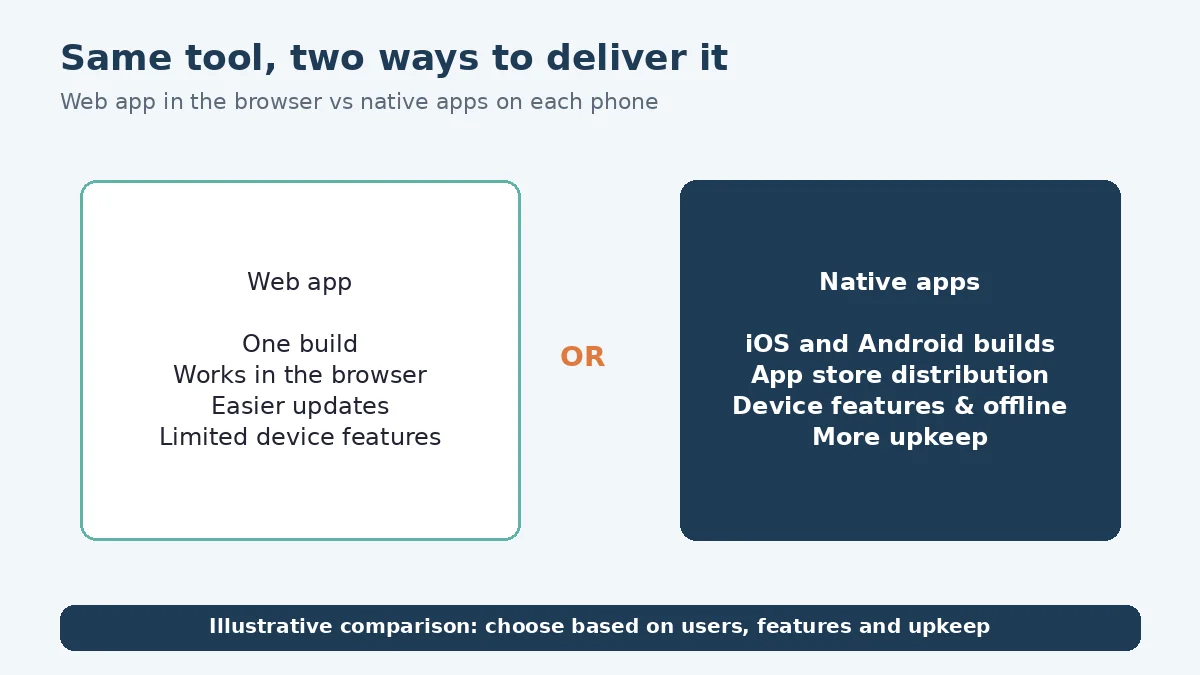
“We need an app” can mean very different things. It might mean a booking tool customers open from a link, a portal staff use on their phones in the field, or an app people download from the App Store or Google Play.
The web app vs native app question shapes long-term upkeep, how users find you and what the product can do. This post explains how LaunchLen Web Solutions Inc. can help you decide between a web app, a progressive web app (PWA) and native iOS and Android apps, based on how your users will use it.
Start with how your users will use it
The right choice starts with the people using the product, not the technology. Questions we can work through with you include:
- Who are the users? Customers, staff, or both. Staff on company devices have different needs from members of the public.
- How will they find it? Through search and shared links, or by looking in an app store.
- How frequently will they use it? A tool people open once to book a service is different from one they use throughout the workday.
- Where will they be? At a desk, on the road or somewhere with patchy connectivity.
- What device features does it need? Camera, location, notifications or background tasks.
The answers can point toward one option or another, and sometimes toward both.
What a web app (or PWA) does well
A web app runs in the browser. MDN describes a key benefit of websites as a “single codebase,” because the web “is inherently cross-platform,” and notes that websites “are indexed by search engines, and can be shared and accessed just using URLs” (MDN, What is a progressive web app?).
A progressive web app goes further. MDN says a PWA “can be installed on the device, can operate while offline and in the background, and can integrate with the device and with other installed apps” (MDN, Progressive web apps). It also notes that PWAs should use feature detection and offer fallbacks, because they can rely on advanced Web APIs “which may not be supported by all browsers.”
A web app or PWA can suit:
- Tools people reach from a link, such as booking, quoting or customer portals.
- Content that should be found in search.
- Products that need to work on many devices from one codebase.
- Updates you want users to get straight away, without an app store release.
Our web and app development page notes that every site we build is responsive, so it works on phones and tablets. Our post on AI-powered web development covers how AI features can fit into web projects.
What native iOS and Android apps do well
Native apps are built for a specific platform. MDN lists their benefits as easy access from an icon on the device, offline and background operation, a dedicated UI, OS integration including device features “such as the camera, GPS or accelerometer,” and app store distribution, “giving users a single place to find them” (MDN).
A native app can suit:
- Products people use frequently, where an icon on the home screen matters.
- Heavy use of device features, such as the camera, location or sensors.
- Reliable offline work, such as field staff recording jobs without a signal.
- Customers who expect to find you in an app store.
We build native mobile apps for both iOS and Android. Our post on how we build native iOS and Android apps covers that process, so this post sticks to the decision.
App stores, updates and long-term upkeep
Native apps come with app store rules. Apple’s App Review Guidelines say an app “should include features, content, and UI that elevate it beyond a repackaged website,” and that if an app “no longer functions as intended or you’re no longer actively supporting it, it will be removed from the App Store” (Apple, App Review Guidelines). Google Play requires new apps and updates to target a recent Android API level, and explains that targeting newer versions brings “security and performance improvements” (Android Developers, Meet Google Play’s target API level requirement).
In practice, upkeep can include:
- Store reviews for each release, on each platform.
- Operating system updates that can require app changes.
- Separate releases for iOS and Android, unless a cross-platform approach is used.
- Keeping web and app features in step if you offer both.
A web app has upkeep too, including browser testing, security updates and hosting, but releases don’t go through a store review. What support looks like after launch, including ongoing updates, can be agreed with you as part of the project scope.
When to do both
Some products benefit from both. A common pattern can be a web app for customers who arrive from search or a link, and a native app for frequent users or staff who need device features. Another can be starting with a web app or PWA to learn what users need, then adding native apps once the case is clear.
Cross-platform frameworks can build iOS and Android apps from shared code. Whether that fits depends on the features you need and how closely the app has to follow each platform’s conventions, which we can compare with you.
Here’s an illustrative example (not a real client): a cleaning company wants customers to book online and staff to check job details on site. Customers get a mobile-friendly web booking tool, while staff get a native app that works when a customer’s building has no signal.
FAQ
Is a progressive web app as good as a native app?
It depends on what you need. A PWA can be installed, work offline and send notifications in supporting browsers, but support for advanced features varies by browser and device. Native apps have fuller access to device features and app store distribution.
Do we need to be in the App Store?
Not necessarily. If customers find you through search or links, a web app may be enough. If they expect to find you in an app store, or you need deeper device features, native apps can make more sense.
Who owns the app once it’s built?
How you can use the app and its code, including with your own team or another developer, can be agreed with you before the project starts.
Working with LaunchLen
We’re LaunchLen Web Solutions Inc. Based in Kitchener, serving Waterloo Region and businesses across Ontario.
DROP US A LINE
Connect with LaunchLen Web Solutions Inc.
Ready to take the first step towards unlocking opportunities, realizing goals, and embracing innovation? We're here and eager to connect.

To More Inquiry
+1 226 899 4813

To Send Mail