From Wireframe to Launch: Our Website Design Process


AI Chatbots and Assistants

- 29 Oct, 2026
- 13 Views
- 0 Comment
By LaunchLen Web Solutions Team
Many businesses have answers buried somewhere: a procedure in a shared folder, a policy in an old handbook, a guide only one person remembers writing. New staff ask the same questions, and experienced staff stop what they’re doing to answer them. An AI knowledge base for employees can help by letting staff ask a question in plain language and get an answer drawn from your own documents.
This post explains how LaunchLen Web Solutions Inc. can scope and build one, and what to plan for.
What an internal knowledge assistant does
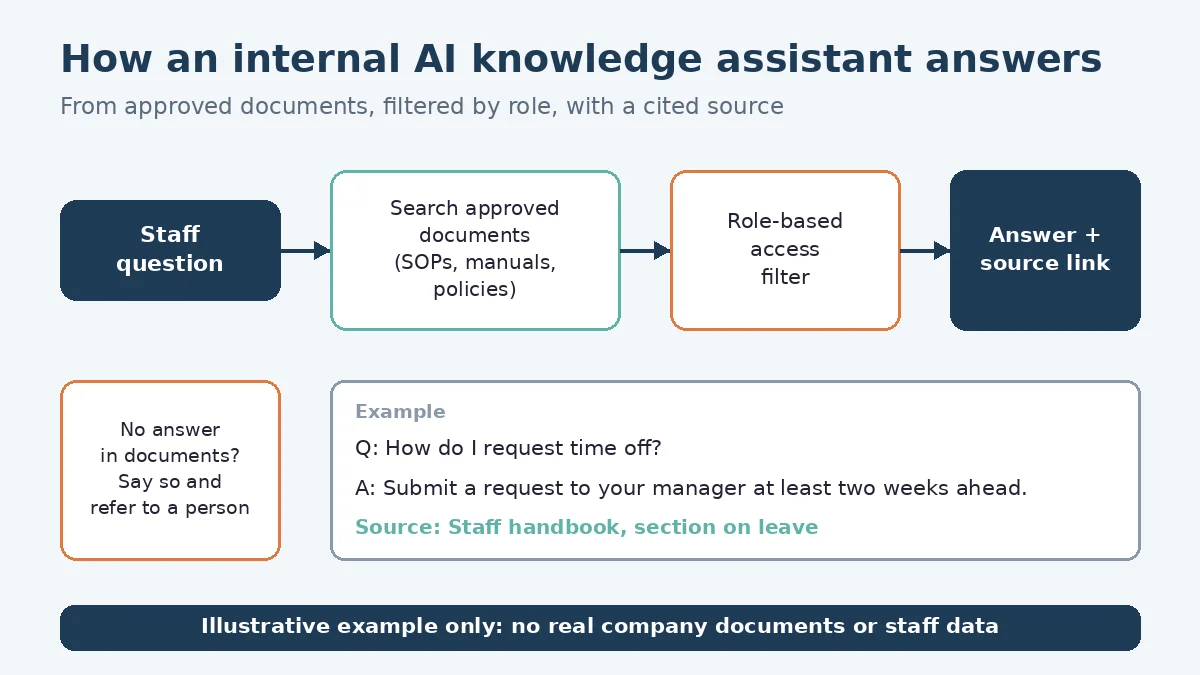
An internal knowledge assistant is a chat tool for your team, not your customers. A staff member asks something like “What’s our process for a damaged delivery?” and the assistant can answer from your SOPs, manuals and policies, with a link to the document it used.
An assistant we build can use retrieval-augmented generation, or RAG. A RAG system first searches a set of documents for passages related to the question, then hands those passages to an AI model to write the answer. The paper that introduced the approach describes a document index that can be replaced to update what the model knows without retraining it (Lewis et al., arXiv). Our guide to what RAG is explains it in plain English.
When a procedure changes, you can update the document rather than the model. We offer internal knowledge assistants for staff, covering areas such as policies, benefits and HR. Documents are uploaded through our secure portal, and access is for employees only, not the public. It’s one of the AI tools on our AI solutions service page.
Choosing the documents it can use
Scoping can start with a simple question: which questions should the assistant answer, and which documents hold the trusted answers? The document set can include:
- Procedures and SOPs. Step-by-step instructions your team already follows.
- Manuals and guides. Equipment, software or product guides staff refer to.
- Policies. HR, benefits, safety, expense or customer-service policies you’re comfortable sharing internally.
- Internal FAQs. Answers your team has written down before, even informally.
Sources can include your website, knowledge base, PDFs, policies, shared drives, help desk and in-scope databases. Documents and details are uploaded through our secure portal as the standard path, and the assistant picks up from what you choose to upload. You control what you upload. No system access is needed to start; credentials are needed only if we’re integrating an existing codebase, micro-SaaS or servers.
As we review the documents with you, we can flag contradictory procedures, outdated versions and common questions with no written answer. You can decide what gets fixed, merged or left out. OWASP’s guidance on RAG systems warns that data from different sources can contradict each other, and recommends reviewing combined data and accepting knowledge sources only from trusted, verified sources (OWASP LLM08).
Access control: who can see what
Payroll procedures, management policies or client files may belong to one team only. An internal assistant needs to respect those boundaries, or it can repeat restricted information to anyone who asks.
OWASP lists unauthorized access and data leakage as a risk in RAG systems, and recommends fine-grained access controls and permission-aware stores that keep different groups of users from reaching each other’s data (OWASP LLM08). A build can include access controls so each person sees answers only from documents they’re allowed to see.
During scoping, we can work through this with you:
- Groups. Which teams or roles exist, and which documents each should reach.
- Sensitive content. What should never enter the knowledge base at all, such as personal information or confidential records.
- Logging. Whether questions and answers are logged, who can review them and how long they’re kept.
The Office of the Privacy Commissioner of Canada says organizations using generative AI should limit the personal information they collect and use to what the purpose needs, and set retention schedules for prompts and outputs (OPC generative AI principles). For advice specific to your business, check with a qualified privacy adviser.
Sources, citations and ‘I don’t know’
A staff assistant is more useful when people can check it. A build can include citations or links to the document each answer came from, so staff can open the source and confirm.
An assistant also needs to admit when it doesn’t know. It can be set up to say so when your documents don’t contain an answer, and to point staff to the right person instead of guessing.
RAG helps, but it doesn’t make answers perfect. OWASP describes RAG as a way to “enhance the reliability” of outputs and “mitigate the risk of hallucinations,” and still recommends human oversight and fact-checking for critical or sensitive information (OWASP LLM09). For anything safety-related or high-stakes, the source document can stay the final word.
Pilot with one team, then expand
A project can start with a pilot: one team, its documents and a list of real questions, to show whether the assistant helps before more is added.
A pilot can include:
- Real questions. Questions the team actually asks, used as test questions.
- Answer review. Team members checking answers against the source documents and flagging anything wrong or incomplete.
- Gap tracking. Unanswered questions, which can point to documents that need writing or updating.
- Access checks. Asking questions about restricted documents on purpose to confirm the assistant declines.
Here’s an illustrative example (not a real client): an office manager pilots the assistant with the operations team. Review shows good answers on routine tasks but conflicting versions of the returns process. The team picks one version, removes the other, and the answers become consistent.
If the pilot shows the assistant is helping, more teams and documents can be added. Your team keeps the documents current.
After launch, we provide full technical support and ongoing updates, and keep improving speed, accuracy, guardrails and hallucination reduction. It’s SaaS-based, so your team runs the latest version. For a customer-facing build, our post on how we build an AI chatbot, step by step walks through the process.
FAQ
Can staff see answers from documents they aren’t allowed to access?
They shouldn’t, and that’s part of scoping. A build can include access controls so each person gets answers only from documents their role is allowed to see, and these can be tested during the pilot.
What happens when the documents don’t have the answer?
The assistant can be set up to say it doesn’t know and point staff to the right person. Questions it couldn’t answer can show where your documents have gaps.
How do you handle documents and conversation logs?
Documents and details are uploaded through our secure portal as the standard path, and the assistant picks up from what you choose to upload. You control what you upload. Logging and retention can be agreed with you before anything is built. Our guide to Canadian data residency for AI and cloud explains the basics.
Working with LaunchLen
We’re LaunchLen Web Solutions Inc. Based in Kitchener, serving Waterloo Region and businesses across Ontario.
If your team spends too long hunting for answers that are already written down, an internal assistant may help. Tell us which questions come up most and where the answers live, and we can help you decide whether it’s the right fit.
DROP US A LINE
Connect with LaunchLen Web Solutions Inc.
Ready to take the first step towards unlocking opportunities, realizing goals, and embracing innovation? We're here and eager to connect.

To More Inquiry
+1 226 899 4813

To Send Mail