What Is a CMS? How a Content Management System Runs Your Website


E-commerce

- 22 Nov, 2026
- 2 Views
- 0 Comment
By the LaunchLen Web Solutions Team · Last updated: November 22, 2026
A new order comes in. Someone copies it into the accounting software, updates the stock count in a spreadsheet, books the shipping label and adds the customer to the mailing list. Multiply that by every order, and a growing store starts to depend on a lot of retyping.
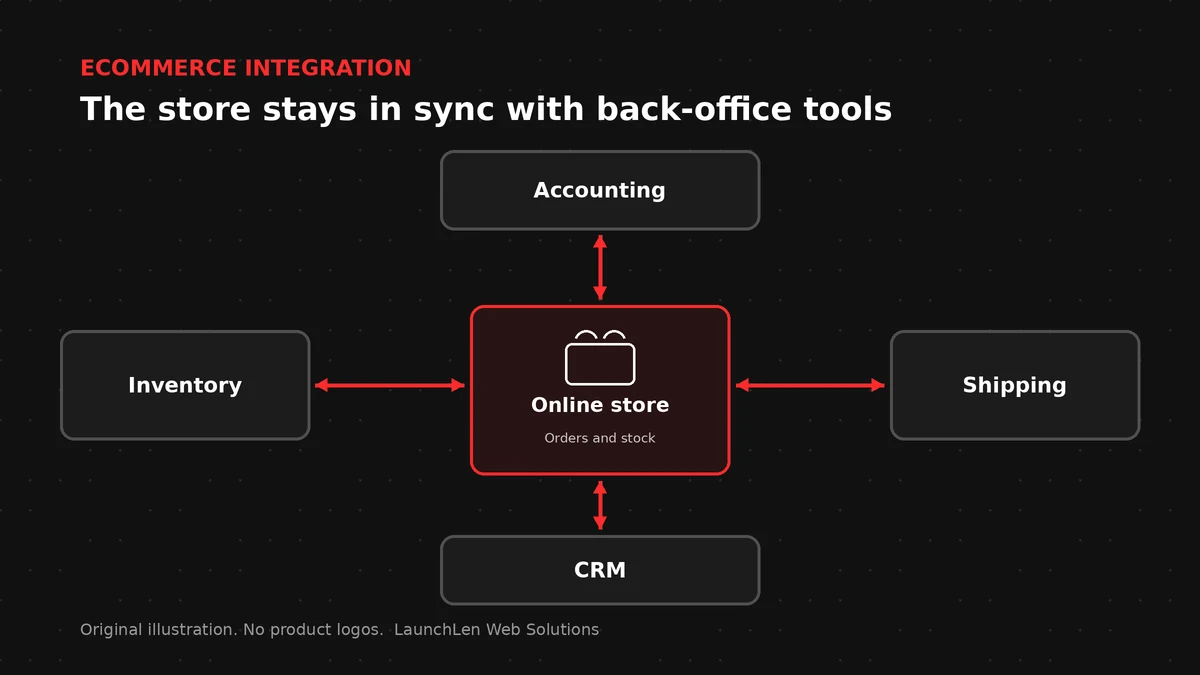
An ecommerce integration connects your store to those tools so information moves on its own. This post explains how we plan one with you, what to connect first and what to check along the way.
What an ecommerce integration does
Our E-commerce Solutions page describes this work as connecting your store to accounting, inventory, shipping, CRM or marketplace tools so orders and stock stay in sync without re-keying.
In practice, a build can include:
- Order sync. New orders flow from the store into accounting or fulfilment tools.
- Inventory sync. Stock levels stay consistent between the store and wherever stock is tracked.
- Customer records. Buyer details reach your CRM or mailing tool, where your consent rules allow it.
- Shipping updates. Tracking details flow back so customers can see where their order is.
Mapping how orders and stock move today
Before connecting anything, we map how an order moves through your business today, step by step. That includes who touches it, which tools hold which information and where mistakes creep in.
We agree with you on:
- The source of truth for each piece of data. For example, does the store or the inventory tool hold the official stock count?
- What triggers each update. A new order, a refund, a stock change or a shipped parcel.
- What happens on errors. Who is told when an update fails, and how it gets fixed.
Deciding the source of truth can prevent a lot of sync headaches later, because two systems can’t both be in charge of the same number.
How store platforms connect: APIs and webhooks
Store platforms offer documented ways for other software to read and update their data. WooCommerce’s REST API documentation explains that it allows store data “to be created, read, updated, and deleted using requests in JSON format”, and its orders API covers creating, viewing and updating orders. Shopify’s Admin API reference says the Admin API “lets you build apps and integrations that extend and enhance the Shopify admin.”
Both platforms’ documentation also covers webhooks, which send a message the moment something happens, such as a new order. Our post on webhooks explains how that works.
Sometimes an existing connector between two tools does the job. Where it doesn’t, a custom connection can fill the gap, such as a custom Node.js service between your store and back-office systems.
Keeping product and stock data consistent
Integrations depend on each product being identified the same way in every system. A shared product code for each item and each variant, such as a size or colour, lets the store and the inventory tool agree on what was sold.
Before the build, we help you look for duplicate or missing codes, products that exist in one system but not the other, and variants set up differently in each. Cleaning these up first is less exciting than building the connection, but it decides whether the connection works.
If the catalogue itself needs tidying, that clean-up can be part of the same project.
Choosing what to connect first
Connecting everything at once makes problems harder to trace. We help you start with the connection that removes the most retyping, then add the next one once it’s running smoothly.
A sensible order can be:
- Orders into accounting or fulfilment, since every sale depends on it.
- Stock levels, so customers don’t buy what’s out of stock.
- Shipping and customer records, once the core flow is reliable.
Our post on connecting your business systems covers the same thinking for tools beyond the store.
Testing with real orders before launch
Each connection is tested end to end before it’s switched on. That means placing test orders, issuing a test refund and changing stock to see that every system updates as expected.
Your team checks the results in the tools they use every day. Once a connection is live, your team can compare a sample of orders across systems for a while, so any gap shows up early.
Your team sets up the accounts and connection settings each integration needs, with our guidance. Any access needed for an existing codebase or server is agreed within the project scope before work starts.
FAQ
Can you connect my store to my accounting or inventory system?
In many cases, either through existing integrations or a custom connection. We check what’s possible with your specific systems before any build is agreed.
Do you work with Shopify stores?
Yes. We aren’t an official Shopify partner. Stores run under your business name and account, and integrations connect to the tools you already use.
What if one of our tools has no integration?
A custom connection may still be possible if the tool offers an API or a way to import and export data. If not, we can suggest a practical manual step or an alternative tool that fits your process.
Working with LaunchLen
We’re LaunchLen Web Solutions Inc. Our E-commerce Solutions page covers store setup, integrations, improvements and migrations. If you’re starting from scratch, our post on planning an online store walks through the whole project.
Store work is project delivery. A build can include mapping your order flow, connecting your store to back-office tools and end-to-end testing, and post-launch support can be agreed separately.
Serving local businesses across Canada and the US, delivered remotely.
DROP US A LINE
Connect with LaunchLen Web Solutions Inc.
Ready to take the first step towards unlocking opportunities, realizing goals, and embracing innovation? We're here and eager to connect.

To More Inquiry
+1 226 899 4813

To Send Mail