SEO Content Strategy: How We Plan Content Around Real Customer Questions


Web Design and Development

- 21 Nov, 2026
- 5 Views
- 0 Comment
By the LaunchLen Web Solutions Team · Last updated: November 21, 2026
If you’ve ever updated your opening hours, added a blog post or swapped a photo on your website without calling a developer, you’ve used a CMS. It’s the part of your website your team actually works in.
This guide explains what a CMS is, how a content management system works, what to look for in a CMS for small business and when a different approach makes more sense.
What is a CMS, in plain English?
CMS stands for content management system. MDN’s glossary defines a CMS as “software that allows users to publish, organize, change, or remove various kinds of content, not only text but also embedded images, video, audio, and interactive code.”
In other words, a CMS lets people who don’t write code run a website. Your team edits pages in a dashboard, and the CMS takes care of turning that content into web pages.
WordPress is one well-known example. Its About page describes it as open source software, built on PHP and MariaDB and licensed under the GPLv2.
How a CMS works
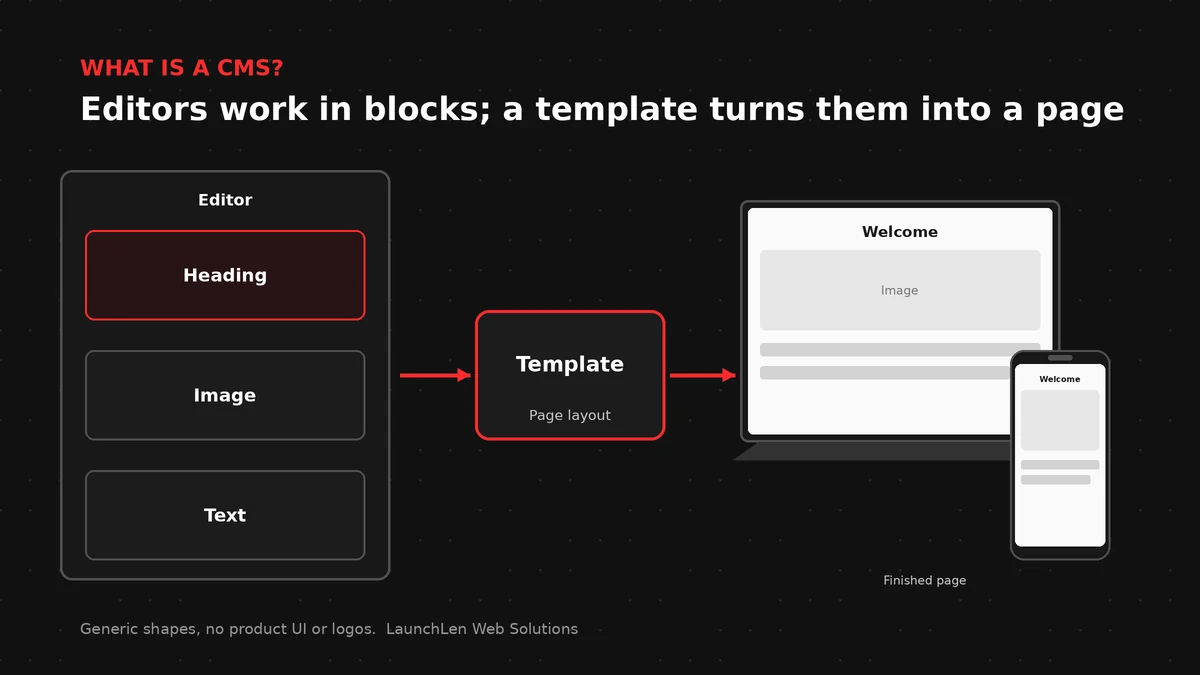
A CMS keeps two things separate: your content and the way it’s displayed.
- Content. Text, images, products and other information, stored in a database.
- Templates and themes. The design rules that decide how each type of page looks.
- The editor. The screen where your team writes and arranges content.
When someone visits a page, the CMS takes the content, applies the template and sends the finished page to their browser. Change the template once, and every page that uses it updates.
Some editors work in blocks, including WordPress’s. Its guide to the block editor describes blocks as “the content elements that you add to create content layouts”, such as paragraphs, images, headings and lists.
What a CMS can do for your team
The everyday benefits are practical:
- Editing without code. Staff can update pages, add posts and swap images themselves.
- Different roles for different people. WordPress’s documentation on roles and capabilities explains that roles give the site owner “the ability to control what users can and cannot do within the site”, such as writing posts or creating pages.
- A history of changes. WordPress’s revisions feature “stores a record of each saved draft or published update”, so you can see what changed and go back if needed.
- Extra features. Plugins or extensions can add things like forms, online stores or search.
Adding AI features to a CMS
A CMS can also be the place where AI features are added to a website. Common additions include a website assistant that answers from your approved content and hands off to staff, improved site search, and drafting help for your editors, with a person reviewing before anything is published.
Before adding any AI plugin or extension, it’s worth checking what visitor or customer information it sends to an outside AI service, what it can read or change on your site, whether it’s actively updated and whether it loads heavy scripts on every page. Sometimes a small custom integration is lighter than a do-everything plugin.
Choosing a CMS for small business
There’s no single right answer, but these questions help:
- Who will edit the site? A CMS should match your team’s comfort level, not the developer’s.
- What content will you publish? A content-heavy site, an online store and a simple brochure site have different needs, and the CMS should handle your main type of content well.
- How much control do you want? Some platforms handle hosting and upkeep for you, while others give you more control and more to look after.
- Can you take your content with you? It helps to know how easily you could move to another platform later.
If you sell online, our comparison of Shopify vs WordPress walks through one common choice.
CMS vs website builder vs custom build
These terms overlap, so it helps to separate them:
- A website builder is a hosted service that combines a CMS, design tools and hosting in one package. It can be quick to start, but tends to offer less flexibility.
- A self-managed CMS such as WordPress gives you more control over design, features and hosting, with more decisions to make.
- A custom build suits web apps with features that go beyond managing content. Our post on React vs WordPress explains when each approach fits.
There’s also a middle path. With headless WordPress, your team edits content in WordPress while a separate front end displays it.
FAQ
Is WordPress a CMS?
Yes, WordPress is an open source content management system. Your team edits content in its dashboard, and themes control how that content looks. It can run a simple brochure site or a busy online store.
Can we switch to a different CMS later?
Yes, with planning. Pages, images, links and settings need to move across, and old web addresses need redirects so visitors and search engines can still find them.
Does a CMS make a website slow?
Not by itself. Slowdowns tend to come from things like oversized images, heavy plugins, render-blocking scripts or hosting limits. A lean setup with well-chosen add-ons helps keep a site quick.
Let’s work together on your project
Choosing a platform or wondering whether your current CMS still fits? We’re LaunchLen Web Solutions Inc.
Our WordPress Development page covers new WordPress builds, redesigns and improvements to existing sites, built with a lean setup: custom where it counts and carefully chosen plugins everywhere else, with content blocks and page layouts your staff can update without breaking the design.
Serving local businesses across Canada and the US, delivered remotely.
Book a free consultation to get started.
DROP US A LINE
Connect with LaunchLen Web Solutions Inc.
Ready to take the first step towards unlocking opportunities, realizing goals, and embracing innovation? We're here and eager to connect.

To More Inquiry
+1 226 899 4813

To Send Mail