What Is an API? How Business Software Talks to Other Software


Web Design and Development

- 18 Nov, 2026
- 11 Views
- 0 Comment
By the LaunchLen Web Solutions Team · Last updated: November 18, 2026
When customers want to check an order, find a document or ask for a change, they send an email and wait. Your team stops what it’s doing, looks the answer up and writes back, and the same questions come in again the next week.
A customer portal gives customers a place to find those answers themselves. This post explains how we approach customer portal development, from working out what customers need to launching a first version.
What a customer portal is (and when it’s worth building)
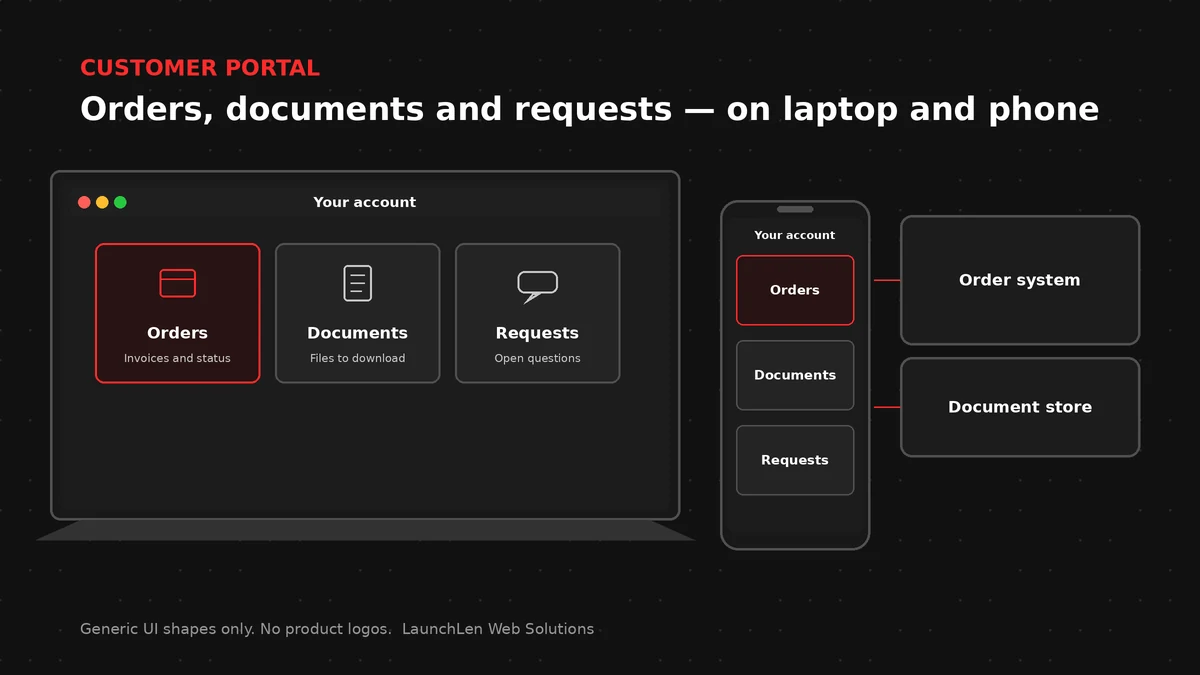
A customer portal is a private area of a website or web app where each customer signs in and sees their own information. Depending on the business, that might be orders, quotes, invoices, job updates, documents or open requests.
Our Web App Development page lists customer portals among the browser-based apps we build to replace spreadsheets and email chains.
A portal tends to be worth building when:
- Customers ask your team the same status questions over and over.
- The information they want already exists in your systems.
- Customers need to send you files or requests in a consistent way.
If none of these sound familiar, a clearer website page or a better form may solve the problem for less effort.
Customer portal development starts with what customers need
The first step isn’t choosing features. It’s understanding what customers are trying to do and why they contact you today.
The UK government’s guidance on learning about user needs advises teams to “Treat any opinions or suggestions that do not come from users as assumptions that have to be proven by doing research.” It also suggests writing each need in plain words, starting with what the person needs to do and why.
In practice, we look at recent customer emails and requests with you and turn them into a short list of needs. For example, an illustrative need might read: “I need to see where my order is, so I can plan around the delivery.”
Choosing the first features for your portal
A customer self-service portal can grow into a lot of things. The first version should do a few things well.
We help you rank the needs by how frequently they come up and how much effort they save your team. The top few become the first release, and the rest go on a list for later.
First-release features can include:
- A sign-in and account page where each customer sees only their own information.
- A status view for orders, jobs or requests.
- A documents area for quotes, invoices or reports.
- A request form that sends a structured request to the right person on your team.
This follows the same thinking as building a first version of any software: launch something useful, learn from it, then add more.
Connecting the portal to the systems you already use
A portal is only as useful as the information behind it. If order or job details live in other tools, the portal needs to show them without your team retyping anything.
A build can include connecting the portal to tools such as your CRM, accounting or job software, depending on what those tools support. Our post on connecting your business systems explains how that planning works.
Your team sets up the connections and accounts the build needs, with our guidance. Any access needed for an existing codebase or server is agreed within the project scope before work starts.
Designing for phones and for every customer
Some customers will open the portal on a phone. Every site we build is responsive, so it works on phones and tablets, and a portal can be built as a mobile-friendly web app.
If you’re unsure whether customers would be better served by an app in an app store, our guide to choosing a web app or a native app walks through the trade-offs.
Accessibility matters too. The W3C’s overview of the Web Content Accessibility Guidelines explains that these guidelines describe how to make web content more accessible to people with disabilities, and we design portals with them in mind.
Testing with real customers before launch
Before launch, a few customers can try the portal with real tasks, such as finding a recent invoice or sending a request. Watching where they hesitate shows what to fix.
A small group of customers can use the portal first while email stays open as a backup, so nobody is left without a way to reach you during the switch.
After launch, your team can track which questions still arrive by email. Those are the clues for what the portal should cover next.
FAQ
Can customers use the portal on their phones?
Yes. A portal can be built as a responsive web app, so it works on phones, tablets and computers.
Does the portal need to connect to our existing software?
It doesn’t have to, but it’s more useful when it does. We check what your current tools can connect to during discovery, before the build is agreed.
Can we add features after launch?
Yes. The first version covers the most common needs, and later features can be planned and scoped with you.
Working with LaunchLen
We’re LaunchLen Web Solutions Inc. Our Web App Development page covers customer portals, booking and quoting tools, internal dashboards and other browser-based apps.
We learn your goals, audience and current setup, and agree on scope. We design the structure and look, then build and review it with you. Custom web applications can be built with React and Node.js, and we can discuss ongoing support options that fit your needs.
Serving local businesses across Canada and the US, delivered remotely.
DROP US A LINE
Connect with LaunchLen Web Solutions Inc.
Ready to take the first step towards unlocking opportunities, realizing goals, and embracing innovation? We're here and eager to connect.

To More Inquiry
+1 226 899 4813

To Send Mail