Helping Shoppers Find Products: How We Can Help With Smarter Store Search


AI Chatbots and Assistants

- 3 Nov, 2026
- 2 Views
- 0 Comment
By the LaunchLen Web Solutions Team · Kitchener, Ontario · Last updated: November 3, 2026
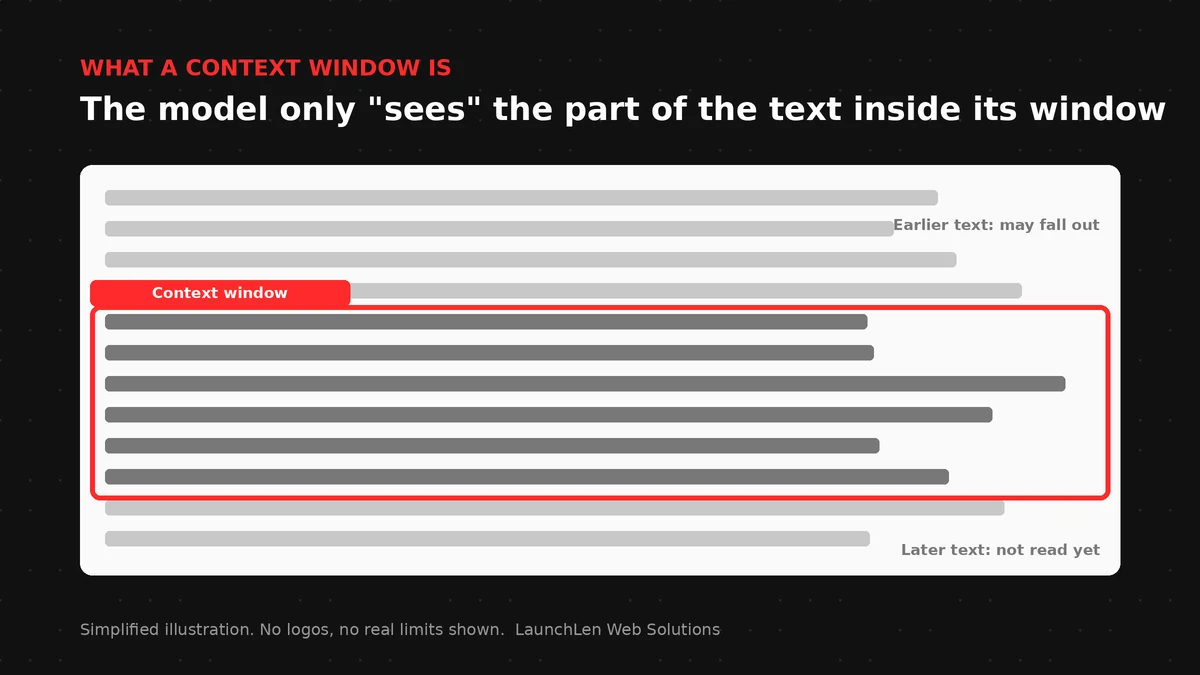
A context window is the amount of text an AI model can consider at once: your instructions, the conversation so far, and any documents you paste or retrieve. When that window fills up, earlier details can drop out of view. That is why long chats sometimes “forget” what you said at the start.
This guide explains context windows in plain English, what happens at the limit, and when summaries, product memory or RAG can help. Provider limits change often; treat any public figure as a snapshot and check the vendor’s docs when you build.
Context windows in plain English
Think of the context window as a notepad the model can read in a single pass. Everything that must influence the next answer has to fit on that notepad: system rules, user messages, tool results and retrieved passages.
The window is not permanent memory. Closing the chat, starting a new thread or exceeding the limit can mean older text is no longer available to the model unless your product stores a summary or fetches facts again.
Clear instructions still matter inside the window. Our guide to prompt engineering for business covers how to structure those instructions without stuffing the notepad with noise.
Tokens: how text is counted
Models do not count characters the way a word processor does. They split text into tokens (pieces of words, punctuation and spaces). Different languages and formats use different numbers of tokens for the same page of text.
You do not need to memorise token math to make good product decisions. You do need to know that:
- Long PDFs, HTML and chat history consume the window quickly.
- Repeating the same policy text in every turn wastes space.
- Tool outputs and retrieved chunks count toward the same limit as your prompt.
Provider documentation describes how each model counts tokens and how large its window is. Cite the docs you rely on with an access date, because those numbers change.
What happens when you hit the limit
When input approaches or exceeds the context window, products behave in different ways. Some reject the request. Some silently drop the oldest messages. Some summarise earlier turns. None of those behaviours is “the model remembering forever.”
For a business tool, surprises show up as:
- Answers that ignore an earlier constraint or price list.
- Staff assistants that miss a policy that was pasted at the start of a long thread.
- Chatbots that contradict a document that scrolled out of the window.
Design for the limit instead of hoping users keep chats short.
Long context vs RAG
Long-context models can take larger documents in one go. That helps for a single report or a short policy pack. It does not remove the need for structure: the model can still miss a clause buried in a huge paste, and every extra token costs latency and money on many APIs.
RAG (retrieval-augmented generation) works differently. You keep source material outside the prompt, retrieve only the passages that match the question, then send those passages plus the question into the window. Our explainer on what RAG is covers the pattern in more detail.
A practical split:
- Long context can suit a one-off review of a document the user just uploaded.
- RAG can suit a living library: website pages, knowledge base articles, PDFs, policies, databases in scope, shared drives and help desk data that change over time.
For LaunchLen chatbot builds, those are the kinds of sources a project can include when they are in scope. Documents and details are uploaded through our secure portal as the standard path, and the chatbot picks up from what you choose to upload. You control what you upload. We do not state a fixed place where indexes or logs live; that depends on the services a project uses and can be reviewed with you before anything is built.
Memory and summaries in chat products
Many chat products add a “memory” or summary layer on top of the raw context window. That can store preferences or a short digest of earlier turns so the full history does not need to be resent every time.
Treat product memory as a design choice with trade-offs:
- Summaries can drop details that later matter.
- Stored memories can go stale when policies change.
- Staff-facing assistants should keep memories inside employee-only access, not on a public site.
Internal staff knowledge assistants are in scope for us when a business wants them: policies, benefits and HR questions answered from approved docs through a secure portal, for employees only, not for the public. Access rules and which sources are included can be agreed with you during discovery. Discovery itself is full requirements gathering and an understanding of the client’s business: what can be automated, what analog or handwritten work can be digitized, and where the gaps are. Exact ownership and deliverables for discovery can be agreed with you.
FAQ
Why did the assistant forget what I said earlier?
The earlier text may have left the context window, or a summary may have dropped the detail. Ask the product to restate key constraints, or retrieve them from a source of truth instead of relying on chat history alone.
Is a bigger context window better for every task?
A larger window can help for some tasks, but it is not a complete strategy. Noise, cost and missed details still happen. Many business tools pair a moderate window with RAG and clear prompts.
Can RAG replace long context entirely?
Not for every task. Uploading one contract for a single review may fit long context. Answering from a large, changing knowledge base usually fits RAG better. Many products use both.
Let’s work together on your project
Planning a chatbot or staff assistant that must stay accurate as conversations and documents grow? We’re LaunchLen Web Solutions Inc.
Based in Kitchener, serving Waterloo Region and businesses across Ontario.
Our AI Solutions page explains AI chatbots for small business, trained on your own content. Builds can include post-launch technical support and ongoing updates so speed, accuracy, guardrails and hallucination reduction keep improving on a SaaS footing where you run the latest version. Before any build, we can agree the scope, deliverables and reporting with you. Book a free consultation to get started.
DROP US A LINE
Connect with LaunchLen Web Solutions Inc.
Ready to take the first step towards unlocking opportunities, realizing goals, and embracing innovation? We're here and eager to connect.

To More Inquiry
+1 226 899 4813

To Send Mail