WordPress Security Checklist for Business Websites


E-commerce

- 2 Nov, 2026
- 6 Views
- 0 Comment
By LaunchLen Web Solutions Team
A shopper lands on your store, types what they want into the search bar and gets nothing back. The product exists. It’s just listed under a different name, or the search can’t match the words they used.
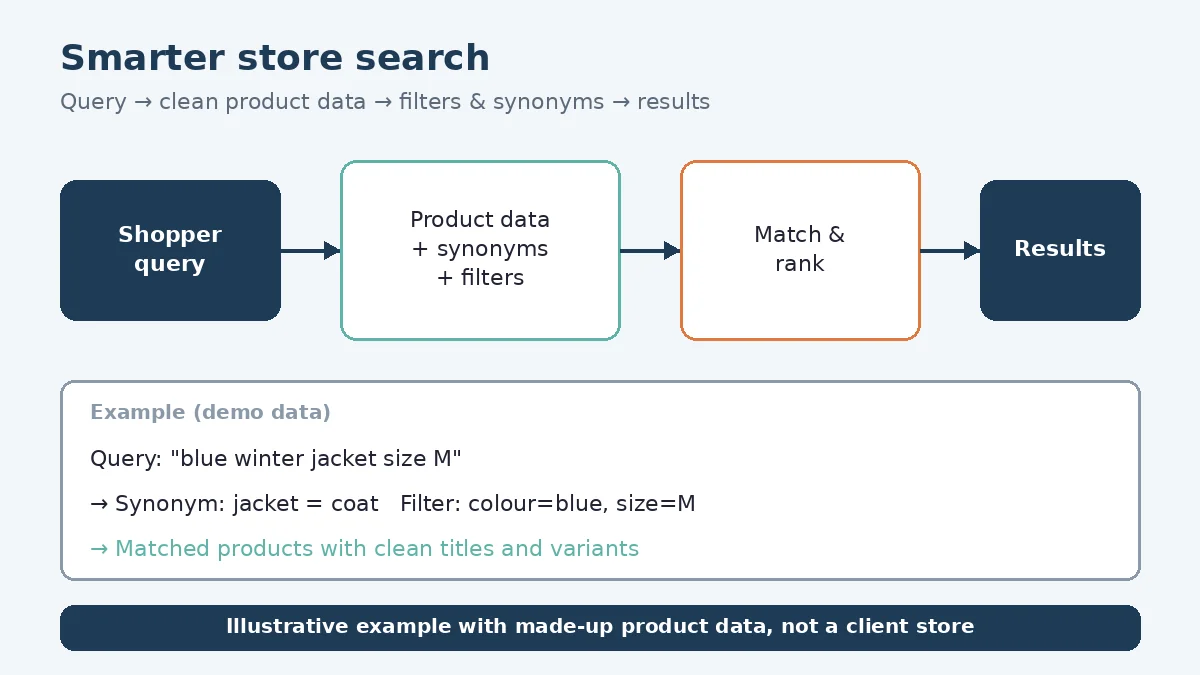
Ecommerce site search is one of the quieter parts of an online store, but it’s where many shoppers tell you exactly what they’re looking for. This post explains how LaunchLen Web Solutions Inc. can help with store search and SEO tuning as part of an e-commerce build or update, including SEO-heavy product descriptions, so products are easier to find in search. Work can cover product data, filters, synonyms and AI-assisted semantic search, tested with real shopper queries.
Why store search matters
Shoppers who search are telling you what they want in their own words. When search works, it shortens the path from that intent to a product page. When it doesn’t, the visit can end there.
The Nielsen Norman Group notes that people searching a single website can end up on a disappointing “No Results” page, and that in its research people run into these pages “when the content exists, but for some reason doesn’t show up as a match for their query” (NN/g, 3 Guidelines for Search Engine “No Results” Pages). That second point matters a great deal for a store owner. Missing results can be a fixable data and setup problem rather than a gap in your range.
Store search improvement doesn’t promise more sales. What it can do is remove avoidable dead ends, so shoppers who came looking for something have a fair chance of finding it.
Product data first: titles, attributes, tags
Search can only match what’s in your product data. Before changing any settings, a review can look at:
- Product titles. Do they use the words shoppers use, or internal codes and supplier names?
- Attributes. Are size, colour, material and other key details stored as structured fields, or buried in description text?
- Categories and tags. Are they consistent, or have several people added overlapping versions over time?
- Descriptions. Do they mention the uses and features shoppers search for?
Store platforms give you tools for this structure. WooCommerce documentation describes categories, tags and attributes as “different ways you can use to organize, display, and filter products,” and says attributes “can also be used to enhance the product filtering and selection process” (WooCommerce, Managing Product Categories, Tags and Attributes). It also recommends defining attributes globally where possible, so a change to one value updates everywhere it’s used.
If your catalogue needs a broader rethink, our guide to planning your online store covers how product structure fits into the wider project.
Filters, synonyms and zero-result fixes
Once the data is in better shape, the search setup itself can be tuned. Work here can include:
- Filters. Letting shoppers narrow results by the attributes that matter for your products, such as size, colour, price range or availability.
- Synonyms. Linking words shoppers use with the words in your catalogue, such as “sofa” and “couch,” or a common nickname for a product line.
- Spelling tolerance. Checking how the search handles typos and near-misses.
- Zero-result pages. Making sure a search with no matches still offers a way forward.
Some platforms include parts of this out of the box. Shopify’s Help Center says core search features, including predictive search and typo tolerance, are available by default, and that its Search & Discovery app lets merchants “create custom filters,” “feature particular products in search results” and adjust result types (Shopify Help Center, Storefront search). Options vary by platform, theme and plan, so the first step can be checking what your store already supports.
For zero-result pages, NN/g recommends clearly explaining that there are no matching results, offering starting points for moving forward and not mocking the user. Suggested starting points include restating the query, keeping it in an editable search box, offering spelling corrections and suggesting similar queries that do return results (NN/g).
Where AI and semantic search help
Keyword search matches words. Semantic search tries to match meaning. A shopper typing “waterproof boots for kids” may not use the exact words in your product titles, but a semantic search can still find the right products.
Our e-commerce solutions page describes smarter store search as search “that understands what shoppers mean,” so fewer searches end in “no results.” Semantic search can be built on embeddings stored in a vector database. Our post on what a vector database is explains how that works in plain English.
AI-assisted search can be a useful layer, but it doesn’t replace good product data. If an attribute is wrong or missing, a smarter search can still return the wrong product. Clean data and sensible filters come first, and AI can help on top.
Shopify’s documentation describes its storefront search as built on “an AI-powered search infrastructure” (Shopify Help Center). On platforms such as Shopify or WooCommerce, the right approach can depend on what’s built in, what an app or extension adds and whether a custom search service makes sense for your catalogue.
Testing with real queries
Changes to search can be judged against what shoppers actually type. Testing can include:
- Gathering real queries. Where your platform or analytics records site searches, those terms can show what shoppers ask for and which searches return nothing.
- Building a test set. A list of common, awkward and misspelled queries, each with the products a shopper would expect to see.
- Checking results before and after. Running the same queries against the old and new setup and reviewing the results by hand.
- Reviewing over time. New products and seasonal searches can show up gaps the first test set missed.
Here’s an illustrative example (not a real client): a home goods store finds that shoppers search for “throw blanket” while its products are titled by fabric name. Adding the shoppers’ term to titles, attributes and a synonym list lets those searches return the right products.
Store search work is project delivery. What support looks like after launch can be agreed with you as part of the project scope. Search settings can keep improving as your catalogue grows. If shoppers are searching your store and leaving empty-handed, a review of your product data and search setup is a practical place to start.
FAQ
Do I need AI search for my store?
Not necessarily. Product data clean-up, filters and synonyms can fix many search problems on their own. AI-assisted semantic search can help when shoppers describe products in many different ways.
Can you improve search on my existing store, whatever platform it runs on?
Yes. We can help with store search and SEO tuning, including SEO-heavy product descriptions, so products are easier to find in search. What can change on an existing store depends on your platform, theme and current apps or extensions, which a review can check first.
Will better search increase my sales?
We can’t promise sales results. Better search can remove avoidable dead ends, so shoppers have a better chance of finding the products you already sell.
Working with LaunchLen
We’re LaunchLen Web Solutions Inc. Based in Kitchener, serving Waterloo Region and businesses across Ontario.
DROP US A LINE
Connect with LaunchLen Web Solutions Inc.
Ready to take the first step towards unlocking opportunities, realizing goals, and embracing innovation? We're here and eager to connect.

To More Inquiry
+1 226 899 4813

To Send Mail