Open-Source vs Closed AI Models: What Businesses Should Weigh


Web Design and Development

- 2 Nov, 2026
- 7 Views
- 0 Comment
By the LaunchLen Web Solutions Team · Kitchener, Ontario · Last updated: November 2, 2026
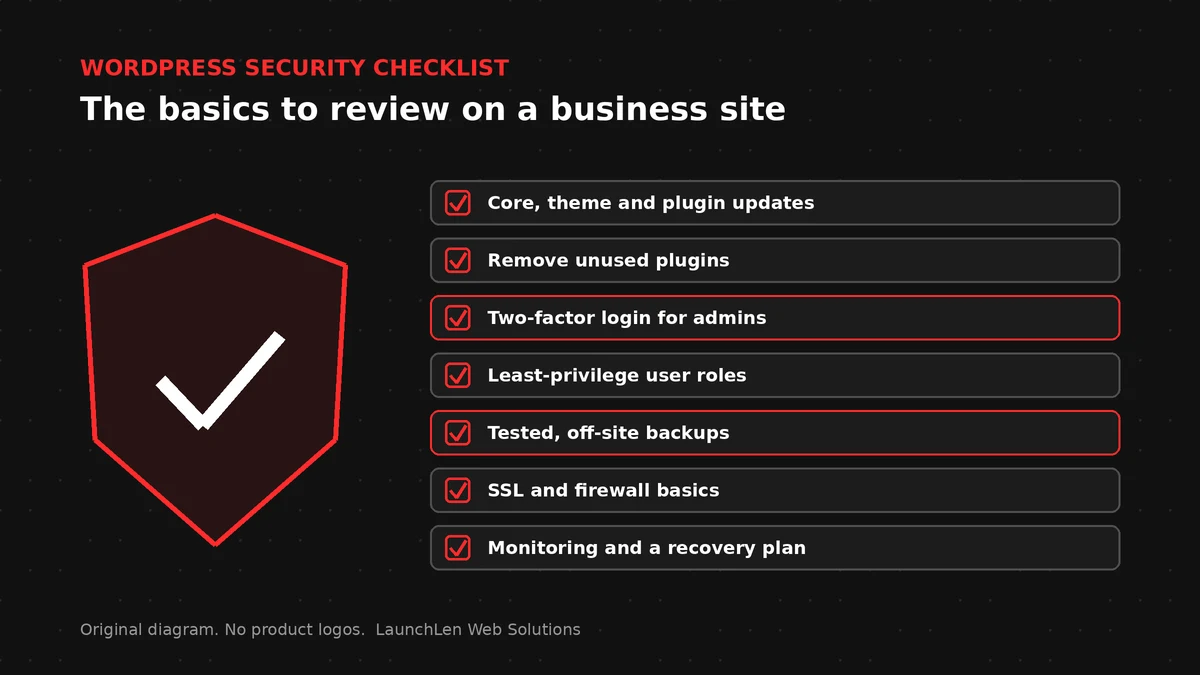
A WordPress security checklist is less about a single tool and more about steady habits: keep software current, limit who can change things, back up what matters, and notice problems early.
This guide walks through the checks that usually matter for a business site, including AI-related plugins. It is educational, not a promise that a site cannot be compromised.
Updates: core, themes, plugins
Out-of-date WordPress core, themes or plugins are a common way attackers get in. Official hardening guidance stresses keeping WordPress and its components up to date.
A practical routine can include:
- Turning on automatic updates for WordPress core where your host and workflow allow it.
- Reviewing theme and plugin updates on a schedule you can keep.
- Removing themes and plugins you no longer use (inactive code still expands the attack surface).
- Testing updates on a staging copy when a change could break bookings, forms or checkout.
Document who owns updates so they do not fall between people.
Plugin hygiene, including AI plugins
Every plugin adds code that can have bugs or weak defaults. Prefer plugins that are actively maintained, and remove anything unused.
AI plugins and connectors deserve the same scrutiny as payment or membership plugins:
- What can the plugin read or write on your site?
- Where do prompts and responses go under the vendor’s terms?
- Are API credentials stored in a way only trusted roles can see?
If you connect WordPress to chatbots or assistants, start from approved content and clear limits. Our guide to WordPress AI integration covers how AI features can sit on a WordPress site without turning every plugin into a free-for-all.
Users, roles and two-factor authentication
Accounts are often easier to attack than software. Use these habits:
- Give each person their own login.
- Grant the lowest role that still lets them do their job (Editor or Author instead of Administrator when possible).
- Remove or demote accounts for people who have left.
- Prefer strong, unique passwords and a password manager.
- Turn on two-factor authentication for administrators and other high-privilege roles when your setup supports it.
Avoid shared “admin” logins. Shared accounts make it hard to see who changed what after an incident.
Backups you’ve actually tested
A backup you have never restored is only a hope. Decide what must be recoverable (files, database, media) and how far back you need to go.
A solid backup approach can include:
- Automated backups on a schedule that matches how often content changes.
- Copies stored away from the same server that runs the site.
- Periodic restore tests onto staging so you know the process works.
- Clear ownership of who runs a restore if the live site fails.
We do not state a fixed place where backups live; that depends on the services a project uses. Frequency, retention and restore tests can be agreed with you for the engagement.
Hosting, SSL and firewall basics
Hosting choices affect how hard it is to keep a site safe. Look for a host that keeps the server software current, offers HTTPS certificates, and makes backups and staging practical.
HTTPS should be on for every public hostname. If you need a refresher on certificates and “Not secure” warnings, see what an SSL certificate is.
A web application firewall (at the host or through a service) can block common probes. It does not replace updates and strong accounts.
Hosting and VPS choices vary by project. Disclosure: LaunchLen has a referral relationship with Hostinger for hosting, VPS and self-hosted automation. Our recommendations stay based on your needs.
For new client work we do not take system access by default; credentials only come into play when integrating an existing codebase, a micro-SaaS product or servers you already run. When a project needs shared hosting or a VPS, we can provide Hostinger options as part of that discussion.
What to do if you’re hacked
If you suspect a compromise:
- Take the site offline or into maintenance mode if visitors or customers could be harmed.
- Preserve logs and a copy of the infected files before you wipe anything (your advisor or host may need them).
- Reset all passwords and keys: WordPress users, hosting panel, FTP or SFTP, database, and any connected services.
- Restore from a clean backup taken before the incident, then update everything.
- Scan for leftover malware and unknown admin users.
- Review how the attacker got in so the same path is closed.
If you are unsure, bring in someone experienced before you destroy evidence. Official WordPress hardening documentation is a good baseline for prevention going forward.
FAQ
Is a security plugin enough on its own?
No single plugin replaces updates, strong accounts and tested backups. Plugins can help with scanning or login protection, but they work well as one layer among several.
Do AI plugins create extra risk?
They can, because they often hold API credentials and may send site content to outside services. Treat them like any powerful plugin: least privilege, clear data rules and a plan to remove them if unused.
Will you monitor our WordPress site for us?
Monitoring and maintenance are not assumed. For WordPress work, post-launch technical support and ongoing updates can be agreed with you as part of the engagement. Scope stays explicit so you know what is covered.
Let’s work together on your project
Need a clearer picture of how your WordPress site is set up and what to tighten first? We’re LaunchLen Web Solutions Inc.
Based in Kitchener, serving Waterloo Region and businesses across Ontario.
Our WordPress Development page explains how we build and improve WordPress sites with a lean setup: custom where it counts, carefully chosen plugins everywhere else, and AI features when they help. Before any work, we can agree the scope, deliverables and reporting with you. Book a free consultation to get started.
DROP US A LINE
Connect with LaunchLen Web Solutions Inc.
Ready to take the first step towards unlocking opportunities, realizing goals, and embracing innovation? We're here and eager to connect.

To More Inquiry
+1 226 899 4813

To Send Mail