Customer Portal Development: How We Plan and Build a Portal


Web Design and Development

- 18 Nov, 2026
- 8 Views
- 0 Comment
By the LaunchLen Web Solutions Team · Last updated: November 18, 2026
Changing a live website is a bit like renovating a shop while customers are inside. A new plugin, a theme update or a redesigned page can look fine in theory and still break a form or a menu the moment it goes live.
A staging site gives you somewhere to try those changes first. This guide explains what a staging site is, how it fits with your live site, what to test there and a few common mistakes to avoid.
What is a staging site, in plain English?
A staging site is a private copy of your website used to test changes before they reach real visitors. It looks and works like your live site, but only your team and the people building the site use it.
Developers use a few names for the different copies of a site. WordPress’s developer reference for the environment type setting lists the possible values as “‘local’, ‘development’, ‘staging’, and ‘production'”, with production meaning the live site.
The idea is simple: make the change on staging, check it, then move it to the live site once you’re happy.
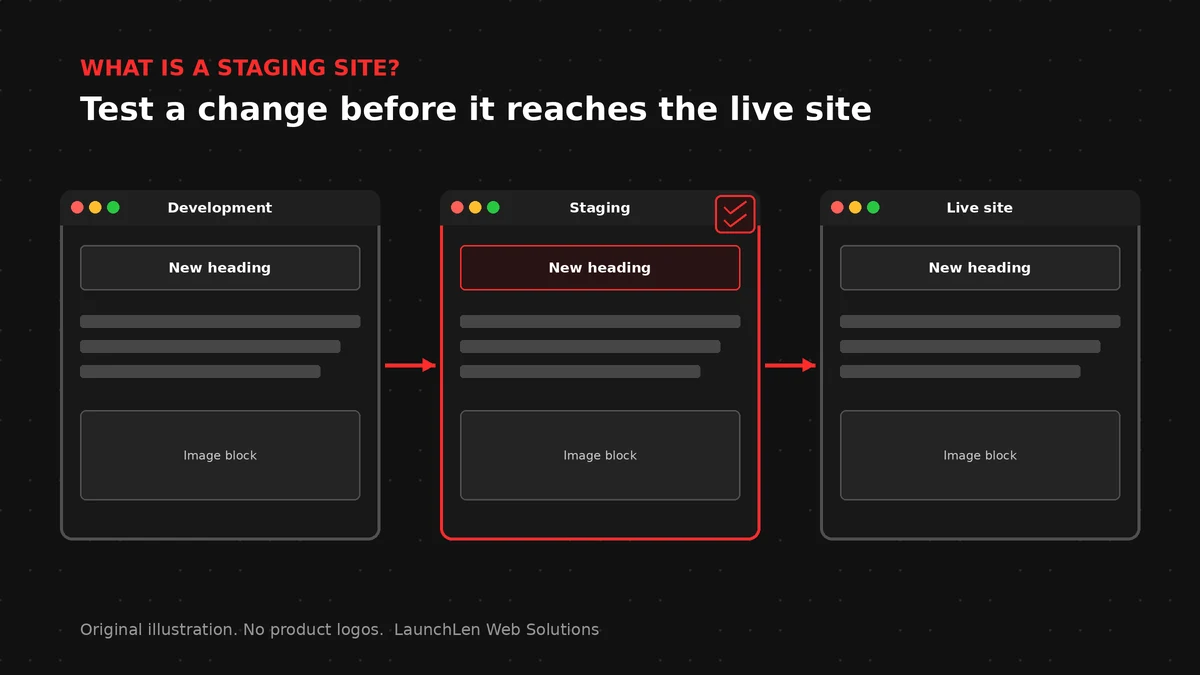
Staging vs production: how the environments fit together
Website work can move through a short chain of environments:
- Development. Where a developer builds and tries out a change, sometimes on their own computer.
- Staging. A shared copy of the site where the change is reviewed and tested in conditions close to the real thing.
- Production. The live site your customers use.
A staging environment is only useful if it closely matches the live site. The Twelve-Factor App guidance on dev/prod parity puts the principle simply: “Keep development, staging, and production as similar as possible.”
If staging runs different software versions or settings from the live site, a change can pass every test and still fail after launch.
What to test on a staging site
A WordPress staging site, or one on any other platform, is the place to check anything that could affect visitors. Useful checks include:
- Updates. Theme, plugin and platform updates, especially ones that change how pages look or work.
- New features. A new form, booking flow or page template.
- Design changes. New layouts, menus and styles, viewed on phones as well as computers.
- Forms and key paths. Contact forms, checkout and anything else that leads to an enquiry or sale.
- Speed. Whether a change makes pages noticeably slower to load.
It’s also the natural place to review bigger projects, such as a redesign or a move to a new platform. Our post on WordPress migration covers how to protect search visibility during a move.
Who sets up and looks after the staging environment
Some hosting plans include a staging tool, and the WordPress reference above asks hosts that support staging environments to label those copies as staging. Other setups need a developer to create the copy by hand.
Either way, it helps to agree who can create staging copies, who reviews changes there and who approves the move to the live site. Writing those responsibilities down before a project starts means nobody has to guess when a change is ready.
Keeping a staging site out of search results
A staging site shouldn’t appear in Google. If it does, visitors could land on an unfinished copy of your site.
Google’s guide to blocking search indexing with noindex explains that a noindex rule tells search engines that support it, including Google, to drop a page from search results. It also notes that for noindex to work, the page must not be blocked by a robots.txt file.
Before the site goes live, it’s just as important to check the opposite: that the live site doesn’t carry over a noindex rule from staging.
Moving changes from staging to the live site
Once a change passes testing, it needs to reach the live site carefully. How that works depends on your hosting and platform, but a sensible process includes:
- A recent backup of the live site before anything changes.
- A clear list of what’s being moved, so nothing extra comes along.
- Care with live content. Orders, form entries and new posts on the live site may be newer than the staging copy, so a full copy over the top can overwrite them.
- A quick check after the move of the pages and forms that matter most.
Hosting plans differ in what they offer here. If you’re comparing options, our guide on how to choose web hosting lists questions worth asking.
FAQ
Do small business websites need a staging site?
Not every change needs one, but any update that could break a form, a layout or a checkout is worth testing first. A staging site is the simplest way to do that.
Will visitors see our staging site?
They shouldn’t. A staging site is meant to be private and kept out of search results with a noindex rule, and it should only be shared with the people reviewing changes.
Can we edit content on staging and the live site at the same time?
It’s better not to. Content added to the live site while staging is in use can be overwritten if staging is copied over it, so agree on which copy your team edits.
Let’s work together on your project
Planning a redesign, a new feature or a big update? We’re LaunchLen Web Solutions Inc.
Our WordPress Development page covers new WordPress builds, redesigns and improvements to existing sites, including content blocks and page layouts your staff can update without breaking the design. If you’re starting fresh, our post on building a custom WordPress theme explains that process.
Serving local businesses across Canada and the US, delivered remotely.
Book a free consultation to get started.
DROP US A LINE
Connect with LaunchLen Web Solutions Inc.
Ready to take the first step towards unlocking opportunities, realizing goals, and embracing innovation? We're here and eager to connect.

To More Inquiry
+1 226 899 4813

To Send Mail