How to Move an Office File Server to the Cloud


Web Design and Development

- 12 Nov, 2026
- 6 Views
- 0 Comment
By the LaunchLen Web Solutions Team · Last updated: November 12, 2026
Hosting plans love the same words: fast, reliable, unlimited. That makes them hard to compare. The easier way to learn how to choose web hosting is to start with what your website actually does, then match it to a hosting type.
This guide walks through the main types of web hosting for small business sites, what to check before you sign up and the warning signs worth noticing.
Disclosure: LaunchLen has a referral relationship with Hostinger for hosting, VPS and self-hosted automation. Our recommendations stay based on your needs.
How to choose web hosting: start with what your site does
Before comparing plans, answer a few questions about your site:
- What is it? A simple brochure site, a WordPress site with a blog, an online store or a custom web app.
- How busy is it? Steady traffic, or spikes around launches, sales or seasons.
- Who looks after it? Someone comfortable with servers, or a team that just wants to edit pages.
- What else does it need? Email on the same domain, a staging copy for testing or room for new features.
- Where should data live? If that matters to you, ask each host where its servers and backups are.
Your answers usually point to one or two hosting types, which makes the shortlist much shorter.
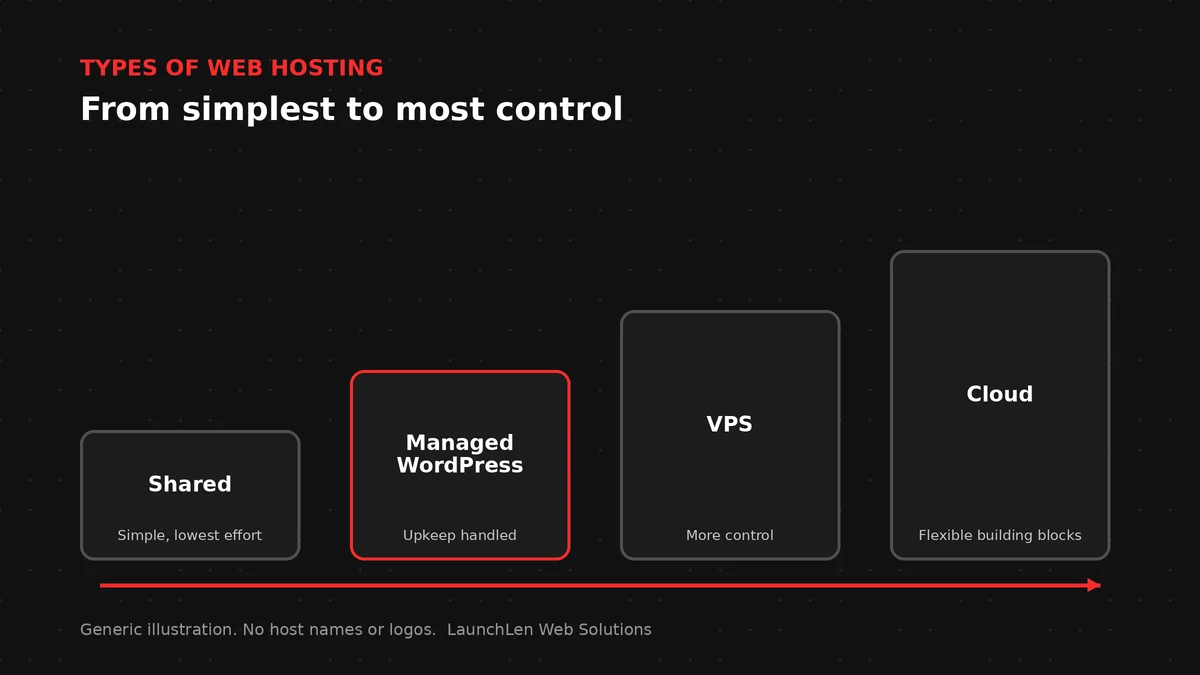
Types of web hosting compared
Shared hosting
Your site shares a server with many others. It’s usually the simplest and lowest-cost option, and it often suits small sites with modest traffic. The trade-off is less control, and a busy neighbour can affect performance.
Managed WordPress hosting
This is hosting set up specifically for WordPress, often with updates, caching and staging tools handled for you. It can suit a business that runs WordPress and wants less day-to-day upkeep.
VPS hosting
A virtual private server gives you a dedicated slice of a server with more control and steadier resources. It also means more responsibility: someone has to set it up, update it and watch it.
Cloud platforms
Large cloud platforms offer flexible building blocks for apps with several services or uneven demand. They’re powerful but often more than a small brochure site needs. If you’re hosting a web app, our comparison of serverless vs VPS goes deeper.
What to check before you sign up
Whatever type you choose, check these points with any host:
- Software support. For WordPress, check the host meets WordPress.org’s current recommended requirements for PHP, the database and HTTPS.
- HTTPS. Ask how SSL certificates are issued and renewed. Our guide to what an SSL certificate does explains why it matters.
- Backups and restores. Ask how often backups run, how long they’re kept, who can restore them and whether you can download your own copy.
- Speed basics. Server response time affects how quickly pages start loading, and web.dev explains it as time to first byte. Caching and what a CDN is are worth understanding too.
- Support. Find out how you reach support and what it covers.
- Room to grow. Check how easy it is to move to a bigger plan or a different hosting type later.
- Ownership. Keep the hosting and domain accounts in your business’s name.
Warning signs when comparing hosts
A few things deserve a second look:
- Renewal terms that are hard to find or very different from the sign-up offer.
- “Unlimited” resources with no fair-use details.
- No way to download your own backups.
- Accounts set up in a past developer’s or agency’s name.
None of these rules a host out on its own. They’re questions to ask before you commit.
Moving to a new host
If your current hosting no longer fits, a move can be planned in steps: take stock of what you run, test on the new host, then switch with a rollback plan ready. Our cloud migration checklist covers the process.
If URLs change during a move, planned redirects send visitors and search engines to the new pages.
FAQ
Is shared hosting good enough for a small business website?
Often, for a simple site with modest traffic. If the site slows down as traffic grows, or you need more control, managed WordPress hosting or a VPS may fit better.
Does web hosting affect SEO?
Indirectly. Slow responses, downtime and HTTPS problems can affect visitors and how search engines crawl your site. Good hosting won’t make a page rank on its own.
Should our hosting account be in our business’s name?
We’d suggest it. Keeping your domain and hosting accounts in your business’s name makes it easier to change providers or developers later.
Let’s work together on your project
Not sure which hosting type fits your website? We’re LaunchLen Web Solutions Inc.
Serving local businesses across Canada and the US, delivered remotely.
Our Cloud Services page explains how we set up hosting for business websites and web applications, configure domains and SSL, and plan moves from an old host. Ongoing care is agreed per project, so you know what’s covered.
Book a free consultation to talk it through.

DROP US A LINE
Connect with LaunchLen Web Solutions Inc.
Ready to take the first step towards unlocking opportunities, realizing goals, and embracing innovation? We're here and eager to connect.

To More Inquiry
+1 226 899 4813

To Send Mail