AI Email and Ticket Triage: How We Build It for a Shared Inbox


Web Design and Development

- 14 Nov, 2026
- 5 Views
- 0 Comment
By the LaunchLen Web Solutions Team · Last updated: November 14, 2026
Every time someone types your web address or sends you an email, a quiet lookup called DNS happens first, and it decides where your visitors and your email end up.
Most business owners only think about DNS when something changes, like moving to a new host or setting up email. This guide explains what DNS is, how it works, which records matter and what to check before you switch anything.
What is DNS, in plain English?
DNS stands for Domain Name System. It’s often described as the internet’s address book: it turns a name people can remember, like your domain, into the technical addresses computers use to find each other. MDN’s glossary has a short definition of DNS, and its guide to what a domain name is explains how the parts of a name fit together.
No single company runs DNS. It’s a shared, distributed system, and ICANN explains its role in coordinating the internet’s unique identifiers, including domain names.
How DNS works, step by step
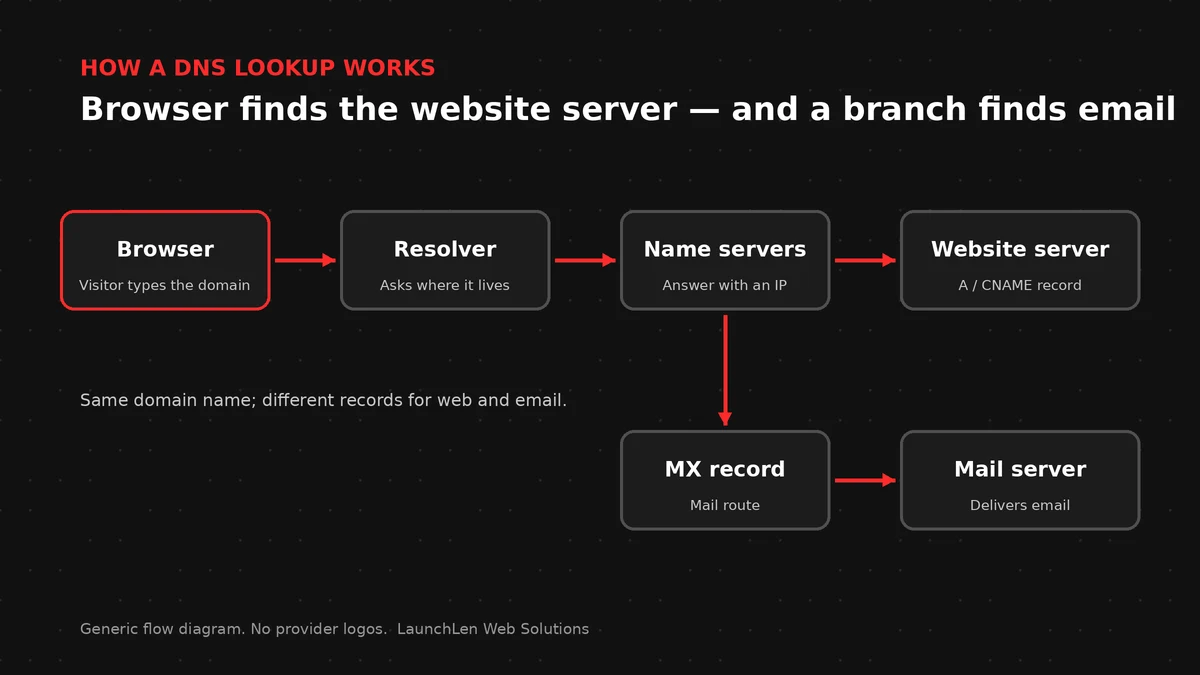
Here’s a simplified version of what happens when someone visits your site:
- Step one: the browser asks a resolver. Their device sends the question “where is this domain?” to a DNS resolver, run by their internet provider, workplace or another service.
- Step two: the resolver checks its cache. If it looked up your domain recently, it can answer right away.
- Step three: if not, it follows the chain. The resolver asks the servers responsible for the top of the naming system, then for your domain ending, such as .ca or .com, until it reaches your domain’s authoritative name servers.
- Step four: the authoritative name servers answer. These hold your domain’s records and give the resolver the address of your website’s server.
- Step five: the browser connects. With the address in hand, the browser loads your site.
Email works the same way, except the lookup asks where to deliver mail rather than where to load a website. For the technically curious, the original DNS specification describes these concepts in detail.
Common DNS records explained
DNS settings are made up of records. These are the ones business owners come across most:
- A record. Points your domain to the address of a server, such as your website host.
- AAAA record. Does the same job for the newer, longer style of internet address.
- CNAME record. Makes one name an alias of another, such as pointing the www version of your domain to the main one.
- MX record. Tells other mail servers where to deliver email for your domain. Our business email setup guide covers email records in more detail.
- TXT record. Holds text that other services read, such as proof that you own the domain or email sending settings.
- NS record. Names the authoritative name servers for your domain, which is where all the other records live.
Registrar, DNS hosting and web hosting: who does what
These three roles are easy to mix up, partly because one company can provide all of them:
- The registrar is where you register and renew the domain itself.
- DNS hosting is wherever your name servers and records are managed. This might be your registrar, your web host or a separate DNS service.
- Web hosting is where your website’s files and software run.
Knowing which is which saves time when something needs changing. Before you make any change, find out who has access to the registrar and DNS accounts, and make sure the domain is registered in your business’s name. If you’re reviewing hosts at the same time, our guide on how to choose web hosting can help.
TTL and DNS cache: why changes take time to show
Every DNS record has a TTL, or time to live. MDN’s TTL definition notes that TTL can refer to the expiry time of cached data. For DNS, it sets how long resolvers can keep a cached answer before asking again.
This is why a DNS change can take a while to show, depending on the TTL, and some visitors may see the new site while others still see the old one because their resolver is still using its cached answer.
When a move is planned, the TTL on the records that will change can be lowered in advance where possible, so the switch shows up sooner once it happens.
Changing hosts: a DNS checklist before you switch
Before you point your domain somewhere new, check:
- Access. Confirm who can log in to the registrar and DNS accounts.
- A copy of current records. Export or screenshot every record, including email and verification records, so nothing is lost.
- Email records. Changing website records shouldn’t touch MX or email-related TXT records. Leave them alone unless email is moving too.
- TTL. Lower it ahead of time where possible.
- SSL. Make sure the new host can issue a certificate for your domain. Our post on what an SSL certificate is explains why it matters.
- Other services. If you use a content delivery network, check whether your records point to it rather than directly to your host.
- Testing. Check the site and email from more than one device and network after the change.
For the wider move, our cloud migration checklist walks through planning, testing and switching over.
FAQ
Is my domain registrar the same as my DNS host?
Sometimes. Many registrars offer DNS hosting, but your name servers might point somewhere else, such as your web host. The NS records for your domain show where your DNS is managed.
Why does my new site show for some people and not others after a change?
Resolvers keep cached answers until the TTL runs out, so until then some visitors may still be sent to the old server.
Who should make DNS changes for our business?
Your team or IT contact, with our guidance. Keeping access with your business means you stay in control of your domain.
Let’s work together on your project
Planning a move, a new website or a domain change? We’re LaunchLen Web Solutions Inc.
Our Cloud Services page covers how we can configure domains and SSL, and guide your team or IT contact through email-related DNS records and lowering DNS cache times in advance where possible. Your team or IT contact makes the registrar and DNS changes, with our guidance.
Serving local businesses across Canada and the US, delivered remotely.
Book a free consultation to get started.

DROP US A LINE
Connect with LaunchLen Web Solutions Inc.
Ready to take the first step towards unlocking opportunities, realizing goals, and embracing innovation? We're here and eager to connect.

To More Inquiry
+1 226 899 4813

To Send Mail