Spreadsheet to Web App: When It’s Time to Replace a Spreadsheet


Case Studies and Guides

- 15 Nov, 2026
- 6 Views
- 0 Comment
By the LaunchLen Web Solutions Team · Last updated: November 15, 2026
“Digital transformation” can sound like a huge, risky project that only big companies attempt. For a small business, it can be much simpler: taking the work that runs on paper, email and spreadsheets and moving it, step by step, into tools that fit.
This post explains how we build a digital transformation plan one process at a time, so your business keeps running while it improves.
What digital transformation means for a small business (and what it doesn’t)
For a small business, digital transformation means changing how specific pieces of work get done, so they’re faster to finish, easier to track and less dependent on one person’s memory.
It doesn’t mean replacing every system at once, buying the newest software or adding AI because everyone else is. BDC’s guide on how to lead digital transformation in your business is a useful Canadian starting point for owners thinking about where to begin. In the US, the SBA’s guidance on managing your business covers the wider business side.
Our Consulting Services page describes the approach we take: moving from paper, email and spreadsheets to connected systems, one process at a time. We help you sequence the changes so the business keeps running while it improves.
Start with one process: mapping how work moves today
The plan starts with a single process, not a list of software. Good candidates are processes that happen every week and cause frustration, such as quotes, job scheduling, invoicing or new-customer intake.
For that process, we map out with you:
- Where the work starts. A phone message, a web form, an email or a paper form.
- Each handoff. Who touches it next, and how they find out it’s their turn.
- Where information gets copied. Every time someone retypes the same details into another place.
- Where it gets stuck. The steps where things wait, get lost or need chasing.
This map is the foundation of the plan. It shows what actually happens, which isn’t necessarily what people assume happens.
If you want a wider look at your tools and setup first, our post on what an IT assessment covers is a good companion. If AI is on your list, our AI readiness checklist can help you decide whether a process is ready for it.
Paper, email and spreadsheets: deciding what to change first
Once a process is mapped, the next question is what to change first. We look for the change that removes the most friction with the least disruption:
- Paper forms can become online forms that feed straight into where the information is needed.
- Email back-and-forth can become a shared status that everyone can see.
- Spreadsheets passed between people can become one shared source, or a simple app.
- Shared files on an old office server can move to the cloud. Our post on moving an office file server to the cloud explains that step.
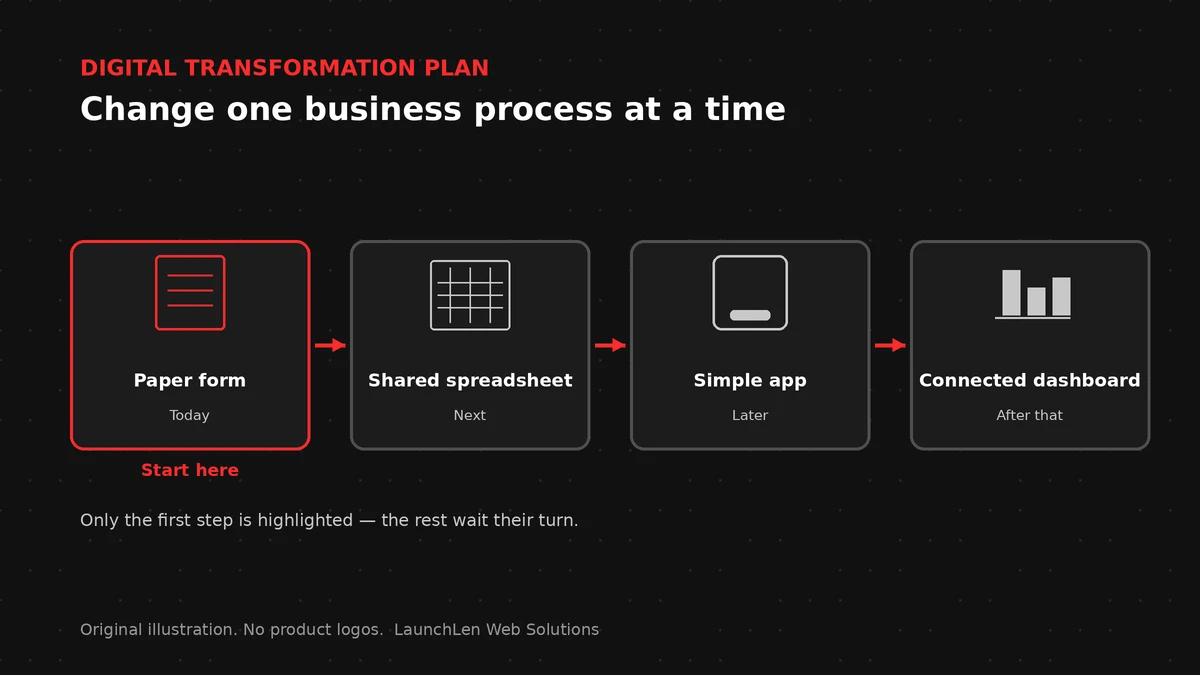
The first change should be small enough to finish and visible enough that your team notices the difference.
Sequencing your digital transformation plan so the business keeps running
Changing too much at once is where digital transformation goes wrong. A plan sets out the order of changes so each one settles before the next begins.
Working in small, planned steps is a common idea in digital delivery. The GOV.UK Service Manual’s guidance on agile delivery covers deciding on priorities and planning work in phases, and the same thinking suits small businesses.
In practice, a sequence can include:
- Running the old and new ways side by side for a short period.
- Picking a quieter time of year for bigger changes.
- Agreeing what “done” looks like for each step before moving on.
- Reviewing what worked before planning the next process.
Bringing your team along
The people who do the work every day know where the problems are. Involving them early makes the plan more accurate, and it makes the change easier to accept.
We suggest naming one person on your team as the owner of each process change. They help test new steps, answer questions from colleagues and flag anything that isn’t working. Short written guides for each new step help too, so nobody has to rely on memory.
When a step needs new software or a custom build
Sometimes a step can’t be fixed by changing how existing tools are used. When that happens, the plan points to the next decision:
- Choosing software. Our software selection process post explains how to compare options against your needs.
- Replacing an old system. Our guide to legacy system modernization covers when and how to replace aging software.
- Connecting tools. Our post on system integration explains how separate tools can share information.
The process map comes first, so any new software or custom build is chosen to fit how your business actually works.
FAQ
Do we need to change everything at once?
No. A plan works through one process at a time, so each change can settle before the next begins.
How do we pick the first process?
Look for work that happens every week, involves several people and causes regular frustration. That’s where a change will be noticed most.
Will we need new software?
Sometimes. Software selection or a custom build comes after the process is mapped, so you only add what the process needs.
Working with LaunchLen
We’re LaunchLen Web Solutions Inc. Our Consulting Services page covers digital transformation planning alongside our other consulting work.
We can map your processes with you, help you decide what to change first and set out a sequence that keeps the business running. How the plan is used afterwards can be agreed with you, whether your team carries it out or we help with specific steps.
Serving local businesses across Canada and the US, delivered remotely.

DROP US A LINE
Connect with LaunchLen Web Solutions Inc.
Ready to take the first step towards unlocking opportunities, realizing goals, and embracing innovation? We're here and eager to connect.

To More Inquiry
+1 226 899 4813

To Send Mail