What Is an SSL Certificate? HTTPS Explained for Business Websites


Case Studies and Guides

- 1 Nov, 2026
- 16 Views
- 0 Comment
By LaunchLen Web Solutions Team
Many businesses run on a system that’s older than some of their staff: a desktop database, a custom tool built years ago, or software the vendor no longer updates. It still works, mostly, but every change feels risky.
Legacy system modernization doesn’t have to mean throwing everything out. This post explains how LaunchLen Web Solutions Inc. can assess an ageing system, the options worth weighing and how a phased plan can keep the business running while things change.
Signs a system is holding you back
An old system isn’t a problem just because it’s old. It becomes one when it starts getting in the way. The UK Government Digital Service lists reasons organizations decide to migrate, including when maintenance costs more than replacement, when supplier support is no longer available and when the risk of maintaining the technology becomes too great (GOV.UK, Managing legacy technology).
For a smaller business, signs can include:
- No more updates. The vendor has ended support, or nobody can patch the software safely.
- Workarounds everywhere. Staff re-type data between systems or keep side spreadsheets.
- One person who knows how it works. If they’re away, problems wait.
- It can’t connect. New tools, a website or an online store can’t exchange data with it.
Security matters too. The Canadian Centre for Cyber Security recommends that small and medium organizations replace software and hardware that no longer receive updates because the vendor ended support (Canadian Centre for Cyber Security, baseline controls).
Understanding what the old system really does
Before choosing an option, it helps to know what the system does. Old systems can collect rules, reports and quirks the business quietly depends on.
GOV.UK names a lack of proper documentation as one of the main technical blockers to migration, along with dependent systems and not knowing exactly what data you hold or its structure (GOV.UK, Managing legacy technology). So an assessment can include:
- Talking to the people who use it. What they rely on and what they work around.
- Mapping features and rules. Calculations, approvals, reports and exports, including the ones nobody mentions until they break.
- Mapping connections. Which other systems, files or people send data in or take data out.
- Reviewing the data. What’s stored, how it’s structured and how clean it is.
- Noting risks. Security gaps, unsupported components and single points of failure.
- Spotting what can be automated or digitized. Manual steps, paper forms or handwritten records a new setup could handle.
Because an assessment looks inside an existing codebase or servers, it does need credentials, agreed with you before it starts.
Our post on how we run an IT assessment for small businesses covers how a review of your wider tools and systems can work.
Options: keep, wrap, refactor, replace
There’s rarely one obvious answer. The options we can weigh with you include:
- Keep. If the system is stable, secure enough and not blocking anything important, leaving it alone can be reasonable, with risks noted and a review planned.
- Wrap. Put a modern layer around the old system, such as an API or an integration, so new tools can work with it without changing its core.
- Refactor. Improve the existing code or setup in stages, keeping what works and fixing what’s fragile.
- Replace. Move to a new system, either an off-the-shelf product or custom software, when the old one can’t reasonably be kept going.
GOV.UK describes a similar range of migration strategies, from retaining a system to retiring it, re-hosting it, repurchasing or re-platforming (GOV.UK, Managing legacy technology). If a system has no modern integration options at all, our guide to AI process automation vs RPA vs agentic AI explains where screen-based automation can fit, and its limits.
Our IT consulting services page describes the aim as a plan you can act on. How you can use that plan, including with your own team or another developer, can be agreed with you before the engagement starts. How you can use a specific assessment and plan can be agreed with you before the assessment starts.
Data migration risks
Whatever the option, data can be the hardest part to move. GOV.UK notes that the information in a system “represents the true value of the system itself” (GOV.UK, Managing legacy technology).
Data risks to plan for can include:
- Unknown structure. Fields used for unintended purposes, or meaning that lives only in people’s heads.
- Quality problems. Duplicates, gaps and inconsistent formats that need cleaning before or during a move.
- History. Deciding what past records need to come across and what can be archived.
- Personal information. Under PIPEDA, organizations must protect personal information with safeguards appropriate to its sensitivity (OPC, PIPEDA Principle 7). Exports and test copies need the same care. For legal questions, check with a qualified privacy adviser.
Test migrations checked against the old system can surface problems early.
A phased plan that keeps the business running
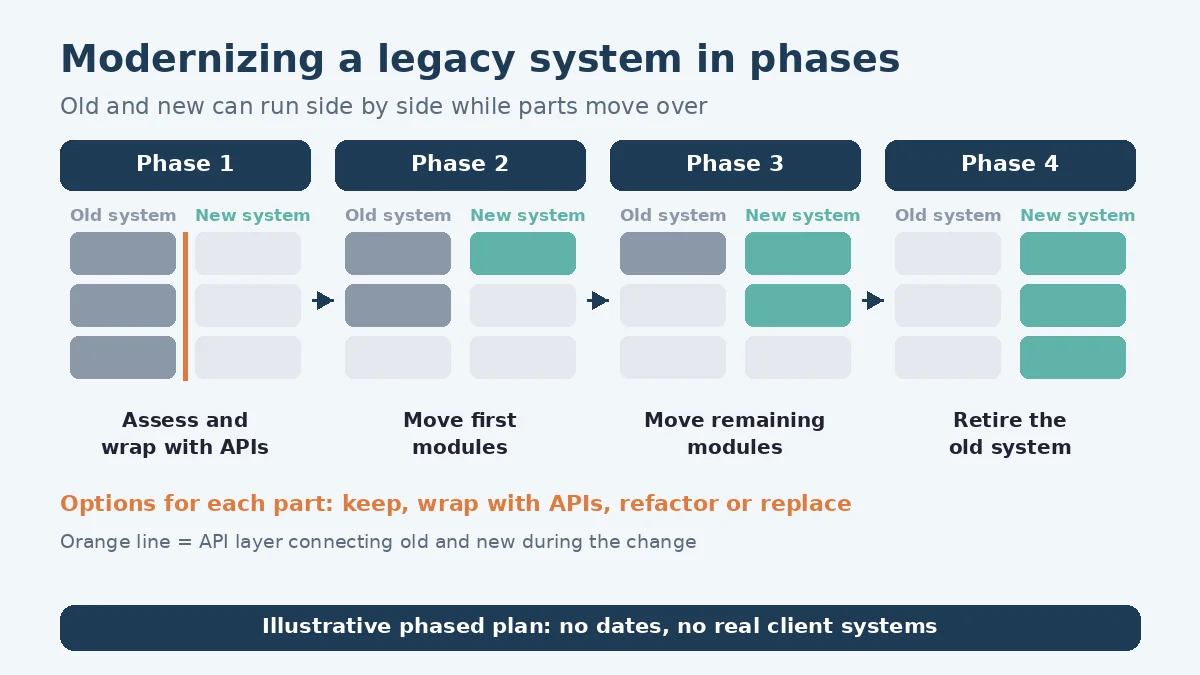
Replacing everything in one go can be risky; a phased approach can reduce that.
Martin Fowler’s “Strangler Fig” describes a gradual approach to legacy modernization: new pieces are built alongside the old system and behaviour moves across in parts (Martin Fowler, Strangler Fig). GOV.UK also recommends iterative or phased migration, noting that gradual retirement of technology is “generally cheaper and simpler” than a full decommissioning project (GOV.UK, Managing legacy technology).
A phased plan can include:
- A first piece with clear value, such as a reporting feature or an integration.
- Old and new running side by side, with a way back if something goes wrong.
- Testing with the people who use the system before each part moves.
- Retiring old parts once their replacements are proven.
Here’s an illustrative example (not a real client): a distributor’s ageing order system can’t connect to its new online store. The first phase wraps the old system with an integration so orders flow automatically. Later phases move reporting and stock management across.
FAQ
How do I know whether to replace or refactor?
It depends on how well the current system works, how much of it is worth keeping, its security risks and what the business needs next. An assessment can compare the options so the decision rests on evidence.
Can we keep using the old system during the change?
It can, in a phased plan. Old and new can run side by side, with parts moving across once they’re tested.
Do we have to use you to carry out the plan?
Not necessarily. How you can use the assessment and plan, including with your own team or another developer, can be agreed with you before the assessment starts.
Working with LaunchLen
We’re LaunchLen Web Solutions Inc. Based in Kitchener, serving Waterloo Region and businesses across Ontario.
If an old system is slowing your business down, or you’re worried about what happens if it fails, an assessment is a practical first step. Tell us what the system does and what’s getting in the way.
DROP US A LINE
Connect with LaunchLen Web Solutions Inc.
Ready to take the first step towards unlocking opportunities, realizing goals, and embracing innovation? We're here and eager to connect.

To More Inquiry
+1 226 899 4813

To Send Mail