Choosing New Business Software: How We Run a Requirements-First Selection


Web Design and Development

- 25 Oct, 2026
- 17 Views
- 0 Comment
By the LaunchLen Web Solutions Team · Kitchener, Ontario · Last updated: October 25, 2026
What is Docker used for? In short, Docker packages an application together with everything it needs to run, so it behaves the same way on a developer’s laptop, a test server and a production server. That package is called a container.
If you’ve heard developers mention Docker and wondered whether it matters for your business app, this guide is for you. We’ll cover the problem containers solve, how they differ from virtual machines, where Docker helps and when it adds more complexity than value.
The ‘works on my machine’ problem
Modern applications rely on a lot of moving parts: a programming language runtime, libraries, a database, configuration settings and more. If one developer’s computer has a slightly different version of something than the server does, the app can work in one place and fail in another.
Docker’s own documentation describes this problem with a web app made of a React front end, an API and a database. Everyone working on it needs the same versions of each piece, and those versions shouldn’t clash with whatever else is installed on their machine. Containers are Docker’s answer.
Containers in plain English
Put simply, Docker is a platform for developing, shipping and running applications in containers. According to Docker’s docs, a container is a loosely isolated environment that holds everything needed to run the application, so you don’t have to rely on what’s installed on the host.
A few terms help:
- Image: a read-only template with instructions for creating a container. Think of it as the recipe.
- Container: a running instance of an image. Think of it as the dish made from the recipe.
- Dockerfile: a text file listing the steps to build an image.
- Registry: a place to store and share images.
Because the image defines the environment, the container that runs on a developer’s computer can run the same way in a data centre or with a cloud provider. NIST’s application container security guide describes containers as a portable, reusable and automatable way to package and run applications.
Containers vs virtual machines
Containers and virtual machines (VMs) both isolate software, but in different ways.
- A virtual machine runs a complete operating system, with its own kernel, drivers and programs, on top of virtualised hardware.
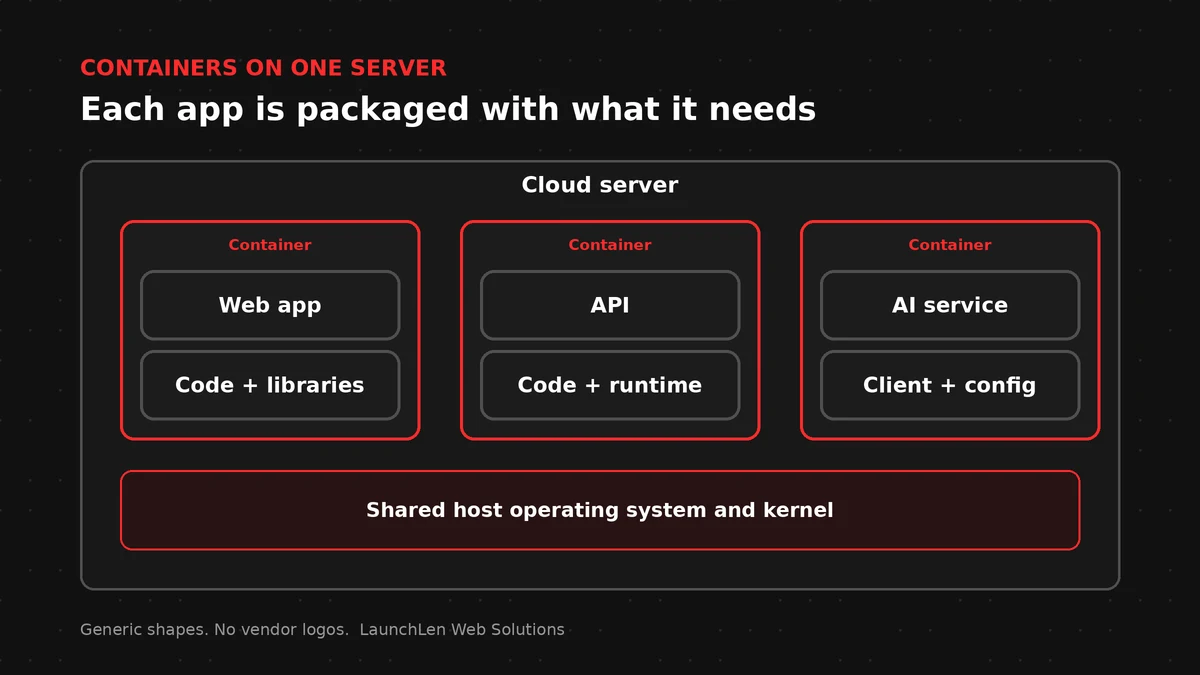
- A container is an isolated process with the files it needs. Containers on the same host share that host’s operating system kernel.
Docker’s docs note that spinning up a whole VM just to isolate one application is a lot of overhead, while containers sharing a kernel let you run more applications on less infrastructure.
It isn’t either-or. Docker notes that you’ll quite often see containers and VMs used together: in a cloud environment, the provisioned machines are typically VMs, and a VM with a container runtime can run several containerised applications.
The trade-off is isolation. Each VM has its own operating system and kernel. Containers are isolated too, but because they share the host’s kernel, how they’re configured matters for security.
What is Docker used for? Consistent deploys, AI services, testing
Consistent deploys. The same image moves from development to testing to production, which reduces surprises when an app goes live. Updates become a matter of building and releasing a new image.
Docker for web applications. A web app can be split into containers for the front end, the back end and the database, each with its own settings. A new developer can start the whole stack on their machine without a long setup process.
AI services. AI features can depend on specific libraries and runtimes. Packaging a service that calls an AI model, or a supporting tool such as a search index, in a container keeps those dependencies contained and repeatable. If you’re exploring agents, our guide to AI agent frameworks explains the code libraries involved.
Testing. Docker’s docs highlight containers for continuous integration and delivery, where code is built and tested automatically in a clean, standard environment every time.
Portability. Containers can run on a laptop, physical or virtual servers, or a cloud platform, which gives you more choice about where an app lives later.
Those are Docker’s core benefits: consistency, repeatability and portability.
When containers add more complexity than value
Docker isn’t the right fit for every project.
- A standard WordPress or hosted site may not need containers at all; managed hosting can handle the server side for you.
- Someone has to maintain it. Images need rebuilding when the software inside them gets security updates, and container settings need reviewing.
- Running many containers can call for an orchestration tool, which manages containerised workloads and services across machines. That can be powerful, and it’s another system to learn and run.
- Security still takes work. Isolation reduces risk but doesn’t remove it. NIST’s guide sets out container-specific security concerns and recommendations for addressing them.
- Licensing. Docker Desktop has licence terms that depend on how and by whom it’s used, so check Docker’s current terms for business use.
Here’s an illustrative example: a small team runs a marketing site on managed WordPress hosting and adds a custom quoting tool. Containerising the quoting tool can make it easier to test and deploy, while the main site stays on managed hosting. For other ways to run apps, see our comparison of serverless vs a VPS.
FAQ
Is Docker the same as a virtual machine?
No. A virtual machine runs a full operating system on virtualised hardware. A Docker container is an isolated process that shares the host’s operating system kernel, which makes it lighter. The two are often used together.
Do I need Docker for my business website?
Not necessarily. A standard content site on managed hosting may not need it. Docker is more useful for custom applications, multi-part systems and teams that want the same environment in development, testing and production.
Is Docker secure?
Containers provide isolation, but security depends on how they’re built and run. Use trusted images, keep them updated, limit permissions and follow established container security guidance.
Let’s work together on your project
Wondering whether containers fit your next app? We’re LaunchLen Web Solutions Inc., based in Kitchener, serving Waterloo Region and businesses across Ontario. Our Cloud Services page explains how we can help with cloud setup and migration. Before any setup work, we can agree the scope, deliverables and reporting with you. Book a free consultation to get started.
DROP US A LINE
Connect with LaunchLen Web Solutions Inc.
Ready to take the first step towards unlocking opportunities, realizing goals, and embracing innovation? We're here and eager to connect.

To More Inquiry
+1 226 899 4813

To Send Mail