What Is a CDN? How Content Delivery Networks Speed Up Your Site


E-commerce

- 7 Nov, 2026
- 17 Views
- 0 Comment
By LaunchLen Web Solutions Team
Opening a Shopify account can be quick. Turning it into a store that looks like your brand, lists products clearly, charges the right taxes and ships correctly takes more care, and the details matter on launch day.
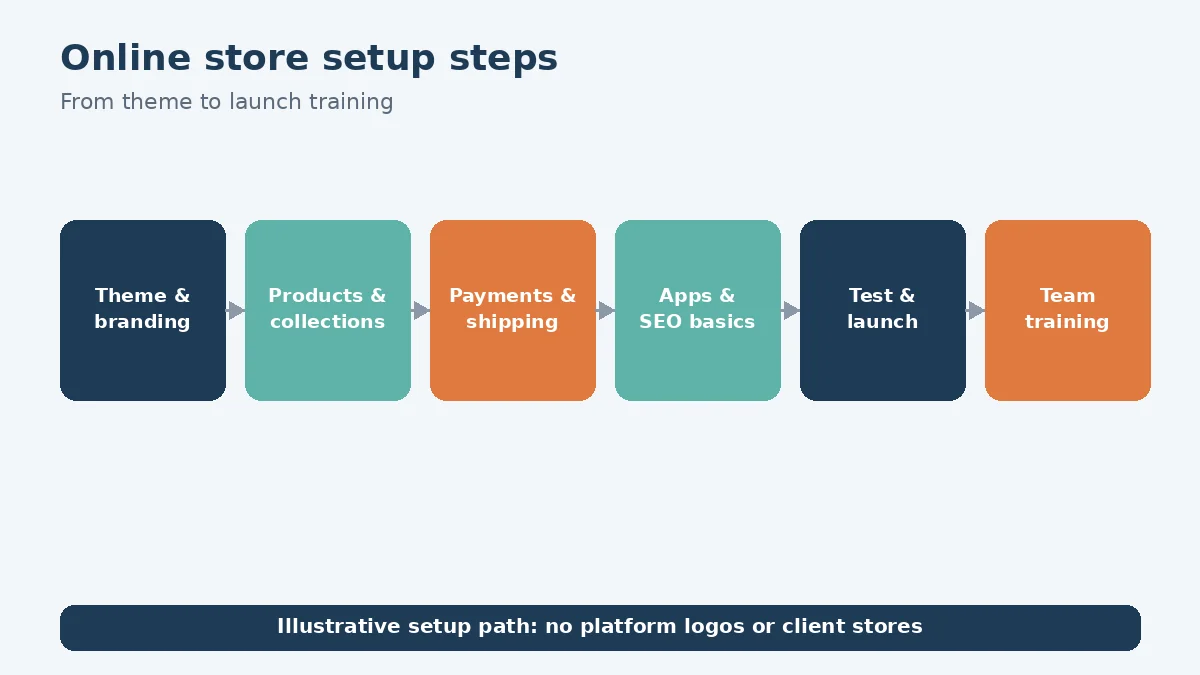
This post walks through how LaunchLen Web Solutions Inc. can handle Shopify store setup with you. We are not an official Shopify partner. The store runs under your business name and account; you bring the domain and catalogue, and we configure the store, load listings and can set up dropshipper connections. Theme and brand, payments, shipping and tax settings, apps, SEO basics, testing and training your team to run the store after launch are part of that work.
Is Shopify the right fit? (recap and link)
Before setup starts, it’s worth confirming the platform. Our WordPress development page describes Shopify as “a hosted platform built around selling, with less to maintain yourself,” while WordPress with WooCommerce “gives you a lot of control and flexibility, especially for content-heavy sites.”
Our post on WordPress or Shopify compares the two in more detail. If you’re still shaping the overall project, our guide to planning your online store covers the wider decisions. This post assumes Shopify is the choice and focuses on setup.
Theme and brand setup
Shopify’s Help Center says what you sell and how your store looks “are two of the most important choices you’ll make for your store” (Shopify Help Center, Getting started). It explains that free themes are developed by Shopify, paid themes come from third-party designers, and paid themes can be tried before buying.
Theme work can include:
- Choosing a theme that suits your catalogue size, product types and how shoppers browse.
- Applying your brand, including colours, fonts, logo and imagery.
- Customizing templates for the home page, collections, product pages and cart.
- Checking accessibility and mobile layout, since many shoppers browse on phones.
Customization can go further where needed, but a lighter touch can make future theme updates easier.
Products, collections and data
Products are the heart of the store. Setup can include:
- Product structure, including variants such as size and colour.
- Collections that match how shoppers look for products.
- Clear titles and descriptions, written in the words customers use.
- Images and alt text for every product.
- Importing existing data from a spreadsheet or another platform, with checks after import.
For larger catalogues, we can help with SEO-heavy product descriptions, titles and alt text from your specs (including AI-assisted drafts). A person should review every item for accuracy before it’s published, especially sizing, materials and safety information.
Our e-commerce solutions page describes this as “product structure and variants, categories, payments, taxes, shipping rules, transactional emails and policies pages, configured carefully so they work on launch day.”
Payments, shipping and tax settings
These settings decide whether orders go through correctly and whether you charge customers the right amounts. Setup can include:
- Payment options available for your store and region.
- Shipping zones and rates that reflect where you ship and how.
- Tax settings for where you sell.
- Transactional emails such as order confirmations and shipping notices.
- Store policies for refunds, shipping and privacy, easy to find.
On taxes, Shopify’s Help Center is clear that it “helps to simplify the procedures for charging sales taxes, but doesn’t remit or file your taxes for you,” and that it’s the merchant’s responsibility to check with Canadian and provincial tax agencies or a tax professional (Shopify Help Center, Canadian taxes). We can configure the settings you and your accountant decide on. This isn’t tax advice.
Apps: keep the list short
Shopify apps can add useful features, but each one is another dependency. Apps can affect page speed, add costs and need their own updates and permissions.
An app review can ask:
- Does the theme or platform already do this? Built-in features can replace some apps.
- What data does it access? Check permissions before installing.
- Is it actively maintained? Look at its update history and support.
- Does it slow the store down? Test pages before and after.
The aim is a short list of apps you understand and need.
SEO basics and launch testing
A new store can start with solid search foundations. SEO basics can include clear page titles and meta descriptions, descriptive URLs, image alt text, sensible collection structure and redirects if you’re moving from an old store. For ongoing work, our SEO services can pick up from there.
Testing before launch can include:
- Test orders from start to finish, including payment, confirmation email and fulfilment.
- Shipping and tax checks for a range of addresses.
- Mobile and desktop checks on key pages.
- Domain setup. Shopify’s Help Center recommends turning on auto-renewal for a domain bought through Shopify “so that your domain registration doesn’t expire by mistake” (Shopify Help Center).
Training your team
A store isn’t finished until your team can run it. Training can cover adding and editing products, processing orders and refunds, updating collections and checking basic reports. Training can be shaped around the people who’ll run the store day to day, such as whoever adds products and whoever packs orders. Handover can include written notes on how your store is set up, which apps it uses and why.
Shopify store setup is project delivery. What support looks like after launch can be agreed with you as part of the project scope. Full technical support and ongoing updates, delivered as SaaS, apply only to our AI chatbots and assistants, not to the store itself.
Here’s an illustrative example (not a real client): a local candle maker moves from selling at markets to selling online. Setup covers scent and size variants, shipping rules for fragile items and a short app list. The owner then adds new seasonal products without help.
FAQ
Do you set up Shopify payments and taxes for us?
We can configure payment, shipping and tax settings in your store based on what you and your accountant decide. Shopify notes that it doesn’t file or remit taxes for you.
Can you move our products from another platform?
It can be possible to import products from a spreadsheet or another platform. Data can be checked after import, and redirects can be set up if you’re moving from an old store.
Who owns the store once it’s set up?
The Shopify store is in your business’s own name and account. You bring the domain and catalogue; we configure the store, load listings and can set up dropshipper connections. We are not an official Shopify partner.
Working with LaunchLen
We’re LaunchLen Web Solutions Inc. Based in Kitchener, serving Waterloo Region and businesses across Ontario.

DROP US A LINE
Connect with LaunchLen Web Solutions Inc.
Ready to take the first step towards unlocking opportunities, realizing goals, and embracing innovation? We're here and eager to connect.

To More Inquiry
+1 226 899 4813

To Send Mail