AWS, Azure or a VPS? How We Help Businesses Choose Their Cloud


Web Design and Development

- 27 Oct, 2026
- 18 Views
- 0 Comment
By the LaunchLen Web Solutions Team · Kitchener, Ontario · Last updated: October 27, 2026
Elementor vs Gutenberg is a question that comes up early when a business plans a WordPress site. Both let you build and edit pages without writing code, but they work in different ways and lead to different trade-offs later.
This guide compares the two on design control, performance, day-to-day editing, plugin reliance and what happens if you switch. There’s no single winner. The right choice depends on your site, your team and how long you plan to keep the build.
What each editor is
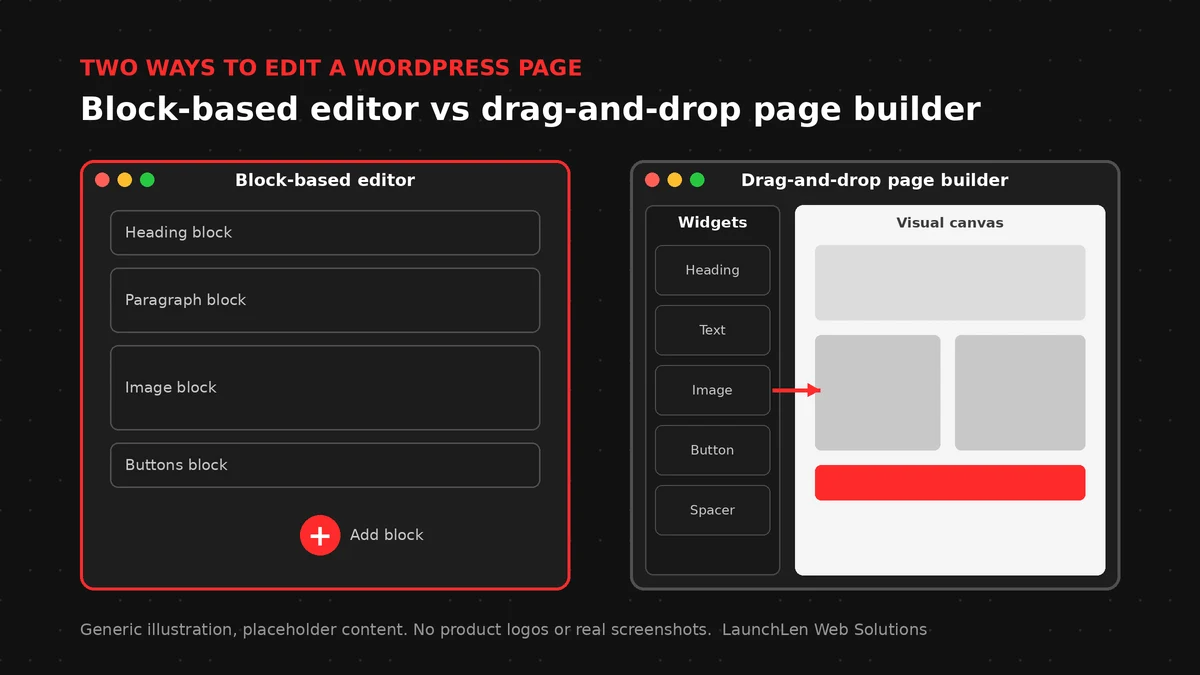
Gutenberg is the WordPress block editor. WordPress’s own documentation says the block editor is also called the WordPress editor or the Gutenberg editor, and that it replaced the classic editor as the default. You build pages from blocks: paragraphs, headings, images, lists, buttons and more. More blocks can be added through plugins.
Elementor is a page builder plugin for WordPress. Instead of a stack of blocks, you work on a visual canvas and drag widgets onto it, with a panel of controls for layout and style. Some features, such as its theme builder and form widgets, come with the Pro version, so check which version a site depends on.
You don’t have to pick one for the whole site. Elementor says the two work together and that you can decide which editor to use as you edit your site.
Design control and layouts
Elementor gives designers detailed visual control. Spacing, columns, backgrounds, entrance animations and responsive settings for each device are all set in the editor panel. That can suit marketing pages where the look matters as much as the words.
The block editor has grown well beyond simple posts. With a block theme, WordPress documentation describes blocks being used for every part of the site, including the header, navigation and footer, edited in the Site Editor. The Styles feature lets you set colours and typography across the site. Classic themes don’t work with the Site Editor, so the theme you choose shapes what the block editor can do.
For reusable sections, both have an answer. In the block editor, a synced pattern updates everywhere it’s used when you edit it. Elementor has saved templates and, in recent versions, reusable components (a Pro feature). Names and options vary by version, so check each product’s current docs.
Performance and page weight
Neither editor makes a site fast or slow on its own. Theme, plugins, images, scripts and hosting all play a part.
That said, the approach matters:
- Page builders can add extra markup, styles and scripts to each page. Elementor lists performance features such as reduced page markup, assets loaded only when needed and element caching. Setting names and defaults change between versions, so check its help docs.
- The block editor saves content as standard HTML with small comment markers that identify each block. A lean block theme can produce light pages, but block plugins add their own styles and scripts too.
The practical answer is to measure your own pages, before and after changes. Our guide to Elementor speed optimization covers fixes for existing builder sites. Responsiveness matters as well as loading speed; see our explainer on Interaction to Next Paint.
Editing experience for your team
Think about who will update the site after launch, not only who builds it.
- Elementor feels like a design tool. People who like to see the finished page while they edit can find it intuitive. The flip side is that a lot of control means a lot of ways to break a layout by accident.
- The block editor feels closer to a writing tool. It’s built into WordPress, so there’s no separate editor to learn for posts. In recent versions, content inserted from a pattern can open in a content-only mode, where editors change text and images without moving the layout.
Whichever you choose, it helps to lock down what editors can change, give them a short how-to and keep a list of the reusable sections they should use.
Lock-in and switching later
This is one of the biggest differences between the two, and it’s worth understanding before you build.
Elementor stores each page’s layout in its own format. Its developer documentation explains that layouts are saved as structured data in a private WordPress custom field, which Elementor reads to build the page. If you later move away from Elementor, those layouts don’t carry over to blocks automatically. In practice, plan for pages to need rebuilding.
The block editor stores blocks in the page content itself, as valid HTML with comment markers. Core blocks are part of WordPress. Blocks that come from a plugin are different: some save only a placeholder and rely on the plugin’s code to display, so removing that plugin can leave gaps.
Switching from Elementor to Gutenberg is possible, but treat it as a rebuild project: inventory your pages, rebuild templates and key pages as patterns, test on a staging copy and keep URLs the same where you can. If you’re considering a bigger change, our guide to headless WordPress explains another option.
Elementor vs Gutenberg: a simple rule of thumb
There’s no universal answer, but these questions can point the way:
- Is the site mostly content, such as service pages, posts and resources, maintained by non-designers? The block editor with a well-built block theme is worth a close look.
- Do you need highly designed landing pages that change often, built by someone comfortable with a visual builder? Elementor can be a good fit.
- Is the site already built in Elementor and working? A full switch may not be worth it. Improving speed and tidying templates can be the better first step.
- How long will the site live? The longer the horizon, the more weight to give lock-in and maintenance.
Here’s an illustrative example: a local service business has a brochure site built in a page builder, and staff mostly update blog posts and service details. Keeping the builder for its designed landing pages while writing posts in the block editor can be a practical middle ground.
Plugin choices matter in both cases. If you plan to add AI features later, our guide to WordPress AI integration explains what to check first.
FAQ
Is Gutenberg the same as the WordPress block editor?
Yes. WordPress’s documentation says the block editor is also called the WordPress editor or the Gutenberg editor. Gutenberg is also the name of the project that develops it.
Can I use Elementor and Gutenberg on the same site?
Yes. Elementor says the two work together and you can decide which editor to use as you edit. Some sites use a page builder for designed pages and the block editor for posts.
What happens to my pages if I switch from Elementor to Gutenberg?
Elementor keeps its layouts in its own data format, so they don’t convert into blocks automatically. Plan to rebuild pages with blocks, test on a staging copy and keep the same URLs where possible.
Let’s work together on your project
Not sure which editor fits your site? We’re LaunchLen Web Solutions Inc.
Based in Kitchener, serving Waterloo Region and businesses across Ontario.
Our WordPress Development page explains how we approach editor-friendly, lean WordPress sites. Before any build or rebuild, we can agree the scope, deliverables and reporting with you. Book a free consultation to get started.
DROP US A LINE
Connect with LaunchLen Web Solutions Inc.
Ready to take the first step towards unlocking opportunities, realizing goals, and embracing innovation? We're here and eager to connect.

To More Inquiry
+1 226 899 4813

To Send Mail