How to Evaluate a RAG System Before It Talks to Customers


Cloud, Hosting and Security

- 26 Oct, 2026
- 16 Views
- 0 Comment
By LaunchLen Web Solutions Team
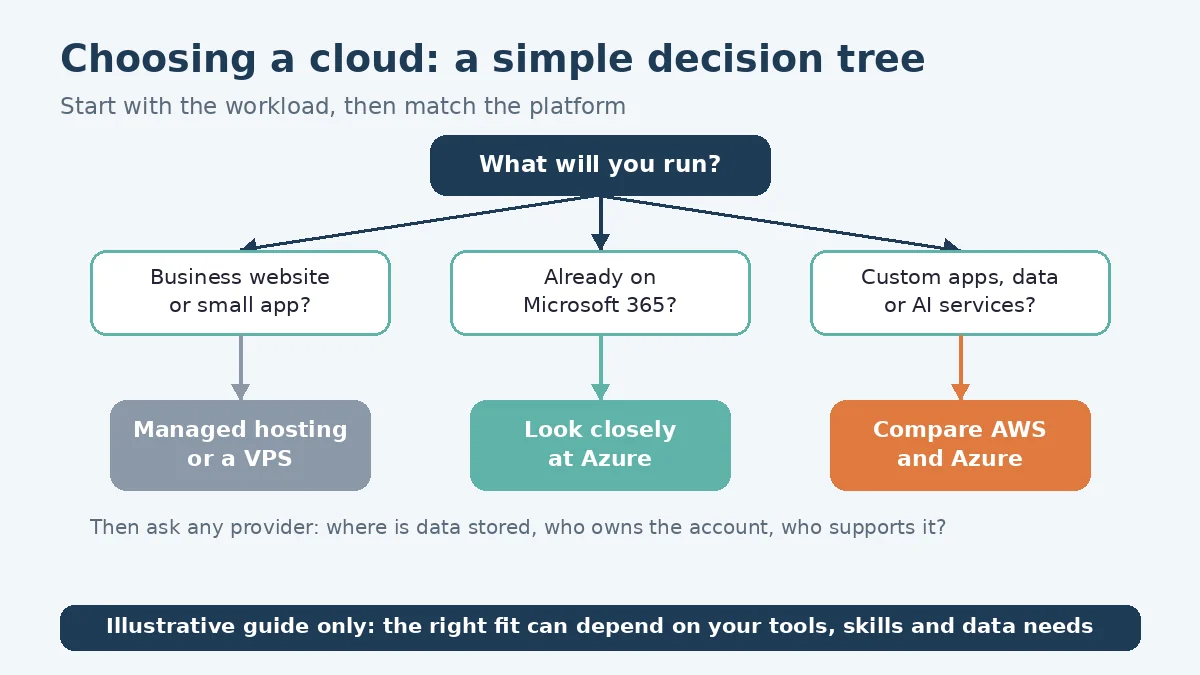
AWS vs Azure for small business is a fair question, but it works better as the second question. The first is what you actually need to run: a marketing website, a customer portal, an internal tool or an AI feature that connects to outside services. The answer can point to a major cloud platform, or to something much simpler.
This post explains how LaunchLen Web Solutions Inc. can help you compare AWS, Azure and a virtual private server (VPS), what we can ask about, and what the comparison can cover. It doesn’t compare prices.
Start with the workload, not the brand
A workload is the thing you need to run: the website, app, database, file storage or automation, plus the people and systems that depend on it. Before anyone names a provider, we can map it with you. Questions can include:
- What does it do, and who uses it? Public visitors, staff, or customers who log in.
- What does it connect to? Email, a CRM, accounting software, a payment provider or an AI service.
- What data does it hold? Especially personal information about customers or staff.
- Who will look after it? Your own team, an existing provider or someone new.
- What happens if it’s unavailable for a while?
Responsibility also shifts with the type of service. AWS describes security and compliance as “a shared responsibility between AWS and the customer,” and says the customer’s share depends on the services they choose. For a virtual server such as Amazon EC2, which AWS classes as infrastructure as a service, the customer manages the guest operating system, “including updates and security patches” (AWS Shared Responsibility Model). Whatever the platform, one of the first questions can be: who patches what?
If a move is already on the cards, our cloud migration checklist explains how we plan one, starting with an inventory of what you run today.
When AWS tends to fit
AWS can be a reasonable fit when:
- You want managed building blocks. AWS notes that for abstracted services such as Amazon S3 and Amazon DynamoDB, it operates the infrastructure layer, the operating system and platforms, while customers manage their data, encryption options and permissions (AWS Shared Responsibility Model). That can mean fewer servers for someone on your side to patch.
- Location and services need to line up. AWS advises selecting a Region that has the services and features you need, and notes you can lower network latency by choosing a Region close to most of your users (AWS Regions).
- Your developers already know it. Familiarity with a platform’s tools can matter as much as its feature list.
More services can also mean more settings to understand and keep secure.
When Azure tends to fit (Microsoft 365 shops)
If your business already runs on Microsoft 365, it can be worth looking closely at Azure. Microsoft says Microsoft 365, Azure and Dynamics CRM Online subscribers are “already using Microsoft Entra ID,” its cloud-based identity and access management service, because “every tenant is automatically a Microsoft Entra tenant” (Microsoft Learn, What is Microsoft Entra?).
In practice, that can mean staff sign-ins and access rules for a new internal tool sit in the identity system your team already uses. Azure can fit when:
- Staff accounts already live in Microsoft 365, and you’d like the same sign-in for internal apps.
- Your existing software or team already works with Microsoft tools.
As with any provider, it’s worth asking how responsibilities are split for each service you plan to use.
When a VPS or managed hosting is enough
Not every small business website needs a large cloud platform, a point our cloud hosting and migration services page makes too. A VPS is a virtual server rented from a hosting provider. With managed hosting, the provider looks after more of the server; what’s included varies by plan, so read the terms.
When shared hosting or a VPS fits, we can provide Hostinger shared or VPS hosting. Disclosure: LaunchLen has a referral relationship with Hostinger for hosting, VPS and self-hosted automation. Our recommendations stay based on your needs.
A VPS or managed hosting can be enough when:
- The site is mostly pages, posts and contact forms.
- There’s one main application and no plan to add many connected services.
- Someone is clearly responsible for updates, backups and security.
That last point is the one to settle early. The Canadian Centre for Cyber Security recommends activating automatic patches and updates where possible, and testing backups regularly to make sure data can be restored (Canadian Centre for Cyber Security, ITSAP.10.035). A simpler setup can be revisited later if your needs change.
Data location questions to ask any provider
Data location deserves its own questions, whichever option you choose. The Canadian Centre for Cyber Security advises small and medium organizations to get to know a service provider before contracting them and to “know where a service provider’s data centres are located,” because “different countries have different privacy laws and data protection requirements” (Canadian Centre for Cyber Security, ITSAP.10.035).
Both major platforms publish their region lists. AWS lists Canada (Central) and Canada West (Calgary), and shows the Calgary Region as one that must be enabled before use (AWS Regions). Microsoft lists Canada Central (Toronto) and Canada East (Quebec) (Microsoft Learn, Azure regions list). VPS providers vary, so ask each one.
A listed region doesn’t mean every copy of your data stays there. Questions can include:
- Which region will each service, backup and log use?
- Is every service you need available in that region?
- Who can access the data, and from where?
- What do the contract and privacy terms say about storage and processing?
Our guide to Canadian data residency for AI and cloud covers these questions and the PIPEDA basics in more depth. It’s general information, not legal advice.
FAQ
Is AWS or Azure better for a small business?
Neither is better for every business. The right fit can depend on the workload, the tools your team already uses, who will look after it and where data needs to be stored. For a simple website, a VPS or managed hosting may be enough.
Which platforms can you work with?
We can work with cloud platforms such as AWS and Azure, as well as VPS hosting. Which option fits, and what our part in the setup would be, can be agreed with you once the workload is clear.
Who owns the cloud account and setup?
How you can use the cloud account and its setup, including with your own team or another provider, can be agreed with you before work starts.
Working with LaunchLen
We’re LaunchLen Web Solutions Inc. Based in Kitchener, serving Waterloo Region and businesses across Ontario.
If you’re weighing AWS, Azure or a simpler host, we can help you compare the options in plain language before you commit to a platform.
DROP US A LINE
Connect with LaunchLen Web Solutions Inc.
Ready to take the first step towards unlocking opportunities, realizing goals, and embracing innovation? We're here and eager to connect.

To More Inquiry
+1 226 899 4813

To Send Mail