Digital Transformation for Small Business: How We Plan It One Process at a Time


AI Chatbots and Assistants

- 16 Nov, 2026
- 3 Views
- 0 Comment
By the LaunchLen Web Solutions Team · Last updated: November 16, 2026
Most businesses have more numbers than time to look at them. Enquiries, bookings, sales and job records sit in different places, and answering a simple question can mean exporting a report, filtering a spreadsheet and hoping nothing was missed.
An AI reporting assistant lets your team ask those questions in plain English. This post explains how we build one, and why the most important feature is that it shows its work.
What an AI reporting assistant does
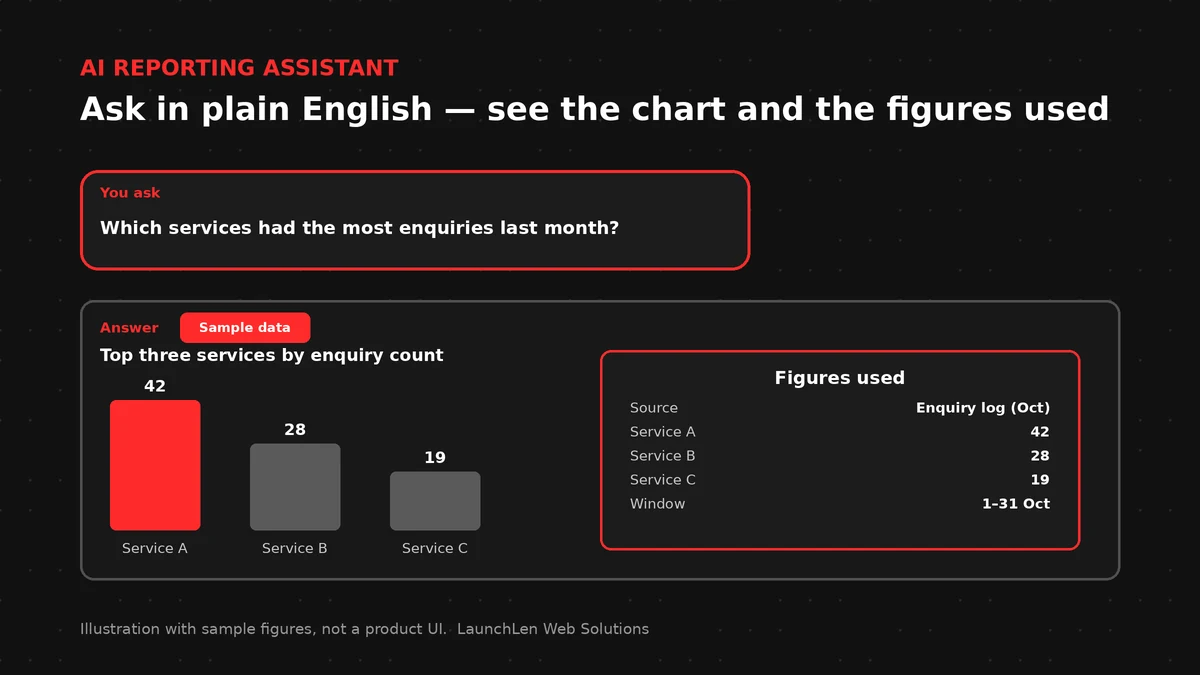
Our AI Solutions page describes a reporting and analytics assistant like this: ask plain-language questions such as “Which services had the most enquiries last month?” and get an answer that can show the figures it used, so they can be checked.
Behind the scenes, the assistant turns your question into a lookup against your business data, runs it and explains the result. Turning everyday questions into database queries is still an active research area. Yale’s Spider text-to-SQL challenge is one well-known research benchmark for it, which is a good reminder that answers need checking.
This post is about numbers and business data. If you want staff to find answers in documents and policies, our post on an AI knowledge assistant for staff covers that.
Start with the questions your team already asks
The right place to start isn’t the data. It’s the questions. Before any build, we work with you to list the questions your team asks every week, such as:
- Which services had the most enquiries this month?
- How many bookings came from the website compared with referrals?
- Which jobs are still open, and for how long?
This list shapes everything else. It tells us which data the assistant needs, which terms need clear definitions and what a useful answer looks like. For example, your team needs to agree on what counts as an “enquiry” before the assistant can count them.
Connecting only the data it needs
An assistant doesn’t need access to everything. It needs the data that answers the questions on your list.
A build can include a curated, read-only view of the figures the assistant uses. In database terms, a view is a saved query that presents selected data as if it were a table, and the PostgreSQL documentation on views explains the idea. This keeps the assistant focused, and it means the definitions your team agreed on are built into the data it sees.
Where your data lives in several tools, a build can include connecting them first. Our post on system integration explains how separate tools can share information. If your figures are still in a shared spreadsheet, our guide to moving from a spreadsheet to a web app covers that step.
Showing its work: figures, filters and sources you can check
An answer you can’t check isn’t much use for business decisions. So the assistant is built to show its work alongside each answer:
- The figures used. The numbers behind the answer, not just the conclusion.
- The filters applied. Which dates, services or categories were included.
- The source. Which data or report the figures came from.
This fits published guidance on responsible AI. The NIST AI Risk Management Framework is a voluntary framework meant to help organizations build trustworthiness into how AI is designed, used and evaluated. The Government of Canada’s guide on the use of generative AI advises reviewing generated content for accuracy before relying on it.
Behind the scenes, the assistant can use a technique called function calling to run defined lookups rather than guessing at numbers.
When the assistant should say “I’m not sure”
A good assistant knows its limits. If a question is unclear, falls outside the data it can see or would need a definition your team hasn’t agreed on, it should say so rather than invent an answer.
A build can include:
- Asking a follow-up question when a request is ambiguous.
- Saying plainly when the data needed isn’t available.
- Pointing to a person who can help with questions outside its scope.
Our post on how to reduce AI hallucinations explains more of the methods that help AI stay grounded in real information.
Piloting with one report
Starting with one report your team already relies on makes it easy to judge the assistant. Your team asks the questions they would normally answer from that report and compares the results.
Where the answers match and the figures are clear, you can add more questions and data. Where they don’t, the definitions or data view get adjusted before the next round.
FAQ
Can it answer from our spreadsheets and our existing system?
It depends on the source. We check what your spreadsheets and systems can connect to during discovery, before a build is agreed.
How do we know an answer is right?
The assistant shows the figures and filters it used, so your team can check the answer against the source.
What happens when it doesn’t know?
It should say so, ask a follow-up question or point to a person, rather than guess.
Working with LaunchLen
We’re LaunchLen Web Solutions Inc. Our AI Solutions page covers the reporting and analytics assistant alongside our other AI work.
A build can include defining your key questions, connecting the data the assistant needs and setting up answers that show their figures. AI assistants we build include full technical support and ongoing SaaS updates.
Your team sets up the data connections the build needs, with our guidance. New clients do not provide credentials or system access. Any access needed for an existing codebase, micro-SaaS or server is agreed within the project scope before work starts.
Serving local businesses across Canada and the US, delivered remotely.
DROP US A LINE
Connect with LaunchLen Web Solutions Inc.
Ready to take the first step towards unlocking opportunities, realizing goals, and embracing innovation? We're here and eager to connect.

To More Inquiry
+1 226 899 4813

To Send Mail