Ecommerce Integration: How We Connect Your Store to Your Back-Office Tools


Web Design and Development

- 22 Nov, 2026
- 2 Views
- 0 Comment
By the LaunchLen Web Solutions Team · Last updated: November 22, 2026
If you’ve ever saved a file as “final”, then “final-v2”, then “final-really-final”, you’ve done a rough kind of version control. It works until two people edit the same file, or until nobody remembers which copy is the real one.
Software teams solve that problem with proper version control tools, and Git is one example. This guide explains what version control is, how Git works and why it matters to you as the owner of a website or app, even if you never write code yourself.
What is version control, in plain English?
The free Pro Git book, published on the official Git website, defines version control as “a system that records changes to a file or set of files over time so that you can recall specific versions later” (About Version Control).
The same chapter lists what that makes possible: going back to an earlier version of a file or a whole project, comparing changes over time and seeing who changed something that might be causing a problem.
For a business, that means every change to your website or app’s code has a record. Earlier versions can be recovered, and mistakes can be traced and undone.
How Git works: snapshots, commits and history
Git is a distributed version control system. Pro Git’s chapter on what Git is explains that Git “thinks of its data more like a series of snapshots of a miniature filesystem.”
A few terms come up often:
- Repository. The project folder plus its full history of changes.
- Commit. A saved snapshot of the project, with a short note explaining what changed and why.
- History. The chain of commits, showing how the project got to where it is.
Because Git is distributed, each developer’s copy holds the full history, not just the latest files. Pro Git notes that in this kind of system, clients “fully mirror the repository, including its full history.”
Branches and pull requests: working safely in parallel
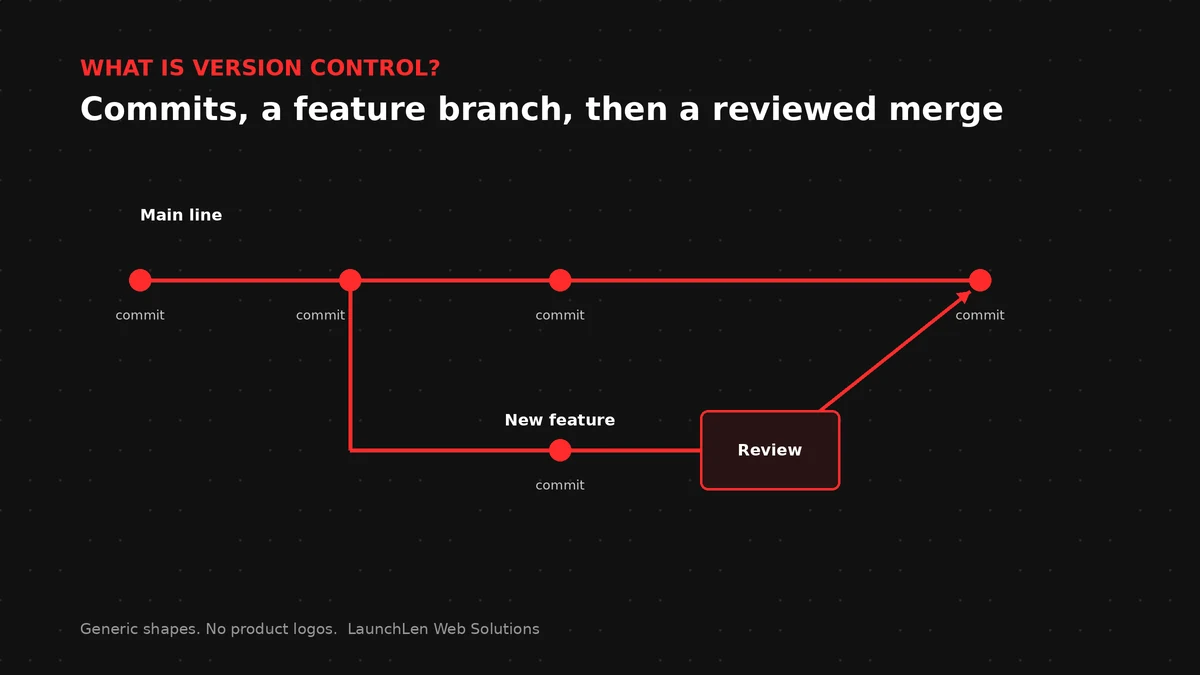
Branches let developers work on a change without touching the main version of the code. A new feature can be built on its own branch, tested and only then merged back in.
On code hosting platforms, that merge step can happen through a pull request. GitHub’s documentation on pull requests describes them as “proposals to merge code changes into a project”, letting teams discuss and review changes before merging them.
For you, this means changes can be reviewed before they reach your live site, and each one is linked to a clear explanation.
Why version control matters for your website or app
Even if you never open Git yourself, it affects your project:
- Changes are traceable. If something breaks, the history shows what changed and when.
- Mistakes can be reversed. A problem change can be undone without rebuilding from scratch.
- Several people can work at once. Branches keep one person’s work from overwriting another’s.
- Handover is easier. A new developer can read the history and the notes on each commit to understand how the code got here.
Version control also works with other tools. Our post on what Docker is used for explains how apps can be packaged so they run the same way everywhere.
What good version control habits look like
You don’t need to read code to tell whether a project’s history is in good shape. A few signs help:
- Clear notes. Each commit has a short, plain explanation of what changed and why.
- Small, focused changes. Work is saved in steps rather than one giant update at the end.
- Reviewed merges. New work happens on branches and is reviewed before it joins the main version.
- Labelled releases. It’s clear which version of the code is running on your live site.
If a developer can’t tell you where your code is kept or how changes are tracked, that’s worth asking about before the project goes further.
Who should own the repository?
It’s an easy question to overlook. Your code repository is part of what you’re paying for, so it should live in, or be handed over to, an account your business controls.
Before a project starts, it’s worth agreeing in writing:
- Where the repository will be held, and who controls that account.
- Who owns the code and its licence, including any third-party components.
- What’s handed over at the end, such as documentation and notes for the next developer.
Clear ownership helps you avoid being locked into one developer. It matters most when you inherit an older codebase, which our post on modernizing a legacy system covers.
FAQ
Do WordPress sites use version control?
They can. Custom themes and plugins are code, and they benefit from version control like any other software. Our post on building a custom WordPress theme covers that kind of project.
Is Git the same as GitHub?
No. Git is the version control tool itself. GitHub is one of several services that host Git repositories and add features such as pull requests.
Do I need to learn Git?
No. It’s enough to know that your code is in version control, where the repository lives and that your business controls access to it. Your developer can walk you through the history whenever you ask.
Let’s work together on your project
Commissioning software and want a clear handover? We’re LaunchLen Web Solutions Inc.
Our Software Development page explains how we write software that someone else can understand, with clear structure, documentation and handover notes, so you’re never locked into a single developer. Ownership and licensing should be agreed in writing before work starts.
Serving local businesses across Canada and the US, delivered remotely.
Book a free consultation to get started.
DROP US A LINE
Connect with LaunchLen Web Solutions Inc.
Ready to take the first step towards unlocking opportunities, realizing goals, and embracing innovation? We're here and eager to connect.

To More Inquiry
+1 226 899 4813

To Send Mail