Custom Approval Workflows: How We Replace Approvals Stuck in Email


Web Design and Development

- 20 Nov, 2026
- 10 Views
- 0 Comment
By the LaunchLen Web Solutions Team · Last updated: November 20, 2026
Every web app keeps its information somewhere: customers, orders, bookings, job notes. Where and how that information is stored shapes what the app can do easily, and what becomes awkward later.
The choice usually comes down to two families of database, SQL and NoSQL. This guide explains the difference in plain English, where each one fits and the questions that help you choose.
What’s the difference between SQL and NoSQL?
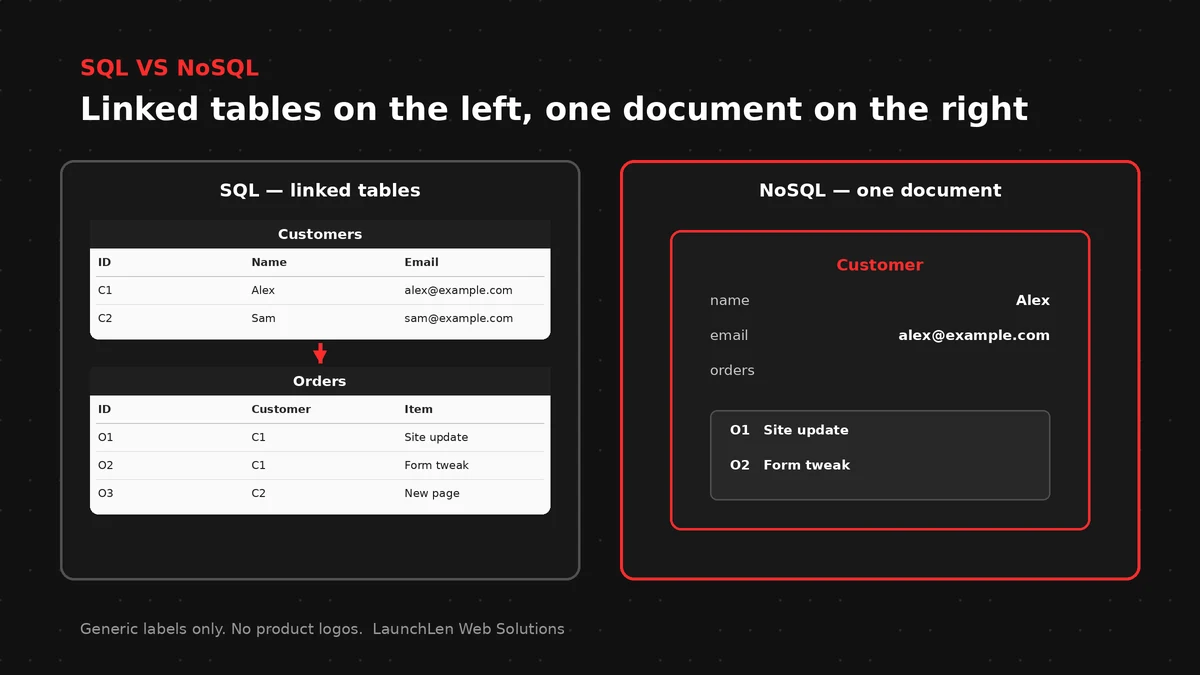
SQL databases, also called relational databases, store information in tables made of rows and columns, a bit like a set of linked spreadsheets. NoSQL databases cover several other ways of storing information, such as documents, simple key-value pairs or graphs.
Microsoft’s architecture guide to data store models sums up the trade-off. Relational systems “organize data into normalized tables by using schema-on-write”, while NoSQL databases “optimize for flexible schemas, horizontal scale, and specific access or aggregation patterns.”
Neither is better in general. Each suits different kinds of information and different ways of using it.
How SQL (relational) databases work
In a relational database, each kind of thing gets its own table. Customers go in one table, orders in another, and each order points to the customer it belongs to.
The structure, or schema, is set up in advance. Every row in the orders table has the same columns, and the database checks new data against those rules before saving it.
Relational databases also support transactions. The PostgreSQL documentation on transactions explains that a transaction “bundles multiple steps into a single, all-or-nothing operation.” That matters for things like taking a booking and updating availability at the same time.
The name SQL comes from the language used to ask these databases questions, which lets you combine tables to answer things like “which customers ordered this month?”
How NoSQL databases work
NoSQL is a broad label, and the Microsoft guide describes several types:
- Document databases. Store semi-structured documents, “often in JSON format”, where each document has named fields. A customer and their recent orders can sit together in one document.
- Key-value stores. Link each value to a unique key, with simple operations to read, add and remove values.
- Graph databases. Store items and the relationships between them, useful for exploring connections.
MongoDB is one example of a document database. Its documentation on databases and collections explains that it “stores data records as documents” grouped into collections.
The Microsoft guide notes that per-document schema flexibility “enables gradual evolution”, meaning the shape of the data can change over time without redesigning every table. The trade-off is that the app itself has to do more of the work of keeping the data consistent.
That flexibility helps when you’re still learning what you need to store. It can also hide mistakes, because the database may not stop two records from storing the same detail in different ways.
SQL vs NoSQL for a business web app
For a business web app, the questions that matter are about your information, not about trends:
- Is your data structured and connected? Customers, orders, invoices and jobs that link to each other fit naturally into relational tables.
- Do several updates need to succeed or fail together? Transactions are a core strength of relational databases.
- Does each record vary a lot in shape? Product catalogues with very different attributes, or content with flexible fields, can suit a document model.
- How will you report on it? Combining and summing up data across tables is a strength of SQL.
Many apps use more than one type. The Microsoft guide says a single data store “rarely satisfies all access patterns efficiently.” An app might keep orders in a relational database and use a vector database for AI search, for example.
If your team’s data still lives in a shared spreadsheet, our guide to moving from a spreadsheet to a web app explains how that data can be cleaned and mapped into a proper database.
Questions to ask before you choose
Before a build starts, it’s worth asking whoever is designing the app:
- Why this database for our data? The answer should point to how your information is shaped and used.
- How will reporting work? Make sure the questions you’ll ask later are easy to answer.
- What happens as the app grows? Ask how new fields and features will be added.
- Can we export our data? Your business should be able to get its information out in a usable form.
The back end that talks to the database matters too. Our post on what Node.js is used for explains one common option.
FAQ
Is NoSQL faster than SQL?
It depends on the workload. Each type is designed for different access patterns, so the right choice comes from how your app reads and writes data, not from a general speed ranking.
Can we switch databases later?
It’s possible, but it means moving and reshaping data and changing the app’s code. Choosing carefully at the start saves that work. It also helps to keep the app’s data access in one place in the code, so a later change touches fewer parts of it.
Do small business apps need NoSQL?
Not necessarily. An app built around structured, connected records can fit a relational database well. NoSQL earns its place when the data or the way it’s used calls for it.
Let’s work together on your project
Planning a web app and wondering how its data should be stored? We’re LaunchLen Web Solutions Inc.
Our Web App Development page covers customer portals, booking and quoting tools, internal dashboards and other browser-based apps. Custom web applications can be built with React and Node.js, with the database chosen to fit your project.
Serving local businesses across Canada and the US, delivered remotely.
Book a free consultation to get started.

DROP US A LINE
Connect with LaunchLen Web Solutions Inc.
Ready to take the first step towards unlocking opportunities, realizing goals, and embracing innovation? We're here and eager to connect.

To More Inquiry
+1 226 899 4813

To Send Mail