What Is a Staging Site? How to Test Website Changes Before They Go Live


Web Design and Development

- 19 Nov, 2026
- 6 Views
- 0 Comment
By the LaunchLen Web Solutions Team · Last updated: November 19, 2026
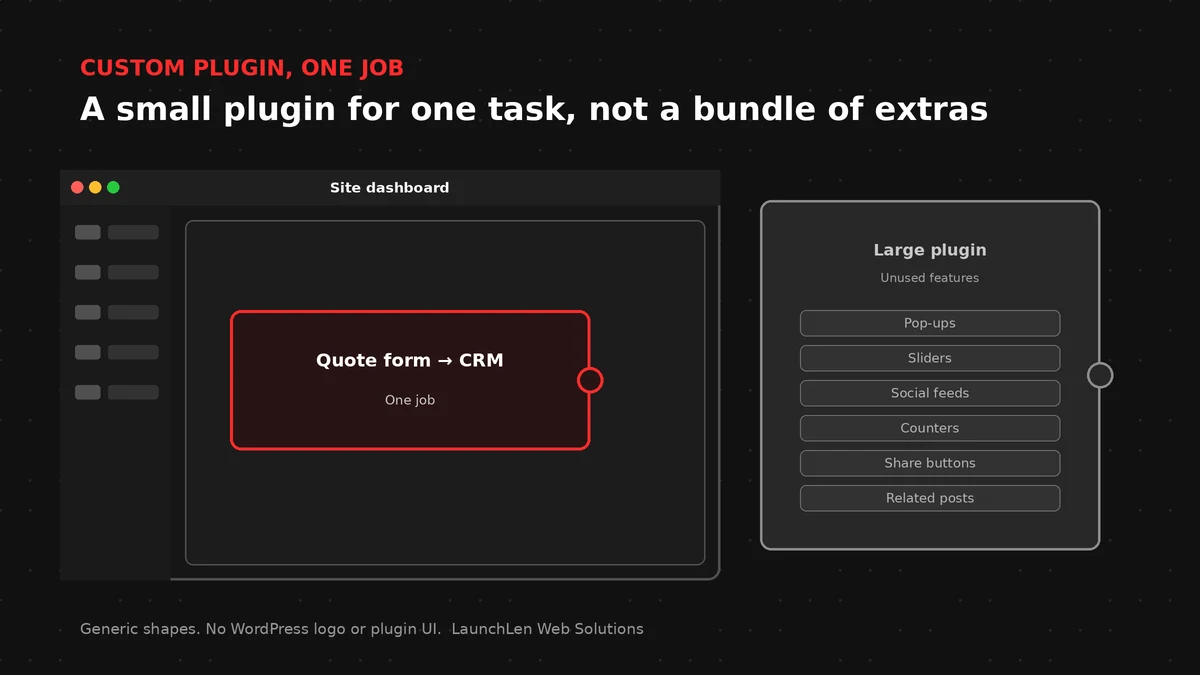
There’s a WordPress plugin for almost everything, which is part of the problem. A site can end up running a large plugin for one small feature, or stitching several together because none of them quite does what the business needs.
Custom WordPress plugin development is the other option: a small piece of software built for your site and your process. This post explains when a custom plugin makes sense, how we scope and build one, and what to agree before work starts.
What a custom WordPress plugin is
WordPress’s own Plugin Handbook puts it simply: “Plugins are packages of code that extend the core functionality of WordPress.”
A custom WordPress plugin is one written for a specific site rather than for sale to thousands of sites. Because it only has to do your job, it can stay small and focused.
Our WordPress Development page describes the kind of work this covers: when an off-the-shelf plugin doesn’t quite fit, or would bring a lot of features you don’t need, we build focused functionality, such as connecting forms to your CRM, syncing data with another system, or adding a custom booking or quoting flow.
Custom plugin vs off-the-shelf plugin: how to decide
An off-the-shelf plugin is the right choice when it does what you need, is actively updated and doesn’t slow your site down. There’s no reason to build what you can sensibly install.
A custom plugin is worth considering when:
- No existing plugin fits your process without awkward workarounds.
- The plugin you’d need is far bigger than the job, bringing many features you’ll never use.
- Several plugins are doing one job together, and each one adds updates to keep track of.
- The feature connects to another system in a way existing plugins don’t support.
Every plugin is a dependency, so fewer, better-chosen plugins mean fewer updates to worry about. Sometimes the answer is one custom plugin that replaces two or three general ones.
Scoping custom WordPress plugin development around one clear job
Good custom plugins start with a short, plain description of the job. For example, an illustrative scope might read: “When a visitor submits the quote form, send the details to our CRM and show a thank-you message.”
From there, we agree with you:
- What triggers it. A form submission, a new order, a scheduled task or a button in the dashboard.
- What it changes. Which data it reads, creates or sends elsewhere.
- Who uses it. Visitors, your staff or both, and what each of them sees.
- What happens when something goes wrong. For example, what your team sees if another system doesn’t respond.
A tight scope keeps the plugin small, which makes it easier to test and to update later.
We also agree what the plugin won’t do. Leaving extras out of the first version, such as reports or settings nobody has asked for, keeps the code easier to understand for whoever works on it next.
How we build it: hooks, prefixes and WordPress standards
WordPress is designed to be extended without editing its core files. The Plugin Handbook explains that hooks “are a way for one piece of code to interact/modify another piece of code at specific, pre-defined spots”, and that they make up the foundation for how plugins and themes interact with WordPress.
Building on hooks means your plugin works alongside WordPress rather than changing it, so core updates don’t overwrite your feature.
We build with the handbook’s guidance on plugin basics in mind. One example is giving the plugin’s code a unique prefix, which the handbook says prevents conflicts with other plugins.
If your site also needs a new design, plugin and theme work can be planned together. Our post on building a custom WordPress theme covers the theme side.
Testing, handover and keeping it up to date
Before the plugin goes live, it’s tested against the scope: each trigger, each result and each error case. Testing can happen on a copy of your site, not on the live site your customers use. Your team can also try it with real examples, such as a sample quote request, before it goes live.
At handover, you get documentation explaining what the plugin does, where its settings live and how it was built, so your team or another developer can pick it up later. Ownership and licensing of the code should be agreed in writing before work starts.
Like any software, a custom plugin needs checking when WordPress or connected systems change. Post-launch support can be agreed per project.
FAQ
Is a custom plugin better than a theme’s functions file?
For features that should survive a theme change, yes. Code in a plugin stays in place if you change your theme, while code added to a theme can disappear when the theme is replaced.
Can a custom plugin add AI features?
It can. Sometimes a small custom integration with an AI service is lighter than a do-everything plugin. Our post on WordPress and AI integrations explains what to check first.
Will a custom plugin connect to our other systems?
That depends on what those systems support. Our post on connecting your business systems explains how we check before a build is agreed.
Working with LaunchLen
We’re LaunchLen Web Solutions Inc. Our WordPress Development page covers custom plugins and integrations alongside new WordPress builds, redesigns and improvements to existing sites.
This is project work. A build can include scoping the plugin, building it on WordPress hooks, testing it on a copy of your site and handing over documentation. The scope is agreed with you before work starts, and post-launch support can be agreed per project.
Serving local businesses across Canada and the US, delivered remotely.
DROP US A LINE
Connect with LaunchLen Web Solutions Inc.
Ready to take the first step towards unlocking opportunities, realizing goals, and embracing innovation? We're here and eager to connect.

To More Inquiry
+1 226 899 4813

To Send Mail