Custom WordPress Plugin Development: How We Build Focused Plugins


Web Design and Development

- 19 Nov, 2026
- 11 Views
- 0 Comment
By the LaunchLen Web Solutions Team · Last updated: November 19, 2026
When someone opens a page, the moment that matters is when the main thing they came for appears: the hero image, the headline or the product photo. Until then, the page feels slow, however quickly the rest of it loads.
Largest Contentful Paint, or LCP, measures that moment. This guide explains what LCP is, what a good score looks like, what slows it down and how to improve LCP on a business website.
What is Largest Contentful Paint (LCP)?
Largest Contentful Paint is one of Google’s Core Web Vitals. web.dev’s guide to Largest Contentful Paint says it “reports the render time of the largest image, text block, or video visible in the viewport, relative to when the user first navigated to the page.”
In plain terms, LCP is the time from clicking a link to seeing the biggest piece of content on the screen. On a business homepage, that might be a large banner image or the main headline block.
The same guide lists the kinds of elements that count, including images, video poster images, background images loaded from a file and blocks of text.
LCP and Core Web Vitals: what counts as a good score
web.dev says that to provide a good user experience, sites should strive for an LCP of 2.5 seconds or less. It recommends measuring at the 75th percentile of page loads, segmented across mobile and desktop.
That last part matters. A page can load quickly on your office computer and still be slow for visitors on phones with weaker connections.
Google’s Search Console has a Core Web Vitals report that groups your pages by status (Poor, Need improvement, Good) for LCP and the other two metrics, based on real-world usage data. LCP sits alongside Interaction to Next Paint, which measures responsiveness, and Cumulative Layout Shift, which measures visual stability.
The four parts of LCP
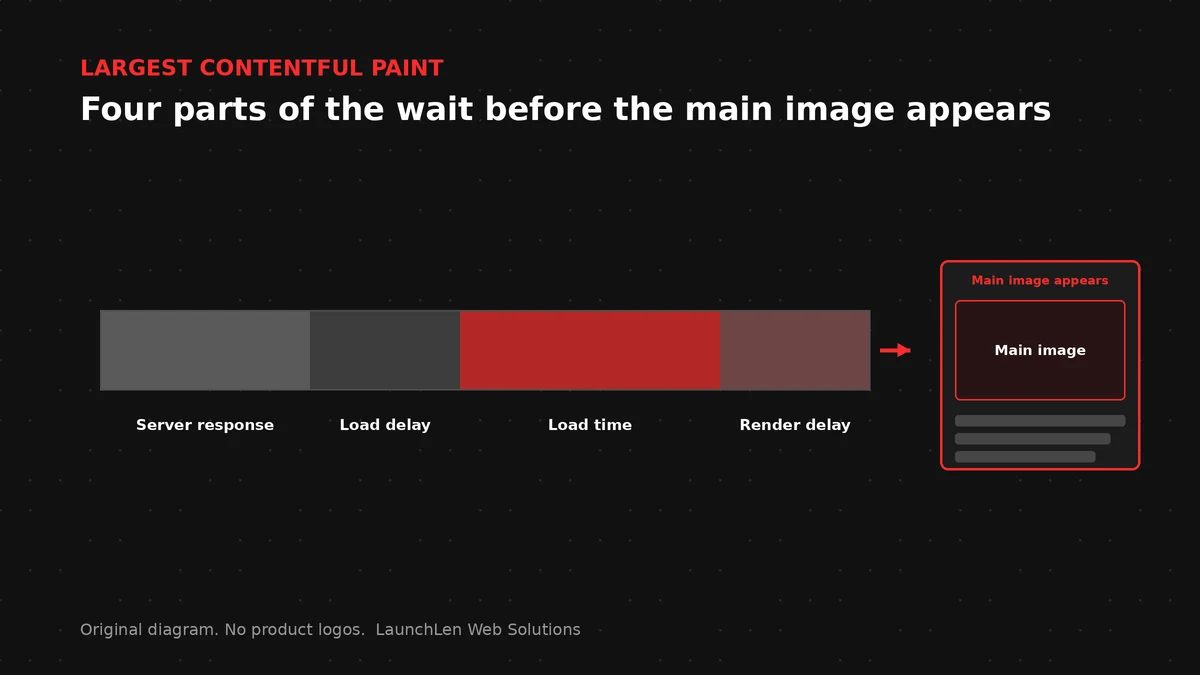
web.dev’s guide to optimizing LCP breaks the LCP time into four parts, with no gaps or overlaps between them:
- Time to First Byte. How long the server takes to start sending the page.
- Resource load delay. The gap before the browser starts loading the main image or file.
- Resource load duration. How long that image or file takes to download.
- Element render delay. The time between the file finishing and the element appearing on screen.
This breakdown is useful because each part has different causes. A slow server and an oversized image both hurt LCP, but they need different fixes.
How to improve LCP
Once you know which part is slow, the fixes become clearer. Common ways to improve LCP include:
- Speed up the server response. A slow first byte delays every part that comes after it, so server and hosting setup matter.
- Shorten the distance. web.dev suggests a content delivery network to get files closer to visitors, which can cut the time a large image takes to arrive.
- Let the browser find the main image early. web.dev advises making the LCP resource discoverable in the initial HTML, rather than loading it later through scripts.
- Don’t lazy-load the main image. Lazy loading is useful further down the page, but web.dev warns: “Never lazy-load your LCP image”.
- Reduce the size of the main image. Compressing it or using a more efficient format reduces the bytes to download, and a hero image doesn’t need to be larger than the space it fills.
- Reduce render-blocking code. Heavy stylesheets, scripts and fonts can hold the main content back even after it has downloaded.
web.dev also points out a catch: fixing one part can simply shift the waiting time to another part. That’s why it helps to measure all four parts before and after each change, rather than fixing images and hoping it works.
If your site is built with a page builder, our Elementor speed guide covers builder-specific causes.
Measuring LCP: field data vs lab tests
There are two ways to measure LCP, and they answer different questions.
- Field data comes from real visitors. It shows how your pages actually perform, which is what Search Console’s report uses.
- Lab tests load a page in a controlled setting. They’re good for testing a fix before and after you make it.
web.dev notes that delays such as redirects and connection setup can make field and lab measurements differ. If the two disagree, trust field data for the real picture and use lab tests to diagnose the cause.
FAQ
Does LCP affect Google rankings?
Google’s page on Core Web Vitals and search results says good Core Web Vitals, along with other page experience aspects, align with what its core ranking systems seek to reward. It’s one factor among many, so helpful content still matters, but a faster page is better for visitors either way.
Why is my LCP slow on mobile but fine on desktop?
Visitors on phones may have slower devices or weaker connections, and a large image sized for desktop can take longer to arrive. That’s why web.dev recommends checking mobile and desktop separately.
What’s the quickest way to check our LCP?
Google’s PageSpeed Insights shows both field data, where enough exists, and a lab test for a single page. Search Console’s Core Web Vitals report shows the picture across your site.
Let’s work together on your project
Is your site slower than it should be? We’re LaunchLen Web Solutions Inc.
Our WordPress Development page explains how we look at what’s actually slowing your site down, such as oversized images, heavy plugins, render-blocking scripts or hosting limits, and fix the causes, using Core Web Vitals as a yardstick for real-world experience.
Serving local businesses across Canada and the US, delivered remotely.
Book a free consultation to get started.
DROP US A LINE
Connect with LaunchLen Web Solutions Inc.
Ready to take the first step towards unlocking opportunities, realizing goals, and embracing innovation? We're here and eager to connect.

To More Inquiry
+1 226 899 4813

To Send Mail