Web App or Native App? How We Help Businesses Decide


AI Chatbots and Assistants

- 6 Nov, 2026
- 14 Views
- 0 Comment
By LaunchLen Web Solutions Team
A chatbot that answers routine questions well can save your team real effort. A chatbot that keeps answering when it shouldn’t can do real damage: a wrong refund policy, a confident guess about a medical or legal question, or a frustrated customer stuck in a loop.
Chatbot human handoff is the part of the design that decides when the bot steps aside and how a person picks up. This post explains how LaunchLen Web Solutions Inc. can design that handoff, from the rules that trigger it to reviewing handoffs so answers keep getting better.
Why handoff matters more than clever answers
Even a well-built chatbot can be wrong. The OWASP Top 10 for LLM Applications describes misinformation as a core vulnerability, occurring “when LLMs produce false or misleading information that appears credible.” It gives the example of Air Canada’s chatbot providing misinformation to travellers, noting “the airline was successfully sued as a result” (OWASP, LLM09:2025 Misinformation).
Retrieval-augmented generation (RAG) helps. OWASP says it can “enhance the reliability of model outputs” and help “mitigate the risk of hallucinations and misinformation.” But it also recommends human oversight and fact-checking, “especially for critical or sensitive information” (OWASP).
Canada’s privacy commissioners make a related point. The Office of the Privacy Commissioner of Canada’s generative AI principles say organizations using these tools should “know that accountability for decisions rests with the organization, and not with any kind of automated system” (OPC, Principles for responsible, trustworthy and privacy-protective generative AI technologies). A good handoff is how a chatbot respects that.
When the chatbot should hand off
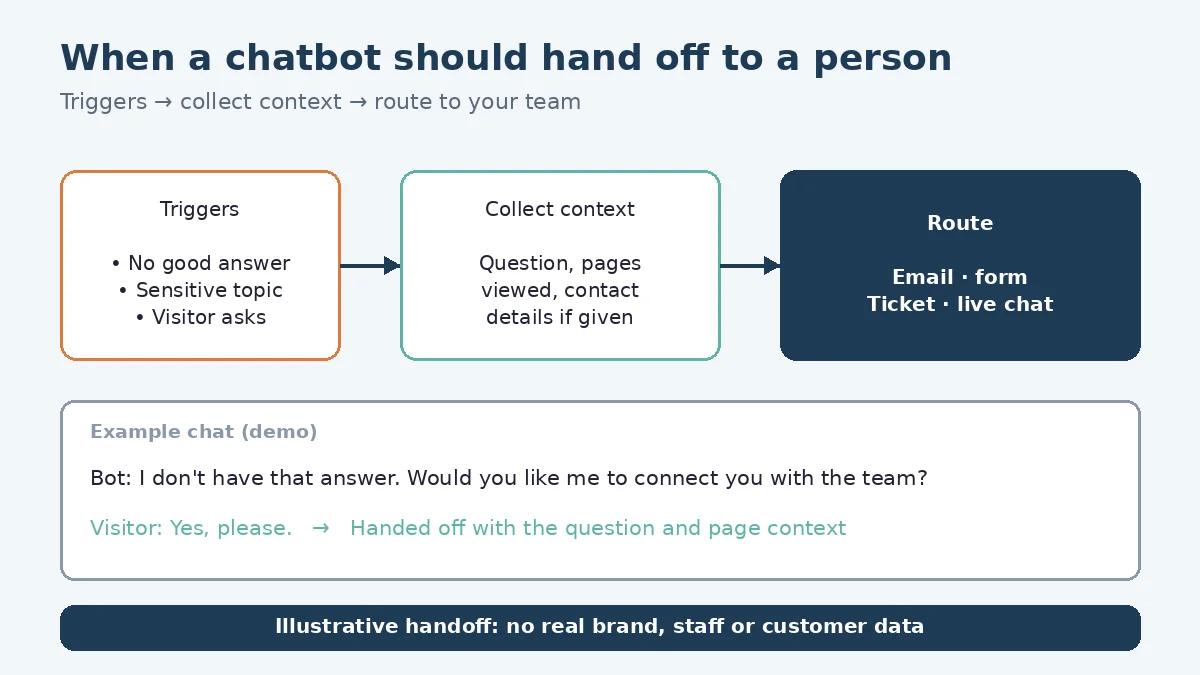
A build can include a handoff to a real person. Handoff rules can be agreed with you before anything is built. Triggers can include:
- No good answer in your content. If the chatbot can’t find a relevant passage, it can say so instead of guessing. Our AI solutions page describes a build that “can be set up to say so and pass the conversation to your team.”
- Low-confidence answers. Where the retrieved content is a weak match, the chatbot can offer a person rather than an answer.
- Sensitive topics. Complaints, billing disputes, health, legal or safety questions, and anything involving personal circumstances can go straight to your team.
- The customer asks. “Can I talk to someone?” should get a clear yes and a way forward.
- Repeated attempts. If a customer rephrases the same question without getting what they need, that’s a signal to step aside.
What the chatbot answers from shapes all of this. Sources can include your website, knowledge base, PDFs, policies, in-scope databases, shared drives and help desk. Documents and details are uploaded through our secure portal as the standard path, and the chatbot picks up from what you choose to upload. You control what you upload.
Collecting the right details first
A handoff that makes the customer start over isn’t much of a handoff. Before passing a conversation on, the chatbot can collect:
- Contact details, such as name and email, with a clear note on why they’re being asked for.
- The question in the customer’s words.
- Relevant context, such as an order number or the service they’re asking about.
- The conversation so far, so your team can see what the chatbot already said.
Collect only what’s needed. OPC’s principles say organizations should limit collection, use and disclosure of personal information to what’s needed for the identified purpose, and that people interacting with a public-facing tool should know “they are interacting with a generative AI tool” (OPC).
Routing: website widget and specialist tickets
Once details are collected, the handoff needs somewhere to go. The main path is the website widget in the bottom-right corner of the page (like on our site). If the chatbot can’t resolve something, it can create a ticket that a specialist escalates and handles. Phone, email and live-chat handoff aren’t offered.
Routing can also follow the topic. Billing questions can go to one specialist queue, booking questions to another and anything urgent to whoever you choose. Our post on how we build an AI chatbot on your own content covers where handoff fits in the wider build.
Outside business hours: setting expectations honestly
A chatbot can keep answering routine questions outside business hours, but your team can’t. The design can make that clear rather than implying a person is standing by.
Outside business hours, the chatbot can:
- Say plainly that the team is away and when your business hours are.
- Collect details so someone can follow up when the team is back.
- Point to urgent options, such as an emergency contact or service, if your business has one.
What it shouldn’t do is promise an instant reply it can’t deliver.
Reviewing handoffs to improve answers
Every handoff is a clue. Reviewing them can show which questions your content doesn’t answer, where answers were unclear and which topics need a different rule.
A review can lead to:
- Content updates, such as adding a missing policy page or clarifying an FAQ.
- Rule changes, such as sending a topic straight to a person.
- Test questions. Real handoff questions can become part of the test set. Our post on RAG evaluation explains how that testing can work.
After launch, we provide full technical support and ongoing updates, and we keep improving speed, accuracy and guardrails and reducing hallucinations.
Here’s an illustrative example (not a real client): a property management company’s chatbot answers routine questions about rent payment options. Questions about repairs collect the unit details and create a ticket for the maintenance specialist. Reviewing handoffs shows tenants asking about parking, so a parking policy page is added to the sources.
FAQ
Will the chatbot pretend to be a person?
It shouldn’t. A build can make clear that customers are talking to an AI assistant, and offer a person when they need one.
How does the chatbot hand off to a person?
The main path is the bottom-right website widget (like on our site). If it can’t resolve something, it can create a ticket that a specialist escalates and handles. Phone, email and live-chat handoff aren’t offered.
Who owns the conversations and handoff records?
How you can use the chatbot, its conversations and handoff records, including with your own team or another provider, can be agreed with you before the project starts.
Working with LaunchLen
We’re LaunchLen Web Solutions Inc. Based in Kitchener, serving Waterloo Region and businesses across Ontario.

DROP US A LINE
Connect with LaunchLen Web Solutions Inc.
Ready to take the first step towards unlocking opportunities, realizing goals, and embracing innovation? We're here and eager to connect.

To More Inquiry
+1 226 899 4813

To Send Mail