What Is a Context Window? Why AI Forgets and What to Do About It


Cloud, Hosting and Security

- 3 Nov, 2026
- 3 Views
- 0 Comment
By LaunchLen Web Solutions Team
Nobody plans to lose their website, their order system or a shared drive full of customer files. But hardware fails, people make mistakes, accounts get compromised and ransomware happens to small businesses too.
A disaster recovery plan for small business is a written answer to one question: if something important stops working, how do we get it back? This post explains how LaunchLen Web Solutions Inc. can help with that plan, from deciding what matters most to testing restores before you need them.
What a disaster recovery plan covers
An IT disaster recovery plan focuses on getting technology and data back after a disruption. It sits inside your wider business continuity planning, which also covers people, premises and suppliers.
Ready.gov, the US government’s preparedness site, says an IT disaster recovery plan “should be developed in conjunction with the business continuity plan,” and that developing one “begins by compiling an inventory of hardware …, software applications and data” (Ready.gov, IT Disaster Recovery Plan). The Canadian Centre for Cyber Security recommends that organizations assume cyber security incidents will occur and have a plan to respond and recover, and that this plan “should be part of the organization’s plans for disaster recovery and business continuity” (Canadian Centre for Cyber Security, baseline controls).
For a smaller business, a plan can cover:
- Websites and online stores, including hosting, domains, DNS records and SSL certificates.
- Business applications, such as booking, ordering, accounting or custom software.
- Data, including databases, shared files and cloud accounts.
- Access, meaning who holds the passwords, admin accounts and recovery codes.
- People and contacts, meaning who does what, and who to contact at each provider.
Deciding what matters most
Not everything needs the same level of protection. The planning can start by listing your systems and asking what happens to the business if each one stops.
The Cyber Centre suggests organizations assess the harm that could follow if information were disclosed, changed without permission or made unavailable. For availability, it says this injury would occur “if the information was either unavailable for use for a period or lost permanently” (Canadian Centre for Cyber Security). Ready.gov advises that priorities for IT recovery “should be consistent with the priorities for recovery of business functions and processes” (Ready.gov).
In practice, this can mean sorting systems into groups: the ones the business can’t run without, the ones that can wait a little and the ones that can wait longer. That ranking can shape what follows.
Recovery time and recovery point targets (RTO/RPO)
Two targets turn “we need it back quickly” into something a plan can work with:
- Recovery time objective (RTO). NIST defines it as “the overall length of time an information system’s components can be in the recovery phase before negatively impacting the organization’s mission or mission/business processes” (NIST CSRC Glossary, Recovery Time Objective). Put simply, how long can this be down?
- Recovery point objective (RPO). NIST defines it as “the point in time to which data must be recovered after an outage” (NIST CSRC Glossary, Recovery Point Objective). Put simply, how much recent data can you afford to lose?
These are targets you set based on your business, not promises from a provider. Ready.gov notes that data restoration times “should be confirmed and compared with the IT and business function recovery time objectives” (Ready.gov). That comparison can show where a backup setup falls short before an outage does.
Backup design and off-site copies
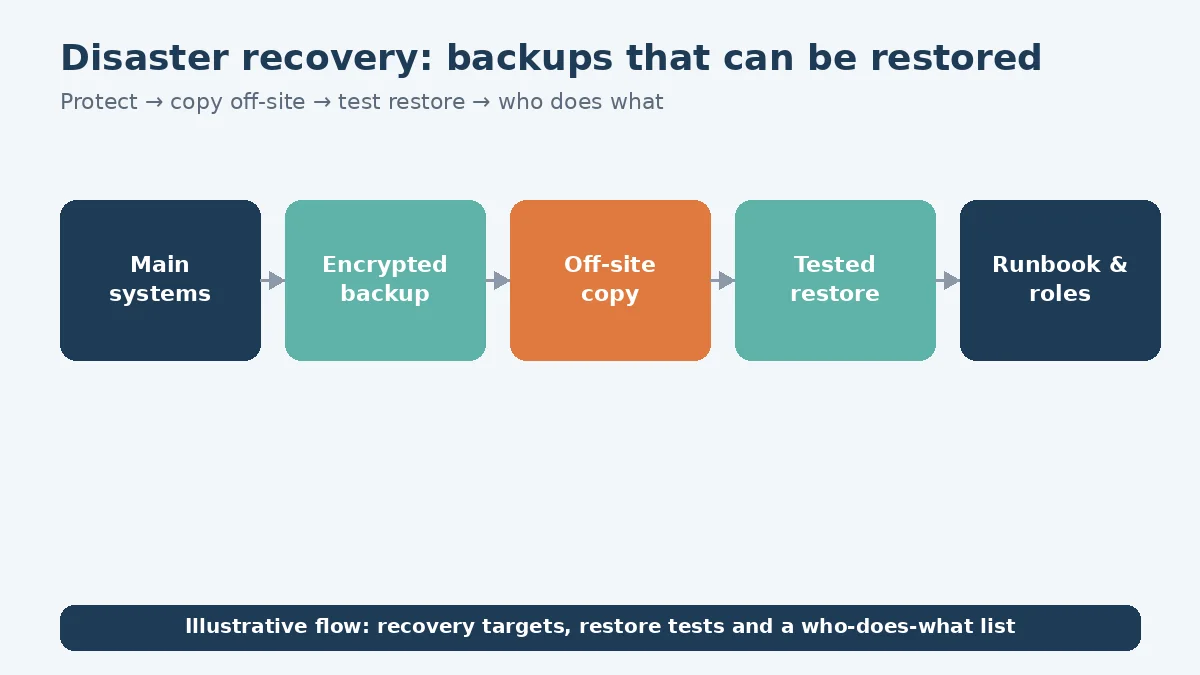
Once targets are set, backups can be designed to meet them. Our cloud and hosting services page puts it this way: “Backups only count if you can restore them.” It also says backup frequency, retention and storage location “are set per project based on how often your data changes and how much you could afford to lose.”
Design decisions can include:
- What gets backed up, including files, databases, configuration and website content.
- How frequently, matched to each system’s recovery point target.
- Where copies are kept, including at least one copy separate from the main system.
- Who can access backups, limited to the people responsible for restores.
- Encryption, so a lost or stolen copy isn’t readable.
The Cyber Centre recommends backing up essential business information “regularly to an external secure location,” storing backups in an encrypted state, restricting access to those responsible for restoration and considering off-site copies “to provide diversity in the event of a disaster” (Canadian Centre for Cyber Security).
Where backups are stored can also raise privacy questions when they hold personal information. Our guide to Canadian data residency for AI and cloud explains the issues to discuss with your privacy adviser. If you’re still choosing a platform, our post on AWS, Azure or a VPS covers how that decision can work.
Restore testing and the runbook
A backup that has never been restored is a hope, not a plan. Ready.gov says to “test the plan periodically to make sure that it works,” and the Cyber Centre recommends that organizations “regularly verify that back-up and restore mechanisms operate as expected” (Ready.gov; Canadian Centre for Cyber Security).
A plan can include:
- Test restores to a separate environment, checked against the recovery targets.
- A runbook, with step-by-step instructions for restoring each priority system.
- A who-does-what list, naming the person responsible for each step and their backup.
- A contact sheet for hosting, domain and software providers.
- A printed copy. The Cyber Centre advises keeping an up-to-date hard copy of the incident response plan for when soft copies aren’t available.
Here’s an illustrative example (not a real client): a retailer’s runbook lists its online store as the first system to restore, then its accounting data, then its shared drive. A test restore shows the store’s media files were missing from the backup, which can then be fixed before a real outage.
FAQ
Is a backup the same as a disaster recovery plan?
No. A backup is a copy of data. A disaster recovery plan covers what to restore first, how, by whom and within what targets, and includes testing that restores work.
Can you guarantee how quickly our systems will be back?
We can’t guarantee recovery times. A plan can set recovery targets that fit your business and test restores against them, so you know where you stand.
Who keeps the plan once it’s written?
How you can use the plan, including with your own team or another provider, can be agreed with you before the work starts.
Working with LaunchLen
We’re LaunchLen Web Solutions Inc. Based in Kitchener, serving Waterloo Region and businesses across Ontario.
DROP US A LINE
Connect with LaunchLen Web Solutions Inc.
Ready to take the first step towards unlocking opportunities, realizing goals, and embracing innovation? We're here and eager to connect.

To More Inquiry
+1 226 899 4813

To Send Mail