Connecting Your Business Systems: How We Plan a Custom Integration


AI Automation and Agents

- 28 Oct, 2026
- 17 Views
- 0 Comment
By the LaunchLen Web Solutions Team · Kitchener, Ontario · Last updated: October 28, 2026
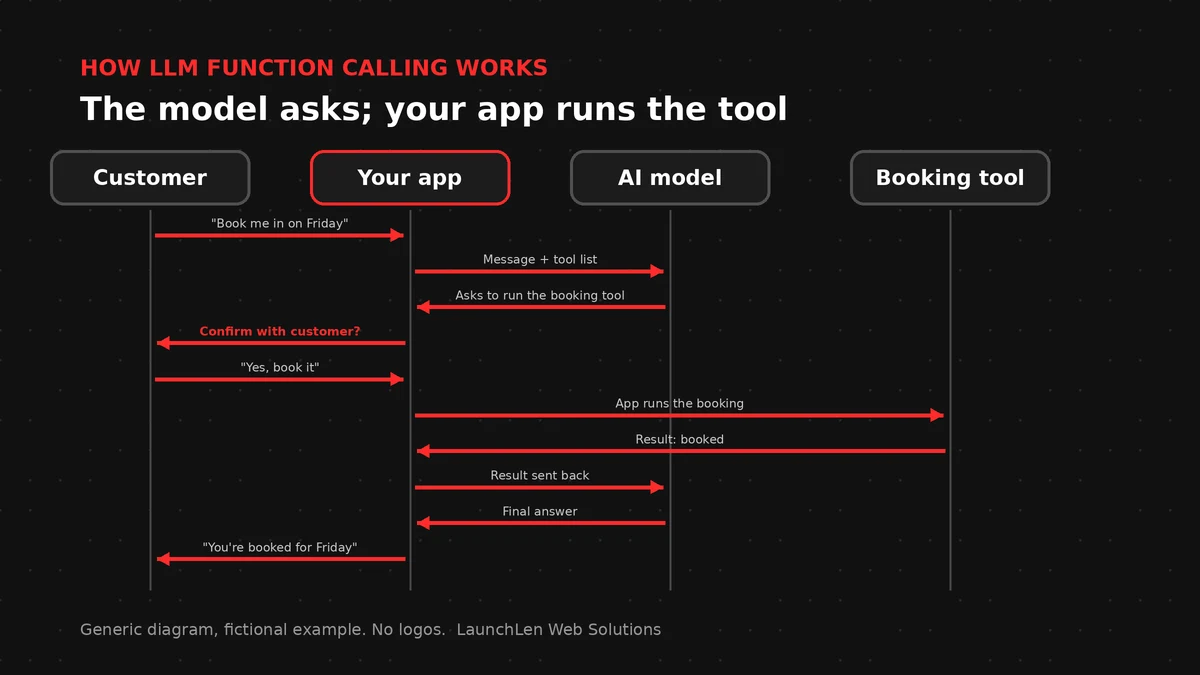
On its own, a large language model (LLM) can only write text. LLM function calling is what lets it check a calendar, look up an order or update a customer record: the model asks your software to run a specific task, and your software decides whether to do it.
This guide explains what function calling is, how the request-and-response loop works, how structured outputs help, some business examples and the guardrails that help reduce the risks for real business use.
What function (tool) calling is
When your application sends a request to a model through an LLM API, it can also send a list of tools the model is allowed to use. Each tool has:
- A name, such as “check availability” or “get order status”.
- A description of what it does and when to use it.
- Parameters, the inputs it needs, described in a schema: for example a date, a service type or an order ID.
If the model decides a tool would help answer the user, it doesn’t reply with text. It replies with a structured request: “call this tool with these inputs”.
The key point: the model doesn’t run the tool itself. Providers’ documentation is clear that your application executes the function and sends back the result. Your code stays in charge of what actually happens.
Function calling vs tool calling. The terms mean nearly the same thing. Providers use both, and some describe a function as one kind of tool, defined by a schema.
How the request-and-response loop works
An LLM tool calling exchange is a short conversation between your application and the model:
- First, your app sends the user’s message plus the list of available tools.
- The model replies with a tool call: the tool’s name and the inputs it chose.
- Your app checks the request and, if it’s allowed, runs the function, such as a database lookup or a call to another system.
- Your app sends the result back to the model.
- Finally, the model writes the answer, or asks for another tool call if it needs more information.
A model can request more than one tool call in a single turn, so your code should be ready to handle several.
Here’s a simplified, illustrative tool definition:
{
  "name": "check_availability",
  "description": "Check open appointment slots for a service on a given date.",
  "parameters": {
    "type": "object",
    "properties": {
      "service": { "type": "string" },
      "date": { "type": "string", "description": "Date in YYYY-MM-DD format" }
    },
    "required": ["service", "date"]
  }
}
Clear names and descriptions do a lot of the work. One provider’s guide suggests writing descriptions a new staff member could follow, keeping the set of tools small and not asking the model to fill in values your code already knows, such as the ID of the logged-in customer.
Structured outputs: getting reliable JSON
Function calling depends on the model returning inputs in the right shape. Structured outputs are a feature some providers offer that constrains the model’s response to a schema you supply. It’s designed to stop required fields being skipped and values falling outside the options you allow.
A few things to know:
- Support varies. Whether strict schema matching is available depends on the provider, the model and the API you use, so check current docs.
- Valid format isn’t the same as correct content. A schema can require a date field to contain a date. It can’t tell whether it’s the date the customer meant.
- There are edge cases. One provider’s documentation notes that a response may not match the schema if the model refuses a request or hits an output limit. Your code still needs to handle that.
So keep validating inputs on your side, even when structured outputs are switched on.
Business examples: bookings, lookups, CRM updates
Function calling is what turns a chatbot or internal assistant into something that can act. Some illustrative examples:
- Bookings. A website assistant checks open slots with a read-only tool, offers options, and only creates the booking after the customer confirms.
- Lookups. A customer asks where their order is. The assistant calls an order-status tool for that signed-in customer and explains the answer in plain language.
- CRM updates. After a sales call, staff paste in their notes. The assistant drafts a summary and a suggested status change, and a person approves it before anything is saved.
- Internal questions. An assistant for staff looks up a policy or a product spec from an approved source and links to it.
Here’s an illustrative example: a home-services company wants its website chat to book estimates. A safer design gives the model one tool to check availability and a second tool to request a booking, which only goes through after the customer confirms the details on screen.
As the number of tools and steps grows, this starts to look like an agent. Our overview of AI agent frameworks covers the code libraries teams can use, and our explainer on the Model Context Protocol covers a standard way to connect AI apps to tools.
Guardrails: validation, permissions, confirmations
Giving a model tools also gives it a way to cause harm if something goes wrong. OWASP’s guidance on excessive agency traces the root cause to excessive functionality, excessive permissions or excessive autonomy, and its advice maps neatly onto function calling:
- Offer only the tools a task needs. If an assistant only needs to read orders, don’t give it a tool that can cancel them.
- Keep permissions narrow. A lookup tool can use read-only access. Actions taken for a user can run with that user’s own permissions, not an all-access account.
- Check permissions outside the model. OWASP recommends enforcing authorization in the systems the tools connect to, rather than relying on the model to decide what’s allowed.
- Validate every input. OWASP’s guidance on output handling advises treating the model like any other user, with a zero-trust approach. Check that IDs, dates and amounts make sense before running anything.
- Ask a person to confirm high-impact actions, such as payments, deletions, cancellations or messages sent on someone’s behalf.
- Watch for injected instructions. Content the model reads, such as a web page, email or uploaded file, can contain hidden instructions. OWASP calls this indirect prompt injection.
- Log tool calls and set sensible rate limits, so problems can be spotted and traced quickly.
None of these removes risk completely. Together, they limit what can go wrong and make problems easier to catch.
FAQ
Does the AI model run my code?
No. With function calling, the model only returns a request naming a tool and its inputs. Your application decides whether to run it, runs it and sends the result back.
Is function calling the same as tool calling?
Mostly, yes. Providers use both terms for the same request-and-response pattern. “Tool” is the broader word, and a function is one kind of tool, defined by a schema.
Is function calling safe to use with customer data?
It can be designed with care. Limit the tools and permissions, check authorization in your own systems, validate inputs, require confirmation for important actions and log activity. Review what data each tool sends to the model provider.
Let’s work together on your project
Thinking about an AI assistant that can look things up or take actions? We’re LaunchLen Web Solutions Inc.
Based in Kitchener, serving Waterloo Region and businesses across Ontario.
Our Software Development page explains how AI features can connect to the systems you already rely on, with approved tools used within set limits. Before any build, we can agree the scope, deliverables and reporting with you. Book a free consultation to get started.
DROP US A LINE
Connect with LaunchLen Web Solutions Inc.
Ready to take the first step towards unlocking opportunities, realizing goals, and embracing innovation? We're here and eager to connect.

To More Inquiry
+1 226 899 4813

To Send Mail