What Happens in Our Technical SEO Audit (and What You Get at the End)


Web Design and Development

- 16 Oct, 2026
- 20 Views
- 0 Comment
By the LaunchLen Web Solutions Team · Kitchener, Ontario · Last updated: October 16, 2026
If you’re planning a new business website, you may hear two very different recommendations: “Just use WordPress” and “Build it in React.” Both can produce a fast, professional site. They’re different kinds of tools, though, and the right choice depends on who will update the site, what it needs to do and how you want to maintain it.
This guide compares React vs WordPress on the points that matter most to business owners. There’s no single winner, and we work with both.
What each one actually is
WordPress is an open-source content management system (CMS). It gives you an admin area where you can create pages, publish posts and manage media, plus a large ecosystem of themes and plugins. A typical WordPress site is ready to edit as soon as it’s set up.
React is a JavaScript library for building user interfaces. It isn’t a website platform on its own. A React site is built by developers, usually with a React framework, and often paired with Node.js or another back end for server-side work. The React documentation recommends starting new apps with a framework.
So the comparison isn’t quite like-for-like. WordPress is a ready-made content platform you customize. React is a toolkit for building exactly the interface you need, with more of the structure designed from scratch.
Content editing: who updates the site
This is often the deciding factor.
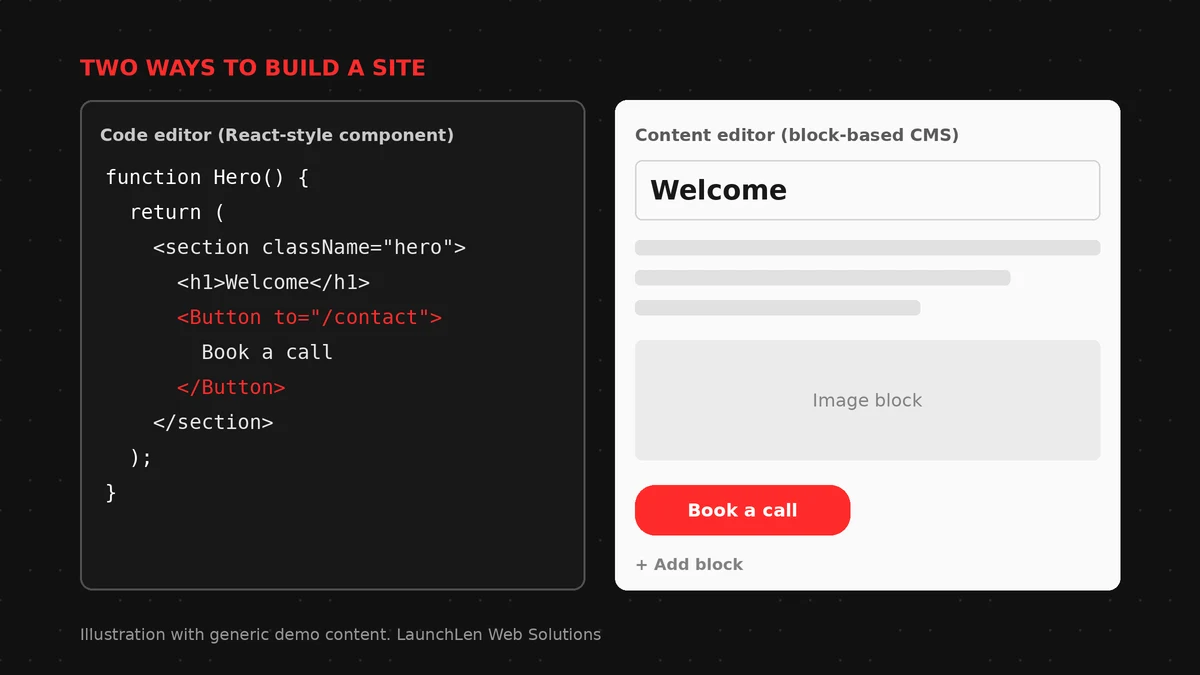
- WordPress is built for non-technical editors. Your team can add pages, update service descriptions, publish blog posts and swap images in the block editor or a page builder, without a developer.
- React sites usually need a separate way to manage content. Text may live in code, in files or in a connected content system. Without one of those, even a small wording change can mean a developer update.
If marketing or office staff will update the site often, WordPress has a clear head start. If content rarely changes, or the site is really an application with a few pages around it, editing matters less.
Performance and SEO
Both can be fast, and both can be slow.
- WordPress speed depends heavily on the theme, the number and quality of plugins, images and hosting. A lean, well-maintained WordPress site can perform well. One overloaded with add-ons usually won’t.
- React gives developers fine control over what loads and when, which can produce very fast experiences. But a React site that renders everything in the browser can delay content for users and search engines.
On SEO, Google can process JavaScript, but its own guidance notes that server-side or pre-rendering is still a good idea, because it makes sites faster for users and crawlers and not all bots can run JavaScript. Modern React frameworks support server rendering, so this is a design decision rather than a limit.
WordPress has well-established SEO plugins and handles titles, metadata and sitemaps without custom work. With React, those basics are built into the project by developers.
Integrations, apps and AI features
- WordPress has plugins for forms, bookings, e-commerce and many integrations, plus a REST API for connecting other systems. That’s quick when a plugin fits. It’s harder when you need something no plugin does, or several plugins have to work together. Our guide to adding AI to WordPress safely covers the plugin-vs-custom question for AI features.
- React suits interactive, app-like experiences: customer portals, dashboards, quote builders, account areas and features that share logic with a mobile app. Integrations and AI features are built to your requirements, which takes more development but avoids being boxed in by a plugin.
If your site is mostly pages and posts with a few standard features, WordPress often covers it. If the website is really a piece of software, React usually fits better. For more on what “AI-ready” means for a business site, see our guide to AI-powered web development.
Long-term upkeep
Every website needs maintenance. The work just looks different.
- WordPress needs regular updates to the core software, theme and plugins, plus backups and security monitoring. Plugins can be abandoned or conflict after updates, so fewer, well-supported plugins make upkeep easier.
- React sites without their own admin area avoid plugin-related updates, but they rely on code dependencies that also need regular updating and security fixes. Changes generally require someone comfortable with the codebase.
Ask who will maintain the site in two or three years, and what happens if that person or team changes.
When a hybrid makes sense (preview of headless WordPress)
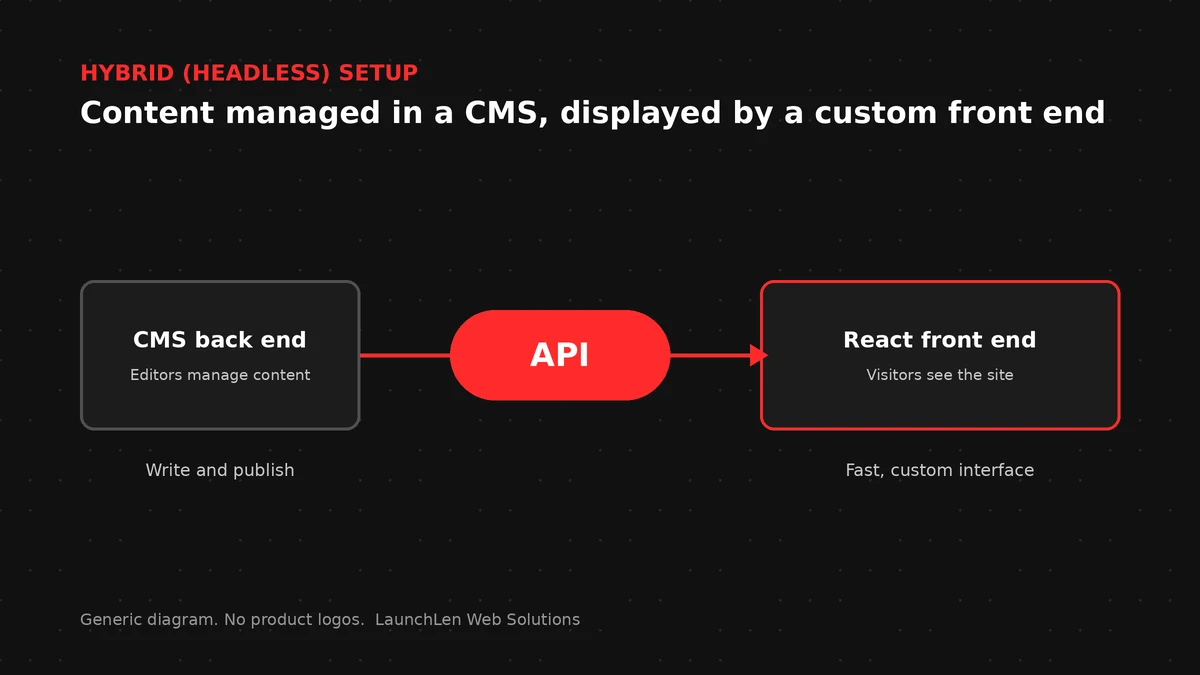
You don’t have to pick only one. In a “headless” setup, WordPress stays as the content back end, where your team edits pages and posts, and a React front end displays that content through the WordPress API.
A hybrid can suit businesses that want easy editing plus an app-like front end. It also adds complexity: two systems to host, update and secure, and some WordPress features may need rebuilding on the front end. It’s worth it when both needs are real, not as a default. We’ll cover headless WordPress in more depth in a future post.
FAQ
Is React better than WordPress for SEO?
Neither is automatically better. WordPress handles SEO basics with established tools. React can perform well in search when it’s built with server-side or pre-rendering and proper metadata. Content quality and site structure still matter most.
Can I switch from WordPress to React later?
Yes, but it’s usually a rebuild of the front end, not a simple migration. Your content can often be moved or kept in WordPress through a headless setup. Plan redirects and SEO checks carefully.
Which is quicker to launch?
For a standard business site with typical pages, WordPress is often quicker to launch because so much exists out of the box. A custom React build takes longer up front but can be shaped precisely to more complex requirements.
Let’s work together on your project
Not sure whether WordPress, React or a hybrid fits your next website? We’re LaunchLen Web Solutions Inc., based in Kitchener, serving Waterloo Region and businesses across Ontario. We work with WordPress and with React and Node, and our web and app development page explains how we approach builds. We’ll talk through your goals with you and agree the scope and deliverables together. Book a free consultation to get started.
Sources
- React, Creating a React App (recommends starting new apps with a framework): https://react.dev/learn/creating-a-react-app
- Node.js, About: https://nodejs.org/en/about
- WordPress.org, About WordPress: https://wordpress.org/about/
- WordPress Developer Resources, REST API Handbook: https://developer.wordpress.org/rest-api/
- WordPress.org Documentation, Block Editor: https://wordpress.org/documentation/article/wordpress-block-editor/
- Google Search Central, Understand JavaScript SEO basics (“server-side or pre-rendering is still a great idea”): https://developers.google.com/search/docs/crawling-indexing/javascript/javascript-seo-basics

DROP US A LINE
Connect with LaunchLen Web Solutions Inc.
Ready to take the first step towards unlocking opportunities, realizing goals, and embracing innovation? We're here and eager to connect.

To More Inquiry
+1 226 899 4813

To Send Mail