Largest Contentful Paint (LCP): What It Is and How to Improve It


Web Design and Development

- 20 Nov, 2026
- 9 Views
- 0 Comment
By the LaunchLen Web Solutions Team · Last updated: November 20, 2026
Someone needs a purchase signed off, a quote checked or time off approved. They send an email, the approver is busy, and a week later nobody is sure whether it was approved, by whom or which version they saw.
A custom approval workflow turns that email thread into clear steps that everyone can follow. This post explains how we plan and build one with you, and when an off-the-shelf tool might be the better choice.
What a custom approval workflow does
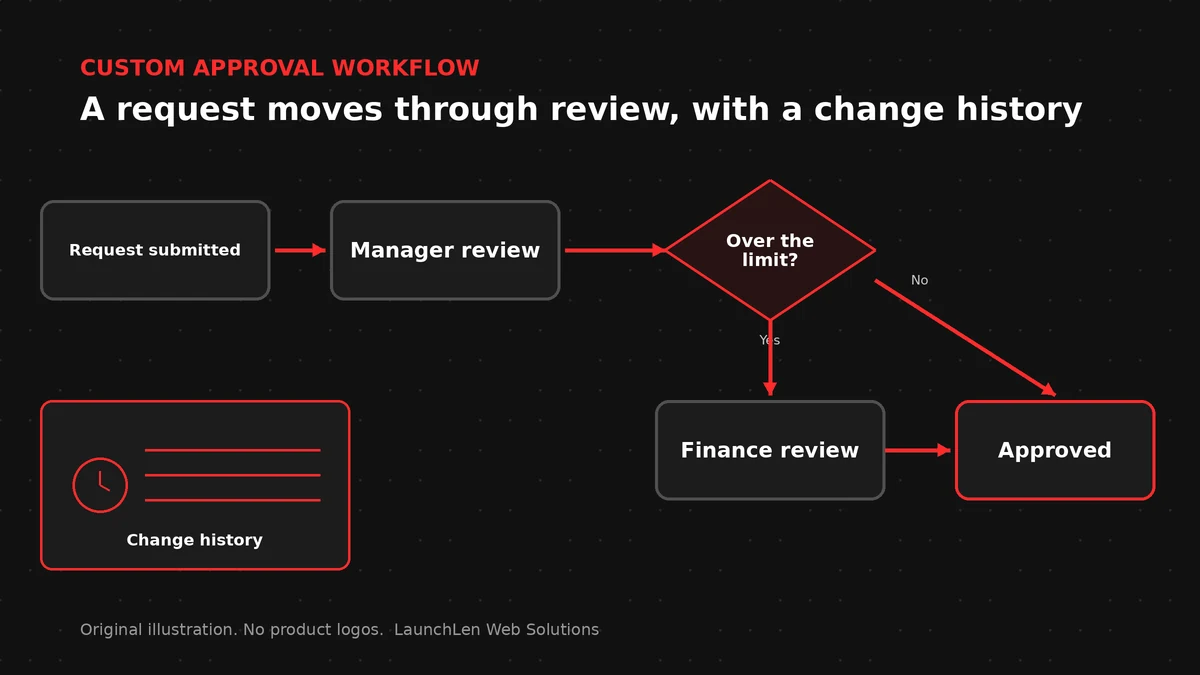
An approval workflow is a set path a request follows until someone approves or declines it. Each step has an owner, a decision and a record of what happened.
Our Software Development page lists approval flows among the internal tools we build, alongside dashboards, admin panels, scheduling and job-tracking tools that replace fragile spreadsheets. It names “an approval process that lives in email threads” as one kind of friction custom software can remove.
In practice, a build can include:
- A request form that collects the same details every time.
- Routing rules that send each request to the right approver.
- Notifications so approvers know something is waiting and requesters know the outcome.
- A change history showing who did what, and when.
Mapping who approves what
Before anything is built, we map your current approval process with the people who use it. This is the same thinking as a software discovery phase: understand the process first, then decide what to build.
Together, we write down:
- The types of request. Purchases, quotes, time off, content or anything else that needs sign-off.
- Who approves each type. Including what happens when that person is away.
- The rules that change the path. For example, an illustrative rule might send any purchase over a set limit to finance as well as a manager.
- What “done” means. Approved, declined or sent back for changes, and who is told.
Drawing the process as a simple flowchart helps everyone agree on it. The Object Management Group describes its Business Process Model and Notation standard, BPMN, as having “an easy-to-use flowchart-like notation that is independent of any particular implementation environment” (BPMN specification page). A whiteboard sketch can do the same job for a small team.
Building the approval process automation step by step
We build the smallest useful version first and improve it from there. For an approval workflow, that might mean one request type, one route and the basic notifications.
Each step in the workflow records a clear status, such as submitted, approved or sent back. When one action updates several records at once, such as approving a request and updating a budget, a database transaction keeps those updates together. The PostgreSQL documentation on transactions explains that a transaction “bundles multiple steps into a single, all-or-nothing operation.”
That helps avoid a request being left half approved if something fails partway through.
Change history and roles: who did what, and when
A clear record answers the questions that email threads can’t: who approved this, when, and what did the request say at the time?
A build can include:
- A change history for each request, showing every status change and comment.
- User roles that set who can submit, who can approve and who can only view.
- A dashboard showing what’s waiting, what’s overdue and what’s been decided.
Roles here are about making responsibilities clear, so each person sees the actions that are theirs to take.
Connecting approvals to the rest of your tools
An approval is part of a bigger process. A purchase approval might need to reach accounting, and a quote approval might need to reach the customer.
A build can include connections to the tools you already use, depending on what those tools support. Your team sets up those connections and accounts, with our guidance.
If requests arrive as documents, such as invoices or forms, our post on AI document automation explains how key details can be pulled out for a person to check before they enter the workflow.
Testing the workflow with the people who use it
Before the workflow replaces email, a few requesters and approvers try it with real examples. They check that each request reaches the right person, that notifications make sense and that sending a request back for changes works as expected.
Anything confusing gets fixed before launch. After launch, the change history and dashboard show where requests wait longest, which points to the next improvement, such as a clearer form or an extra approver for busy periods.
FAQ
Should we build a custom approval workflow or buy a tool?
If an existing product already does most of what you need, configuring it can be the better investment. Custom software suits approval rules that are specific to your business or need to connect to your own systems.
Can approvers act from their phones?
A workflow can be built as a mobile-friendly web app, so approvers can review and decide from a phone or a computer.
Can we keep our approval spreadsheet while the new workflow is tested?
Yes. The existing process keeps running until the workflow is tested, and the switch-over point is agreed with you. Our guide to moving from a spreadsheet to a web app covers that step.
Working with LaunchLen
We’re LaunchLen Web Solutions Inc. Our Software Development page covers approval flows, dashboards and other internal tools.
This is project work. A build can include mapping the process, request forms, routing rules, notifications and a change history. The scope is agreed with you before work starts, and post-launch support can be agreed per project.
Serving local businesses across Canada and the US, delivered remotely.
DROP US A LINE
Connect with LaunchLen Web Solutions Inc.
Ready to take the first step towards unlocking opportunities, realizing goals, and embracing innovation? We're here and eager to connect.

To More Inquiry
+1 226 899 4813

To Send Mail