Designing Human Handoff: How Our Chatbots Know When to Pass You to a Person


Web Design and Development

- 6 Nov, 2026
- 19 Views
- 0 Comment
By the LaunchLen Web Solutions Team · Kitchener, Ontario · Last updated: November 6, 2026
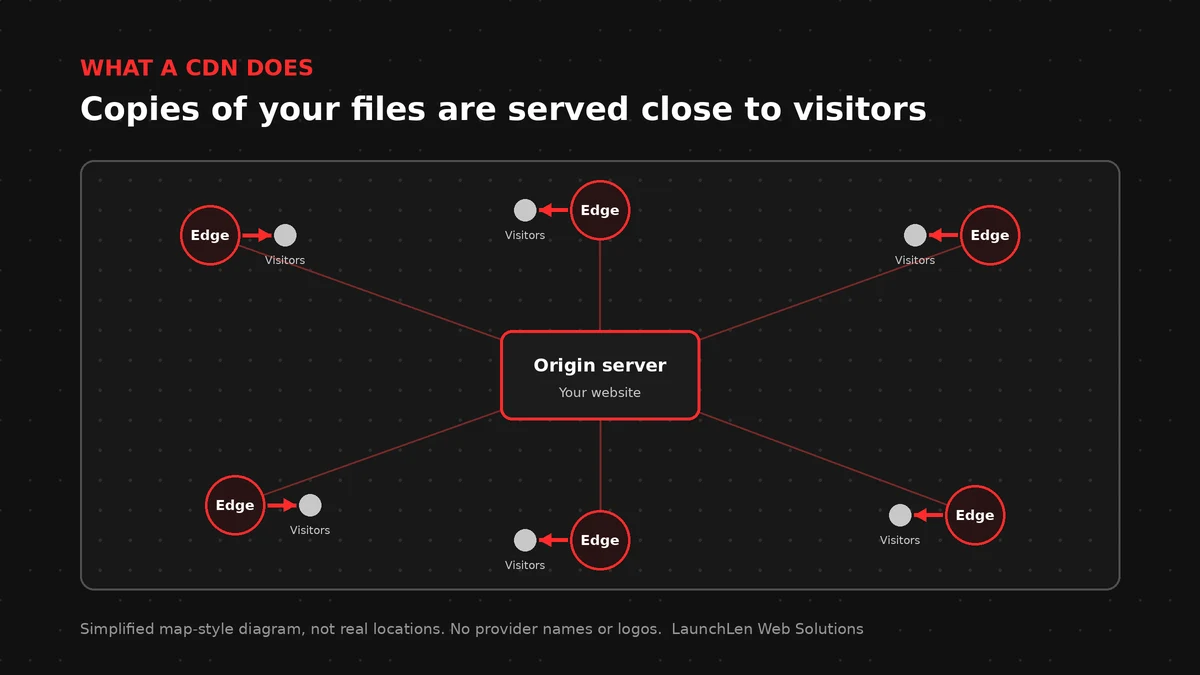
What is a CDN? A CDN (content delivery network) is a group of servers in many locations that keep copies of parts of your website. When someone visits, files can come from a nearby server instead of travelling all the way from your main host.
That shorter trip can make pages feel faster, and a CDN can also absorb traffic spikes and filter some unwanted requests.
This guide explains what a CDN does, what it can and can’t cache, and what to ask about data location.
What is a CDN, in plain English?
Think of your web host as the main warehouse, and a CDN as a set of local pickup points.
The first visitor near a pickup point may still wait for the warehouse, but after that the copy sits closer, so the next visitors in that area get it sooner.
Those pickup points are usually called edge servers, and your main server is called the origin.
A CDN does not replace hosting. Your site still needs a host to run WordPress, your app or your database, and the CDN sits in front of it.
What a CDN caches (and what it can’t)
CDNs suit content that is the same for everyone. Good candidates include:
- Images, fonts and video files.
- CSS and JavaScript files.
- Whole pages that don’t change per visitor, such as many blog posts.
Some content shouldn’t be shared from a cache:
- Shopping carts, checkout and account pages.
- Logged-in dashboards and admin screens.
- Anything showing personal details.
HTTP cache headers tell browsers and CDNs what they may store and for how long. The HTTP caching specification and MDN’s caching guide explain these headers in detail.
Getting the rules wrong can cause stale pages or, worse, one visitor seeing another visitor’s content, so test cache rules carefully before launch.
Speed, security and resilience benefits
A well-configured CDN can help in a few ways.
Speed. Shorter distances and cached files can reduce load times, especially for visitors far from your host. Google’s web.dev guidance describes CDNs as one way to improve delivery of site resources.
Security extras. Many CDNs offer HTTPS at the edge, firewall rules and protection against some kinds of traffic floods. Exact features depend on the provider and plan. For the basics of HTTPS, see what an SSL certificate is.
Resilience. Cached copies can keep some pages available during short traffic spikes, though a CDN does not make an outage impossible.
A CDN won’t fix a slow database, heavy plugins or bloated pages, because it speeds up delivery, not the work your server does to build a page.
CDN for WordPress and web apps
For WordPress, a CDN is usually one piece of a wider speed plan. That plan can include page caching, image optimization and a lean plugin set.
The WordPress developer docs on caching describe how page caching and object caching fit together, and a CDN then helps deliver the cached results.
If your site is built with a page builder, front-end weight often matters as much as distance. Our guide to Elementor speed optimization covers that side.
For web apps, a CDN often serves the static front end, while API calls with personal data usually go straight to your server, with caching turned off or tightly controlled.
Data location considerations
A CDN copies content to servers in many places, which is the point of it, so it’s worth asking what gets copied.
Public files, like logos and blog images, are usually low risk, but personal information is different.
Questions to ask any CDN provider:
- Which content types will be cached, and which will pass straight through?
- Where are edge locations, and can you restrict regions?
- What request logs does the provider keep, and for how long?
- What do the provider’s terms say about processing on your behalf?
Under PIPEDA, an organization stays responsible for personal information it transfers to a third party for processing. The Office of the Privacy Commissioner explains this in its cross-border processing guidance.
Where cached files and logs end up depends on the services a project uses, and we can review that with you.
Hosting and CDN choices vary by project. Disclosure: LaunchLen has a referral relationship with Hostinger for hosting, VPS and self-hosted automation. Our recommendations stay based on your needs.
FAQ
Do I need a CDN for a small local business site?
Not in every case. If most visitors are nearby and the site is light, good hosting and caching may be enough. A CDN helps more with wider audiences, heavy media or traffic spikes.
Is a CDN the same as web hosting?
No. Hosting runs your site. A CDN keeps copies of some files closer to visitors and sits in front of your host.
Can a CDN break my website?
It can if cache rules are wrong, for example caching a cart page. Careful setup, testing and clear exclusions reduce that risk.
Let’s work together on your project
Wondering whether a CDN would actually help your site? We’re LaunchLen Web Solutions Inc.
Based in Kitchener, serving Waterloo Region and businesses across Ontario.
Our Cloud Services page explains how we help businesses set up, move and look after the infrastructure behind their websites, web apps and AI tools. Before any work, we can agree the scope, deliverables and reporting with you. Book a free consultation to get started.

DROP US A LINE
Connect with LaunchLen Web Solutions Inc.
Ready to take the first step towards unlocking opportunities, realizing goals, and embracing innovation? We're here and eager to connect.

To More Inquiry
+1 226 899 4813

To Send Mail