How We Report on SEO: What We Measure and Why


Web Design and Development

- 31 Oct, 2026
- 13 Views
- 0 Comment
By the LaunchLen Web Solutions Team · Kitchener, Ontario · Last updated: October 31, 2026
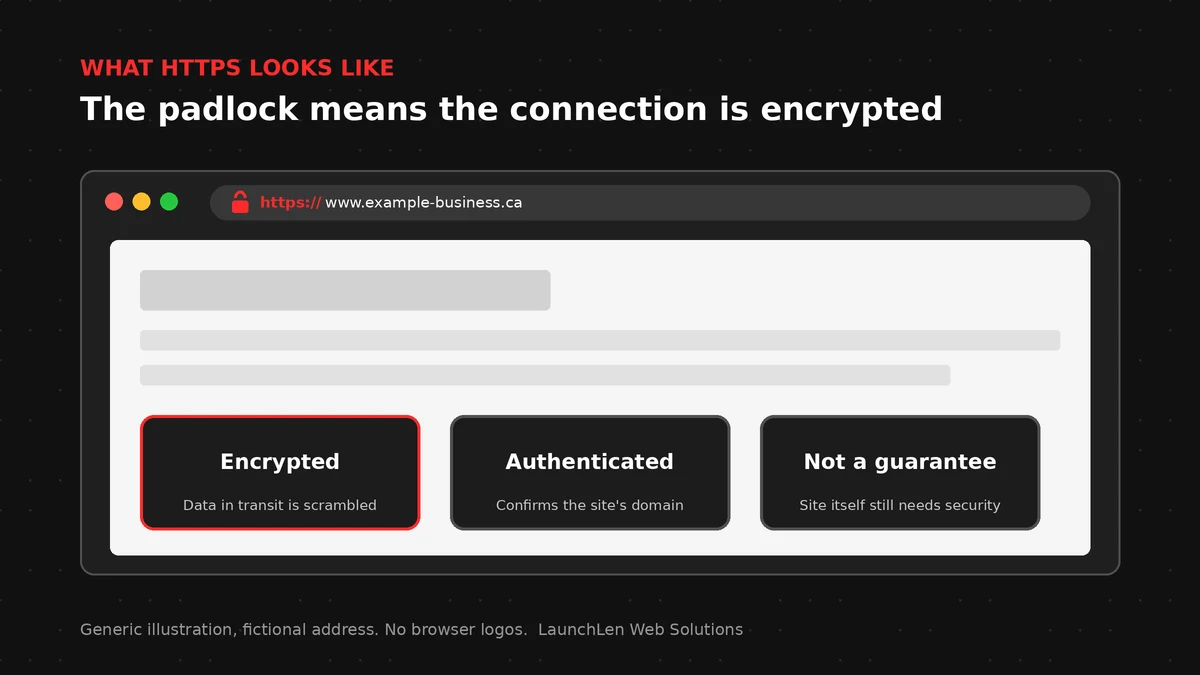
An SSL certificate (today usually a TLS certificate) is a small file that helps a browser confirm it’s talking to the right website and set up an encrypted connection. When it’s working, the address bar shows HTTPS and a padlock.
This guide explains what HTTPS protects, how SSL relates to TLS, common certificate types, renewal and the usual causes of “Not secure” warnings.
What HTTPS protects (and what it doesn’t)
HTTPS is HTTP over a secure connection. The HTTP specification describes HTTPS as HTTP used over TLS. In plain terms, HTTPS helps with:
- Encryption in transit. Data between the visitor’s browser and your server is harder for someone on the network to read.
- Integrity. Tampering with the data in transit is harder to hide.
- Authentication of the site. The certificate binds a public key to a domain name, so the browser can check it’s reaching the site it thinks it is.
HTTPS does not by itself:
- Make the site free of malware or scams.
- Prove the business is trustworthy beyond domain control (that depends on the certificate type and how it was issued).
- Encrypt data once it sits on your server or in a third-party tool.
Privacy and residency questions for cloud and AI setups are a separate topic; see our guide to Canadian data residency for AI and cloud.
SSL vs TLS
People still say “SSL certificate” out of habit. SSL (Secure Sockets Layer) is the older family of protocols. TLS (Transport Layer Security) is what modern sites use. Modern TLS is defined in the current TLS specification.
When a host or control panel offers an “SSL certificate,” it usually means a certificate used for TLS/HTTPS. The brand name stuck; the protocol moved on.
Certificate types: DV, OV, EV
Issuers commonly group certificates by how much they check before issuing:
- Domain Validation (DV). Confirms control of the domain, for example by a DNS or HTTP check. Enough for many business sites.
- Organization Validation (OV). Adds checks about the organization.
- Extended Validation (EV). Involves a more rigorous organization check. Browser UI for EV has changed over time, so don’t rely on a green company name in the bar as your main signal.
Exact checks and labels depend on the certificate authority and current industry rules. Read the issuer’s docs for the product you buy. Free and paid options both exist; public certificate authorities document automated DV certificates.
Renewal and automation
Certificates expire. Missed renewals are a common cause of sudden “Not secure” warnings.
Many hosts and tools renew certificates automatically, especially when using automated DV issuance. Still check:
- That auto-renewal is enabled.
- That renewal alerts go to an inbox someone monitors.
- That DNS and firewall rules still allow the validation checks your issuer uses.
If you move hosts, plan certificates as part of the cut-over. Our cloud migration checklist covers migration planning in more detail.
Hosting and VPS choices vary by project. Disclosure: LaunchLen has a referral relationship with Hostinger for hosting, VPS and self-hosted automation. Our recommendations stay based on your needs.
Fixing ‘Not secure’ and mixed-content warnings
Browsers show warnings for several reasons. Common ones:
- No HTTPS, or an expired or mismatched certificate. The name on the certificate doesn’t match the site, or the certificate isn’t trusted.
- Mixed content. The page itself is HTTPS but loads scripts, images or frames over plain HTTP. MDN explains that mixed active content (such as scripts) is particularly serious because it can be rewritten in transit.
- Broken redirects. Some URLs still send visitors to HTTP.
- Wrong host setup. A new domain or CDN in front of the site without a matching certificate.
Fixes usually include installing a valid certificate for every hostname you use (including www and apex), redirecting HTTP to HTTPS, and updating asset URLs to HTTPS. Test after changes on a phone as well as a desktop.
FAQ
Do I need to buy an SSL certificate?
Not in every case. Many hosts include free automated certificates. Paid certificates can add organization validation, insurance-style features or support options, depending on the issuer. Match the product to your needs.
Is HTTPS enough to keep customer data safe?
It protects data in transit between the browser and your site. You still need secure handling on the server, careful access control, updates and sound practices for any tools that process the data.
Why does my site say Not secure after I installed a certificate?
Common causes include an incomplete install, a name mismatch, an expired certificate, mixed content or visitors still hitting an HTTP URL. Check the certificate details in the browser and the page’s mixed-content console messages.
Let’s work together on your project
Need a clear picture of hosting, HTTPS and how your site is set up? We’re LaunchLen Web Solutions Inc.
Based in Kitchener, serving Waterloo Region and businesses across Ontario.
Our Cloud Services page explains how we can help with cloud setup and migration. Before any work, we can agree the scope, deliverables and reporting with you. Book a free consultation to get started.
DROP US A LINE
Connect with LaunchLen Web Solutions Inc.
Ready to take the first step towards unlocking opportunities, realizing goals, and embracing innovation? We're here and eager to connect.

To More Inquiry
+1 226 899 4813

To Send Mail