REST vs GraphQL: Choosing an API Style for Your Web App


Web Design and Development

- 30 Oct, 2026
- 11 Views
- 0 Comment
By LaunchLen Web Solutions Team
A WordPress theme controls how your site looks and how your team edits it. Many sites start with an off-the-shelf theme and a page builder, then pile on settings, plugins and workarounds until simple edits feel risky. Custom WordPress theme development takes a different route: a theme designed around your brand, your content and the people who update it.
This post explains how a custom theme project with LaunchLen Web Solutions Inc. can work, from the design system to testing and handover.
Custom theme vs off-the-shelf theme
Off-the-shelf themes are built to suit as many sites as possible. That flexibility can be useful, but it can also mean extra features, options and scripts your site never uses. A heavily modified demo can end up harder to maintain than something built for the job.
A custom theme starts from your content instead. It can include only the layouts, styles and features your site needs. Our WordPress development services describe this as a theme designed around your brand and content rather than a heavily modified demo, with reusable blocks so the site stays consistent as it grows.
A custom theme isn’t always the right answer, though. If your site is small, your budget is tight or your design needs are simple, a well-chosen existing theme can be the better fit. We can talk through the trade-offs with you before any design work starts.
Design system and block patterns
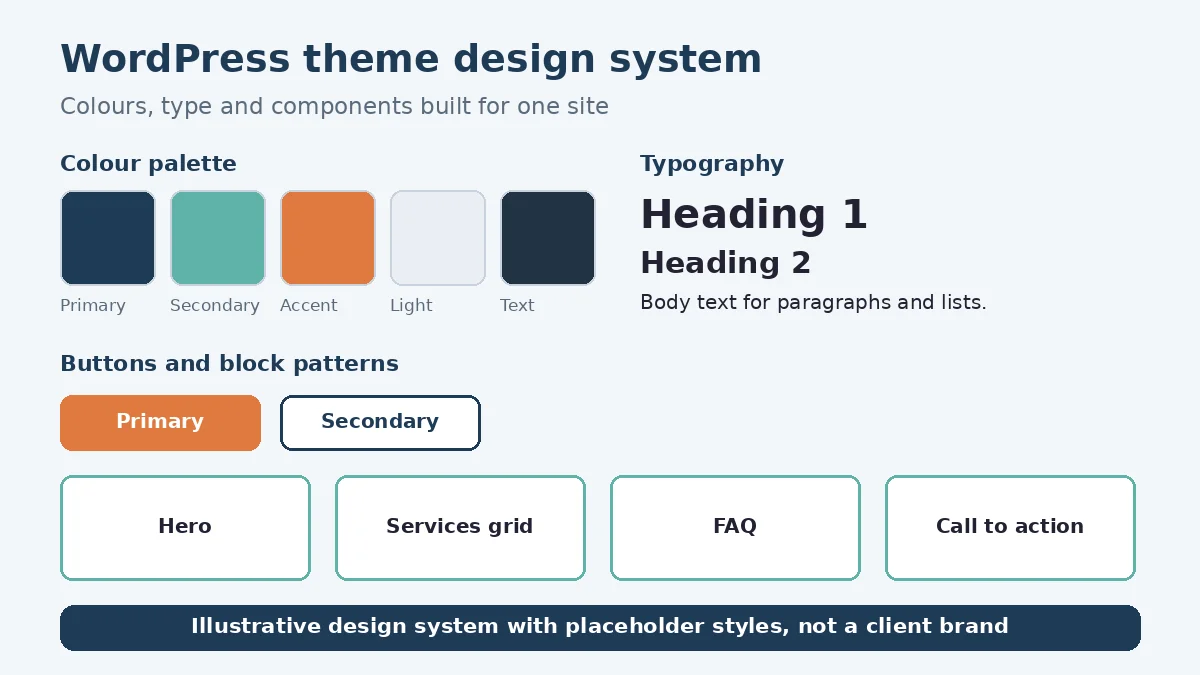
A custom theme can start with a design system: the colours, typefaces, spacing, buttons and other components your site uses, defined once and reused everywhere. That can keep pages consistent, even as different people add content over time.
In a modern WordPress block theme, much of this can live in a theme.json file. The WordPress Theme Handbook describes theme.json as “a foundational piece of block theming,” useful for “everything from configuring colors to defining default typography settings to applying front-end styles” (WordPress Theme Handbook, Global Settings and Styles).
The design system can then be turned into block patterns. The Theme Handbook describes a pattern as “one or more blocks that have been pre-configured and presented to the end-user,” or “reusable groups of blocks” (WordPress Theme Handbook, Introduction to Patterns). Patterns for a business site can include:
- Page sections. Hero areas, service summaries, calls to action and contact blocks.
- Content layouts. Team or location sections, FAQs, feature lists and image-and-text rows.
- Starter pages. Ready-made layouts for common page types, so a new page starts on-brand.
Making editing easy for your team
A theme can look great and still be frustrating to edit. So part of the work can be shaping the editing experience around the people who’ll use it.
The WordPress Block Editor Handbook says curating the editor helps ensure “consistency and alignment with the site’s style and branding guidelines” and makes it easier to manage content “without accidental modifications or layout changes” (Block Editor Handbook, Curating the Editor Experience). It lists approaches such as block locking, patterns, theme.json settings and selectively disabling editor features.
In practice, editing decisions can include:
- Which colours and font sizes editors can pick, limited to the brand palette.
- Which blocks can be moved or deleted in key templates, so headers and footers stay intact.
- Which patterns appear first, so editors reach for on-brand layouts.
- What stays flexible, so your team isn’t boxed in when content needs change.
Here’s an illustrative example (not a real client): a professional services firm wants staff to add new service pages without help. A “service page” starter pattern with locked headings and a fixed contact section lets them fill in the content while the layout stays consistent.
Speed, accessibility and SEO built in
Because a custom theme can include only what your site uses, it can avoid loading features nobody needs. Google’s Core Web Vitals measure loading, interactivity and visual stability, and web.dev describes them as the subset of Web Vitals that “apply to all web pages” (web.dev, Web Vitals). Building with them in mind from the start can be easier than fixing a slow theme later. If your current site uses a page builder, our guide to Elementor speed optimization covers common causes of slowness.
Accessibility can be designed in at the same time. The Web Content Accessibility Guidelines (WCAG) are organized under four principles: perceivable, operable, understandable and robust (W3C, WCAG 2 Overview). For a theme, that can mean colour palettes with enough contrast, visible focus states, logical heading structure and navigation that works with a keyboard.
On the SEO side, the theme can provide clean heading structure, readable URLs and room for titles, meta descriptions and structured data. We can’t promise rankings or speed scores, but a lean, well-structured theme can give your content a solid foundation.
Testing and handover
Before launch, the theme can be tested away from public view. Testing can include:
- Browsers and devices. Checking layouts on common desktop and mobile browsers.
- Editing. Having your team try real edits, such as adding a page, swapping an image or reordering sections.
- Accessibility. Keyboard navigation, contrast and heading checks.
- Content. Confirming existing content looks right in the new templates.
Handover can include notes on how the patterns, templates and editing controls work, so your team knows what each one is for. What happens after launch, including any ongoing support, can be agreed with you as part of the project scope. If you’re also thinking about adding AI features to the site, our guide to WordPress AI integration explains what to check first.
FAQ
Is a custom theme better than a page builder?
Not always. A page builder can suit sites that need frequent layout changes by non-technical staff. A custom theme can suit sites that value consistency, a focused editing experience and fewer moving parts. We can help you weigh the two for your site.
Can our team still edit the site without a developer?
That’s the aim. Patterns, starter pages and editing controls can be set up so your team can add and update content without breaking the design.
Who owns the custom theme when it’s finished?
How you can use the finished theme, including with your own team or another developer, can be agreed with you before the project starts.
Working with LaunchLen
We’re LaunchLen Web Solutions Inc. Based in Kitchener, serving Waterloo Region and businesses across Ontario.
If your current theme makes simple edits feel risky, or your site no longer reflects your brand, a custom theme may help. Tell us what your site needs to do and who updates it.
DROP US A LINE
Connect with LaunchLen Web Solutions Inc.
Ready to take the first step towards unlocking opportunities, realizing goals, and embracing innovation? We're here and eager to connect.

To More Inquiry
+1 226 899 4813

To Send Mail