LLM Function Calling: How AI Models Use Your Tools and Data


Web Design and Development

- 28 Oct, 2026
- 15 Views
- 0 Comment
By LaunchLen Web Solutions Team
A new website can go wrong in two ways. It can look polished but fail to answer the questions customers actually ask, or it can say the right things in a layout nobody can follow. A clear website design process helps avoid both, because each stage settles one set of decisions before the next begins.
This post explains how a website project with LaunchLen Web Solutions Inc. can work, from first conversation to launch, and what your role can be at each stage. The steps follow the four stages on our web and app development services page: consultation and strategy, design and development, integration and AI, and launch and support.
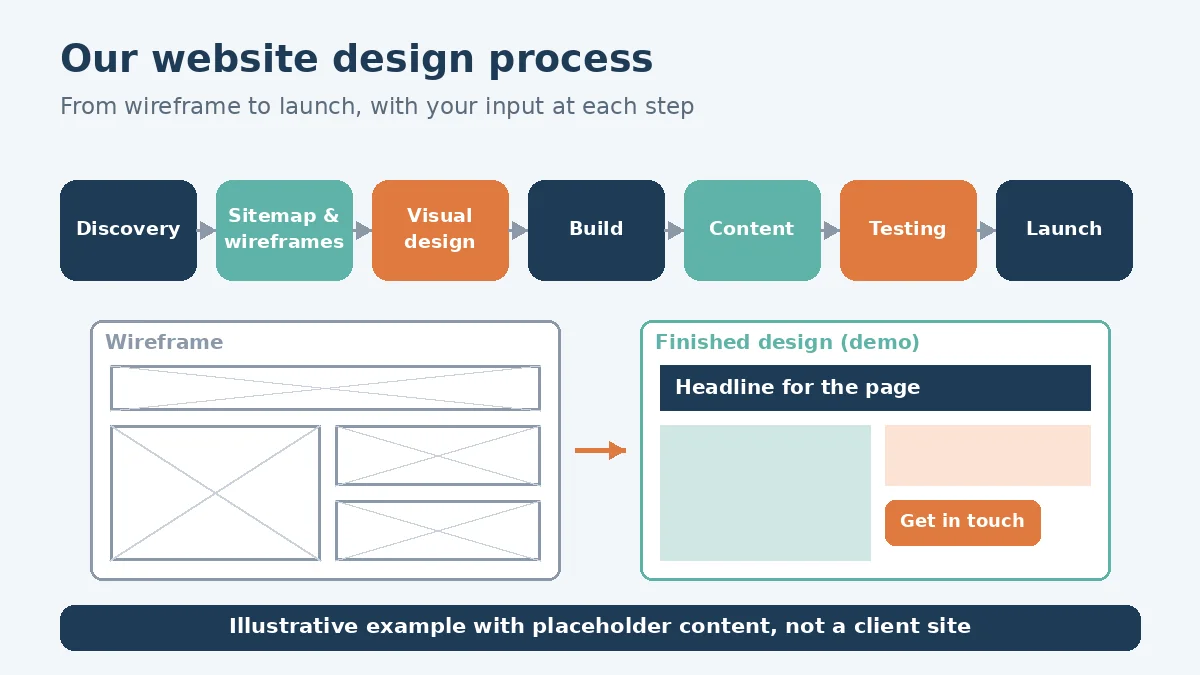
Discovery: goals, audience and must-haves
Discovery can start with a free consultation about what the website needs to do for your business. Questions can include:
- What should the site achieve? More enquiries, bookings, online sales, or fewer repeat questions for your team.
- Who is it for? The customers you want to reach, and what they need to find quickly.
- What are the must-haves? Pages, forms, booking, a store, or connections to systems you already use.
- What’s working or not working today, if you have a site already.
- Who decides? One main contact who can approve each stage can help keep the project moving.
Discovery delivers the full requirements and an understanding of how your business works, including which manual or paper-based steps the site could automate or digitize. That becomes an agreed scope: what’s in the first version, what can wait, and what success looks like.
Sitemap and wireframes
Next comes structure. A sitemap lists the pages and how they connect, so every service, location or product has a clear home. It can also show where a single page is trying to do too many jobs.
Wireframes can then sketch each key page without colours, photos or final copy. Nielsen Norman Group describes wireframes as visualizing “a user path or flow, as well as page layouts, information hierarchy, and even interactions,” and notes they can range “from quick sketches to detailed representations of the final design” (Nielsen Norman Group).
Reviewing a wireframe is where your knowledge of your customers can matter a great deal. Questions to ask can include: is the main action obvious, is the most important information near the top, and does the page answer what a visitor came for? Changes at this stage don’t yet involve finished visuals.
Visual design and feedback rounds
With the structure agreed, visual design adds your brand: colours, type, imagery and the look of buttons, forms and navigation. Design can start with a few key pages, such as the homepage and a service page, before the style is applied across the site.
Feedback rounds can be built into the scope, so you know when your input is needed and what can still change. Feedback can be most useful when it’s tied to goals (“visitors won’t see the booking button”) rather than taste alone. Collecting comments in one place, from the people who need to approve, can help avoid conflicting changes.
Accessibility belongs in this stage, not just at the end. Ontario’s guidance on accessible websites advises thinking about accessibility from the start and telling your web developer your expectations early (Government of Ontario, How to make websites accessible). Colour contrast, readable type and clear focus states are design decisions.
Build, content and integrations
The approved design can then be built on a platform that fits the project. Options can include WordPress for content-led business sites and custom web applications, which can be built with React and Node.js. Our post on React vs WordPress compares the two.
Content can be the stage that holds a project up. What we can ask for can include a list of your services, examples of sites you like and don’t, your logo and brand assets if you have them, and access to your current domain and hosting. How content and access are shared can be agreed with you in advance. We don’t offer general copywriting, but we can help with technical content and SEO-heavy blog writing aimed at organic traffic when that fits the project.
Integrations can include forms that route enquiries, CRM connections, booking tools or an AI assistant that answers from content you’ve approved. Our guide to AI-powered web development explains what “AI-ready” can mean for a business site. If a native iOS or Android app is part of the plan, our web and app development services page covers that work too.
Testing: devices, speed, accessibility
Before launch, testing can include:
- Devices and browsers. Google says it uses “the mobile version of a site’s content” for indexing and ranking, and recommends responsive design as “the easiest design pattern to implement and maintain” (Google Search Central). Pages can be checked on phones, tablets and desktops.
- Speed. Google’s Core Web Vitals cover loading, interactivity and visual stability (web.dev, Web Vitals). Lab tests during the build can catch problems early, though web.dev notes lab measurement “is not a substitute for field measurement” from real visitors.
- Accessibility. Ontario’s guidance suggests automatic assessment, review with assistive technology such as a screen reader and, if possible, testing by people with disabilities (Government of Ontario). A site can be built toward WCAG 2.0 Level AA, and if you’re legally required to comply, an accessibility review before launch is worth planning.
- Forms and integrations, with test submissions checked end to end.
Launch and handover
Launch can be planned for a time that suits your business. A launch checklist can include connecting the domain, confirming SSL, checking that search engines aren’t blocked, and setting up redirects if the new site replaces an old one.
Handover can include documentation and the access details you need to manage the site. Ongoing support options can be discussed with you as part of the scope, so it’s clear who looks after updates after launch.
FAQ
What do we need to prepare before a website project starts?
A rough list of your services, examples of sites you like, your logo and brand assets if you have them, and access to your current domain and hosting can help. We don’t offer general copywriting; technical content and SEO-heavy blog writing for organic traffic can be part of the project when needed.
Do we need wireframes if we already know what we want?
They can still help. A wireframe can show whether a layout supports what visitors need before design time goes into colours and images.
Do we own the website when it’s finished?
How you can use the design, content and code, including with your own team or another developer, can be agreed with you before the project starts.
Working with LaunchLen
We’re LaunchLen Web Solutions Inc. Based in Kitchener, serving Waterloo Region and businesses across Ontario.
If you’re planning a new website or rethinking an old one, start with what it needs to do for your customers. We can help you turn that into a plan, a design and a site your team can run.
DROP US A LINE
Connect with LaunchLen Web Solutions Inc.
Ready to take the first step towards unlocking opportunities, realizing goals, and embracing innovation? We're here and eager to connect.

To More Inquiry
+1 226 899 4813

To Send Mail