Elementor vs Gutenberg: Which WordPress Editor Should You Use?


Web Design and Development

- 27 Oct, 2026
- 14 Views
- 0 Comment
By LaunchLen Web Solutions Team
A small business can run on several separate tools: a website, a CRM, accounting software, perhaps a booking system or an AI assistant. Each can work well on its own. The trouble can start in the gaps between them, where someone copies details from one screen into another.
System integration for a small business means closing those gaps, so information entered once can show up wherever it’s needed. This post explains how LaunchLen Web Solutions Inc. can plan a custom integration, what we can ask about, and what the plan can include.
The cost of copy-and-paste between systems
Re-typing takes time, and each manual hand-off can introduce a typo, a missed record or two systems that quietly disagree. Information can also arrive late: an enquiry waiting in an inbox, or an approved quote that hasn’t become an invoice.
Signs an integration may be worth exploring can include:
- The same details are entered in more than one place, such as a customer’s name and address.
- Reports don’t match because each system holds a slightly different version of the truth.
- A process depends on one person remembering to move information along.
Not every gap needs custom software. A built-in connector or a process change can be enough, and we can tell you if that’s the case. Our guide to AI process automation vs RPA vs agentic AI explains how rule-based automation, RPA and AI differ.
Mapping what data moves where
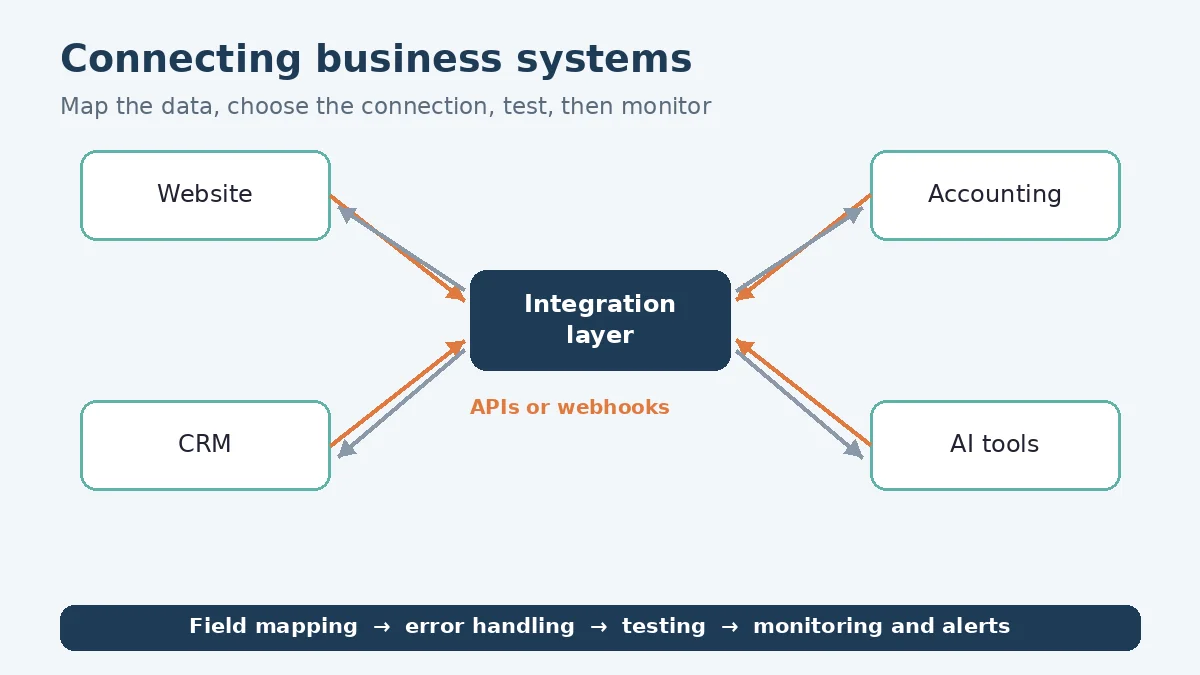
Planning can start with discovery, before anyone picks a technology. Discovery delivers the full requirements and an understanding of how your business works, identifies what can be automated and which paper or handwritten steps can be digitized, and maps the gaps. The resulting data map can record, for each flow:
- The source and destination, such as website form to CRM.
- The trigger. What starts the transfer: a new enquiry, a status change, a schedule.
- The fields. Which details move, and how they match up. A “name” in one system can be “first name” and “last name” in another.
- The system of record. Which system wins if two disagree.
- Personal information. Which flows carry customer or staff data.
That last item shapes the design. Under PIPEDA, organizations must protect personal information “against loss, theft, or any unauthorized access, disclosure, copying, use or modification” (Office of the Privacy Commissioner of Canada, Principle 7). An integration can be designed to move only the fields each system needs.
Here’s an illustrative example (not a real client): a contractor’s website form creates a lead in the CRM. When the job is won, the customer’s details flow into the accounting system as a draft invoice for review. The map can show that the CRM is the system of record for customer details, and the accounting system for payments.
APIs, webhooks or an integration platform
Once the map is clear, the next question is how each connection can work. MDN describes an API as a set of features and rules that let software interact with a program, “as opposed to a human user interface” (MDN Web Docs, API). Options can include:
- APIs. Your integration asks a system for data, or sends data to it, when needed.
- Webhooks. The system sends data when an event happens. GitHub’s developer documentation explains that webhooks are used “to receive data as it happens, as opposed to polling an API,” and that calling the API can suit cases where you only need information once or intermittently (GitHub Docs, About webhooks).
- An integration platform. A hosted service with pre-built connectors, which can suit simple flows between supported tools.
The right choice can depend on what each system supports and how quickly data needs to move. Our custom software development services page describes the custom APIs and connectors we can build. If an AI tool is part of the picture, our guide to what an LLM API is explains how AI models plug into business software.
Error handling, logging and alerts
Integrations can fail quietly: a system is briefly unavailable, a required field is blank, a password expires. Planning for that can include:
- Validation. Checking incoming data before it’s saved. OWASP warns that developers “tend to trust data received from third-party APIs more than user input” (OWASP API Security Top 10, 2023).
- Retries and a holding area, so a failed transfer can be tried again or reviewed rather than lost.
- Logging. OWASP’s logging guidance says application logs must record “when, where, who and what” for each event, and that items such as access tokens, passwords and payment card data should usually not be recorded directly (OWASP Logging Cheat Sheet).
- Alerts to the right person when something fails.
- Limited access. The Canadian Centre for Cyber Security recommends applying the principle of least privilege (ITSAP.10.035). The same idea can apply to an integration’s credentials, which can be limited to the data and actions it needs.
Who receives alerts, and who fixes problems after launch, can be agreed with you as part of the project scope.
Testing with real records
Made-up sample data can miss the awkward cases real records contain: a customer with two addresses, a cancelled order, an unusual name. Testing can include:
- Each flow from end to end, in a test environment where the systems allow it.
- Failure cases, such as a missing field or a system that doesn’t respond.
- Duplicate checks, so the same record isn’t created twice.
- A review with the people who use the systems.
Real records can contain personal information, so how test data is chosen and handled can be agreed with you in advance. The OPC’s safeguards guidance suggests removing or blocking out personal information that isn’t relevant when providing copies to others (Office of the Privacy Commissioner of Canada, Principle 7). Integrating an existing codebase, micro-SaaS or servers does need credentials, such as a test account or API keys. What’s shared can be agreed with you before work starts.
FAQ
Do our systems need an API to be connected?
Not necessarily. An API or webhooks can make an integration easier to build and monitor, but where a system has neither, options can include scheduled exports and imports. What’s practical can be checked before the work is scoped.
What happens when one of the connected systems changes?
A software update or a new field on either side can affect an integration. Logging and alerts can help spot problems early, and who looks after changes after launch can be agreed with you as part of the project scope.
Who owns the integration code?
How you can use the integration code and its documentation, including with your own team or another developer, can be agreed with you before work starts.
Working with LaunchLen
We’re LaunchLen Web Solutions Inc. Based in Kitchener, serving Waterloo Region and businesses across Ontario.
If your team spends time moving information between systems, tell us which tools you use and where the hand-offs happen. We can help you work out what’s worth connecting.
DROP US A LINE
Connect with LaunchLen Web Solutions Inc.
Ready to take the first step towards unlocking opportunities, realizing goals, and embracing innovation? We're here and eager to connect.

To More Inquiry
+1 226 899 4813

To Send Mail