What Is Docker Used For? Containers Explained for Business Apps


E-commerce

- 25 Oct, 2026
- 27 Views
- 0 Comment
By LaunchLen Web Solutions Team
Ecommerce replatforming means moving an online store from one platform to another while keeping it open for business. Done carelessly, a move can break product links, lose order history or quietly change how tax and shipping are charged. Done carefully, the move can be close to invisible to customers.
This post explains how a store move with LaunchLen Web Solutions Inc. can work, what has to move, and how we can help protect your search visibility along the way.
Signs it’s time to switch platforms
Not every frustration needs a new platform. Sometimes a cleanup, a better theme or a missing integration solves the problem. A move starts to make sense when the platform itself is the limit, for example when:
- Day-to-day running is hard. Orders, stock or product updates take manual work the platform can’t automate.
- You’ve outgrown it. Your catalogue, variants, sales channels or integrations need more than it supports.
- Upkeep is a burden. You’d rather the platform handled more of the hosting and updates, or you want more control than it allows.
- It doesn’t fit how you sell. Content and products need to sit side by side, or selling needs to come first.
Platforms such as WooCommerce on WordPress and Shopify suit different businesses. Our post on WordPress or Shopify compares them. We are not an official Shopify partner; on Shopify moves, the store stays in your business name and account, you bring the domain and catalogue, and we configure, load listings and can set up dropshipper connections. If a move isn’t the right answer, we’ll say so.
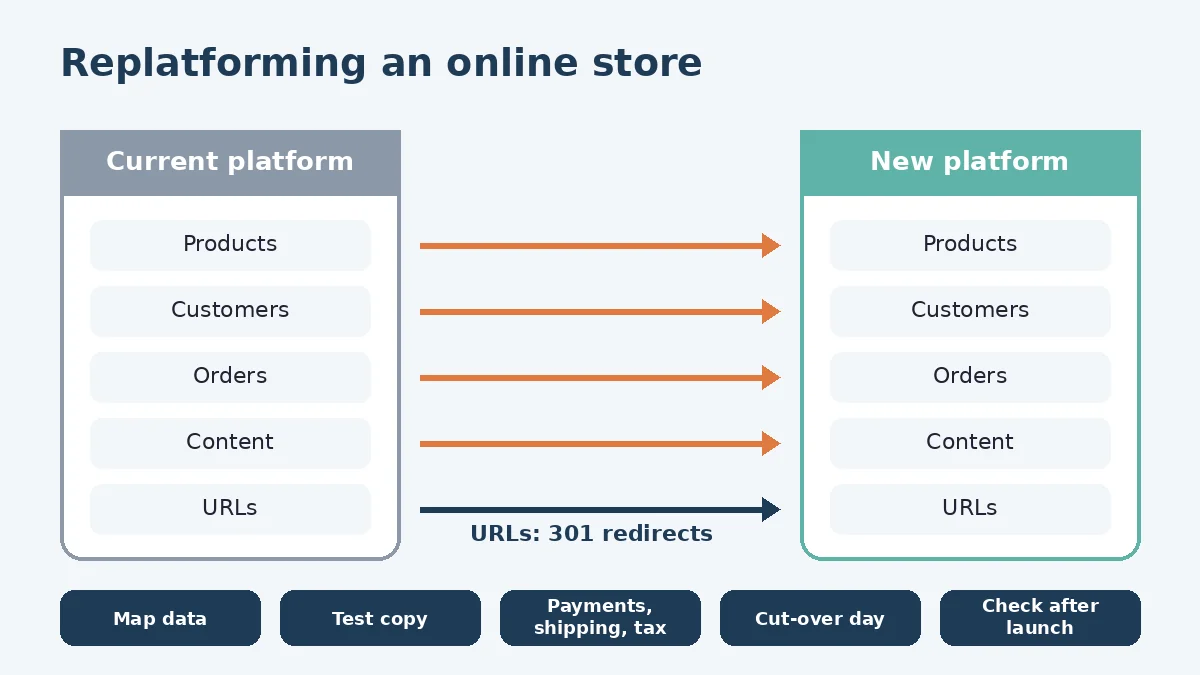
What has to move: products, customers, orders, content
A replatforming project can start with an inventory of everything the current store holds. That inventory can include:
- Products. Titles, descriptions, variants, SKUs, images, categories, tags and any custom fields.
- Customers. Accounts, addresses and marketing consent records.
- Orders. Order history that customers, your accounting and your returns process may depend on.
- Content. Pages, blog posts, policies, transactional emails and the images and files they use.
- Settings and integrations. Apps, accounting or inventory connections, reviews and anything else wired into the old store.
Customer records need particular care. Under PIPEDA, Canada’s federal private-sector privacy law, businesses must protect personal information against loss, theft and unauthorized access, disclosure, copying, use or modification, with safeguards appropriate to its sensitivity (OPC, PIPEDA Principle 7). In practice, export files containing customer data can be limited to what the move needs, shared with as few people as possible and deleted once the move is confirmed. For legal questions, check with a qualified privacy adviser.
Protecting SEO: URLs and redirects
Product and category pages can carry years of search visibility and links. If their addresses change and nothing points the old ones to the new ones, visitors and search engines hit errors.
Google’s site-move guidance sets out the core steps: prepare and test the new site, map current URLs to their new versions, redirect the old URLs to the new ones and monitor traffic on both (Google Search Central, site moves). Our redirect plan can include:
- A full URL map. Every product, category, page and important image, matched to its new address.
- Permanent redirects. Google recommends server-side permanent redirects, such as
301, where possible, and says they don’t cause a loss in PageRank (Google Search Central, redirects; site moves). - No shortcuts. Google warns against redirecting many old URLs to one irrelevant page, such as the home page, which can be treated as a soft 404. Products you’re dropping can return a proper “not found” response or point to a genuinely related page.
- Updated internal links, canonical tags and a new sitemap.
Google also advises changing one thing at a time where possible, and notes that rankings can fluctuate while it recrawls a moved site (Google Search Central, site moves). We can’t promise rankings won’t move, but careful planning and mapping can reduce the risk.
Payments, shipping and tax settings
These settings don’t migrate themselves, and mistakes here cost real money. Setup on the new platform can include:
- Payments. Connecting a payment provider supported by the new platform and testing each payment method you offer. The PCI Data Security Standard applies to entities that store, process or transmit cardholder data, including merchants (PCI Security Standards Council). We can talk with you about how your payment setup affects what you’re responsible for.
- Shipping. Zones, rates, carriers, free-shipping rules and local pickup, rebuilt and checked against the old store’s behaviour.
- Tax. Sales tax settings for where you sell, reviewed with you. This isn’t tax advice, so we recommend confirming them with your accountant.
- Fulfilment and notifications. Order statuses, packing slips and the emails customers receive at each step.
Testing and cut-over day
Before launch, the new store can be built and tested away from public view. Testing can include placing test orders with each payment and shipping option, checking taxes on sample carts, confirming customer accounts and order history came across, and crawling the old URL list to confirm each one redirects where it should.
Cut-over can be planned with you in advance. The plan can include a content freeze on the old store, a final export of recent orders and customers, switching the domain, turning on redirects, and removing any development-only blocks such as noindex rules, which Google lists as a common site-move mistake. After launch, checks can include monitoring Search Console for “not found” errors and submitting the new sitemap. What support looks like after launch can be agreed with you as part of the project scope.
If you’re planning a store from scratch rather than moving one, our guide to planning an e-commerce project covers that path. Store builds, migrations and integrations sit under our e-commerce solutions. If your move is to WordPress, our post on WordPress migration and SEO explains how we can help protect search visibility along the way.
FAQ
Will moving my store hurt my search rankings?
Any move carries some risk, and Google notes rankings can fluctuate while it recrawls. Careful URL mapping, permanent redirects and checks after launch can reduce that risk, but rankings can’t be guaranteed.
Can my order history and customer accounts come with us?
It can, depending on what both platforms support. What can move, and how, can be checked before the project starts.
Do we have to close the store during the move?
The new store can be built and tested while the old one can keep selling. The switch itself can be planned for a time that suits your business.
Working with LaunchLen
We’re LaunchLen Web Solutions Inc., based in Kitchener, serving Waterloo Region and businesses across Ontario.
If your store has outgrown its platform, or running it takes more work than it should, a move may help. Tell us what’s getting in the way, and we can give you an honest view of whether switching is worth it.

DROP US A LINE
Connect with LaunchLen Web Solutions Inc.
Ready to take the first step towards unlocking opportunities, realizing goals, and embracing innovation? We're here and eager to connect.

To More Inquiry
+1 226 899 4813

To Send Mail