Email Migration Checklist: How We Plan a Business Email Move


AI Automation and Agents

- 14 Nov, 2026
- 4 Views
- 0 Comment
By the LaunchLen Web Solutions Team · Last updated: November 14, 2026
A shared inbox works well until it doesn’t. Questions about invoices sit next to booking changes, urgent requests hide under newsletters, and two people answer the same message while another one waits for days.
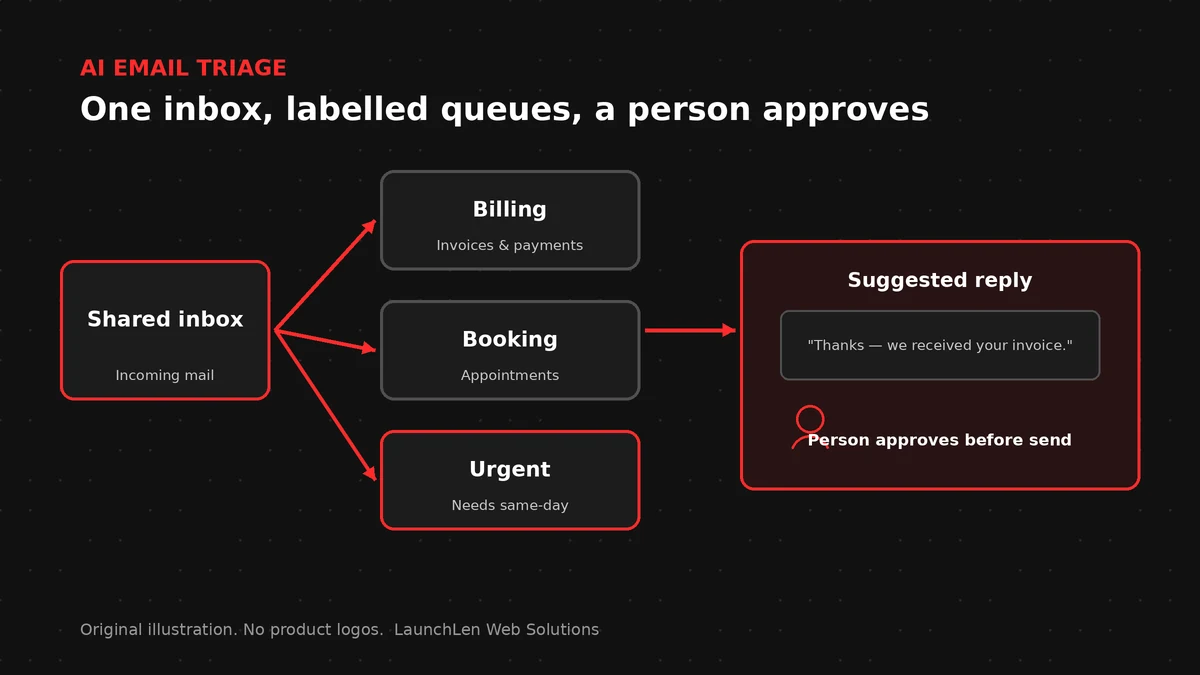
AI email triage helps sort that pile before a person opens it. This post explains what AI email and ticket triage can do, how we plan a build around your inbox, and why your team stays in charge of every reply.
What AI email triage does (and what your team still decides)
Our AI Solutions page describes email and ticket triage as AI that sorts incoming emails or tickets by topic and urgency, pulls out key details and suggests a reply or a route. Your team decides what gets sent.
In practice, a build can include:
- Categories. Each message gets a topic label, such as billing, booking or general question.
- Urgency flags. Messages that match the signs your team treats as urgent move to the top.
- Key details. Names, order or job references, dates and the actual request are pulled into a short summary.
- Suggested replies or routes. The AI drafts a reply for a person to edit, or suggests which person or queue should take it.
What it doesn’t do is just as important. The AI doesn’t send anything on its own, close tickets or make promises to customers. It prepares the work, and a person finishes it.
Mapping your inbox first: topics, urgency and who handles what
Good triage starts with how your team already works, not with the AI. Before any build, we look at a sample of recent messages with you and agree on three things:
- The topics that matter. A short, clear list beats a long one. If two categories get mixed up by people, they’ll get mixed up by AI too.
- What counts as urgent. This is a business decision, written down in plain words, so the AI and your team use the same rules.
- Who handles what. Each category needs an owner or a queue, so a suggested route leads somewhere real.
This map becomes the instructions the triage step follows, and it’s easy to change later as your business changes.
Pulling out key details and suggesting a reply or a route
Once a message has a topic, the next step is making it quick to act on. A summary at the top of each message can show who sent it, what they want and any reference numbers they included.
For common requests, the AI can draft a suggested reply using wording your team has approved, such as your standard answer about booking changes. For everything else, it can suggest a route instead of a reply.
Some messages arrive with documents attached, like invoices or forms. Reading those is a related but separate job, covered in our post on AI document automation.
If you’re weighing different kinds of automation, our guides on moving from RPA to agentic AI and AI process automation vs RPA vs agentic AI explain where rule-based steps end and AI judgment begins.
Keeping a person in charge: review steps and clear limits
AI can misread a message, so triage is built around people reviewing what it suggests. The NIST AI Risk Management Framework, a voluntary framework for managing AI risks, is meant to help organizations build trustworthiness into how AI is designed, used and evaluated.
The Government of Canada’s guide on the use of generative AI puts it plainly: don’t consider generated content as authoritative, and review it for accuracy. We design triage the same way:
- Every suggested reply is a draft until a person sends it.
- Anyone on the team can change a label or a route.
- Corrections are noted, so the instructions can be tuned in the next round.
- Messages the AI can’t place go to a general queue for a person to sort.
Your team connects your inbox or ticket tool through its own integration settings, with our guidance. We never ask for your passwords.
Triage is different from a website chatbot. When a website chatbot hands a conversation to a person, it’s dealing with a live visitor. Triage works behind the scenes on messages that have already arrived.
Choosing a first inbox or queue to pilot
Starting small makes it easier to see what’s working. A good first pilot is one inbox or queue with:
- A steady flow of messages that fall into a few clear topics.
- A team that’s willing to review suggestions and note corrections.
- Standard answers you already use and trust.
After the pilot, you can decide whether to add more categories, more queues or more suggested replies. The scope of each step is agreed with you before work starts.
FAQ
Will the AI send replies on its own?
No. It suggests a reply or a route, and your team decides what gets sent. Nothing goes to a customer without a person approving it.
Can it work with the tool we already use for tickets?
It depends on the tool. We check what your inbox or ticket tool supports during discovery, before any build is agreed.
What if it puts a message in the wrong queue?
A person reviews the label and moves it. Those corrections feed the next round of tuning, so the instructions get clearer over time.
Working with LaunchLen
We’re LaunchLen Web Solutions Inc. Our AI Solutions page covers email and ticket triage alongside the other AI work we do.
This is project work. A build can include categories, urgency flags, key-detail summaries and suggested replies or routes for your team to approve. The scope is agreed with you before work starts, and post-launch support can be agreed per project.
Serving local businesses across Canada and the US, delivered remotely.

DROP US A LINE
Connect with LaunchLen Web Solutions Inc.
Ready to take the first step towards unlocking opportunities, realizing goals, and embracing innovation? We're here and eager to connect.

To More Inquiry
+1 226 899 4813

To Send Mail