Building a First Version: How We Approach MVP Development


Web Design and Development

- 5 Nov, 2026
- 5 Views
- 0 Comment
By the LaunchLen Web Solutions Team · Kitchener, Ontario · Last updated: November 5, 2026
Schema markup (structured data) helps search engines understand what a page is about: a local business, a service, an FAQ, an article. On WordPress, the usual format is JSON-LD in the page head.
This guide covers what schema does, JSON-LD basics, useful types for local businesses, plugin versus custom code, and how to test without spamming markup. Structured data can make pages eligible for certain search features; it does not by itself earn them.
What schema markup is and does
Search engines read visible content and, when present, structured data that describes that content in a standard vocabulary (Schema.org). Google’s Search Central documentation explains that structured data helps its systems understand your pages and can enable rich results when the markup matches the guidelines.
Schema is not a ranking switch. Think of it as clearer labelling. It works when it matches what users actually see on the page. For how local businesses show up in classic results, maps and AI-style answers, see our guide to GEO and AI Overviews for local business.
JSON-LD basics
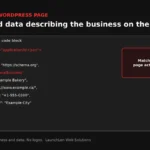
JSON-LD (JavaScript Object Notation for Linked Data) is a script block that describes entities and their properties. Google recommends JSON-LD for many rich-result types because it stays separate from the HTML you style.
A simple pattern:
- One or more
@typevalues (for example Organization or LocalBusiness). - Properties such as name, url, telephone and address that match the page.
- Nested objects when needed (an address inside a LocalBusiness).
Keep markup truthful. If the page does not show a phone number, do not invent one in JSON-LD. Google’s structured-data policies warn against spammy or mismatched markup.
Useful types for local businesses
Types that often matter for Ontario service businesses:
- Organization — the company as a whole.
- LocalBusiness (or a more specific subtype when it fits) — name, address, phone, opening hours, area served.
- Service — what you offer, tied back to the provider organization.
- FAQPage — questions and answers that appear on the page.
- Article or BlogPosting — for guides like this one.
- BreadcrumbList — often handled by your SEO plugin’s defaults.
FAQ markup has a further limit on Google. As of May 2026, Google Search Central states that FAQ rich results are no longer shown in Google Search, and the FAQ rich-result documentation was later removed. You can still mark up FAQs that are genuinely visible on the page (other systems may use Schema.org FAQPage), but do not expect a special FAQ display in Google Search.
Plugin vs custom code
On WordPress you generally choose among:
- Your SEO plugin’s schema settings for Organization, LocalBusiness, articles and breadcrumbs.
- A dedicated schema plugin when you need more types.
- Custom JSON-LD in a child theme, a small plugin or a tag manager when templates are unique.
Plugins are enough for many brochure sites. Custom code helps when you have many service pages with different attributes, or when a plugin’s output conflicts with another.
Whichever path you pick:
- Prefer one authoritative Organization / LocalBusiness block, not three competing copies.
- Keep markup in sync when your address or hours change.
- Avoid pasting the same FAQ schema on every URL if those questions are not on that URL.
When several plugins each inject Organization data, search engines can see conflicting names or addresses. Pick one source of truth and disable the duplicates. After a redesign or a move to a new domain, re-export and re-test the same templates so redirects and canonical URLs still match the entities you describe.
Testing and avoiding spammy markup
Before you call the work done:
- Use Google’s rich-results / structured-data testing tools on key templates (home, contact, a service page, a FAQ page, a blog post).
- Confirm the parsed type and required properties.
- Compare markup to visible content.
- Re-test after plugin updates.
Spammy patterns to avoid include fake reviews, hidden content described only in schema, and irrelevant types bolted onto every page. Google’s structured-data policies are the reference; when in doubt, mark up less and keep it accurate.
Structured data often sits alongside a broader technical review. Our technical SEO audit process describes how we look at crawlability, indexation and related issues.
FAQ
Does schema markup mean I will get rich results?
No. As of May 2026, Google no longer shows FAQ rich results in Search. FAQPage markup can still describe visible FAQs for other consumers; it does not earn a special FAQ display in Google.
Do I need FAQ schema on every page?
Only where a real FAQ section appears. Repeating the same FAQ JSON-LD sitewide is a common mistake and can conflict with policies.
How do you report on SEO work that includes schema?
We can report in the tool you prefer (for example Google Analytics, or another analytics tool you already use), on a schedule we agree with you. Schema work shows up as implementation and validation notes; it is not a promise of a particular rich result.
Let’s work together on your project
Want schema and technical SEO that match how your business actually presents itself online? We’re LaunchLen Web Solutions Inc.
Based in Kitchener, serving Waterloo Region and businesses across Ontario.
Our SEO Services page explains SEO and AI search optimization for Kitchener-Waterloo businesses: showing up clearly across classic results, maps and AI-style answers, starting with the fundamentals. Before any work, we can agree the scope, deliverables and reporting with you. Book a free consultation to get started.
DROP US A LINE
Connect with LaunchLen Web Solutions Inc.
Ready to take the first step towards unlocking opportunities, realizing goals, and embracing innovation? We're here and eager to connect.

To More Inquiry
+1 226 899 4813

To Send Mail