How to Price Products for Profit After Marketplace Fees and Ad Costs


SEO and Growth Marketing

- 23 Nov, 2026
- 2 Views
- 0 Comment
By the LaunchLen Web Solutions Team · Last updated: November 23, 2026
Search engines find pages by following links. An XML sitemap gives them a second route: a single file that lists the pages you want them to know about.
This guide explains what an XML sitemap is, when it helps, what it can’t do and how to check that yours is working.
What is an XML sitemap?
Google’s documentation describes a sitemap as “a file where you provide information about the pages, videos, and other files on your site, and the relationships between them” (Learn about sitemaps).
Google’s build guide covers several sitemap formats, including XML, RSS and plain text. An XML sitemap is written in a structured, machine-readable way, so it isn’t meant for human visitors. Each entry lists a page address and, optionally, when that page last changed.
The format follows a shared standard, the sitemaps protocol, so different search engines can read the same file.
Does your site need an XML sitemap?
Not every site strictly needs one. Google notes that “if your site’s pages are properly linked, Google can usually discover most of your site.”
Google’s overview lists cases where a sitemap is more likely to help:
- Large sites, where it’s harder to make sure every page is linked from another page.
- New sites with few links from other sites, because crawlers find pages by following links.
- Sites with a lot of video or image content that you want shown in search results.
For a small, well-linked site, a sitemap can still be a sensible default. It gives search engines a clear list of the pages you care about.
What goes in a sitemap
A good sitemap lists only the pages you want to appear in search results. That means:
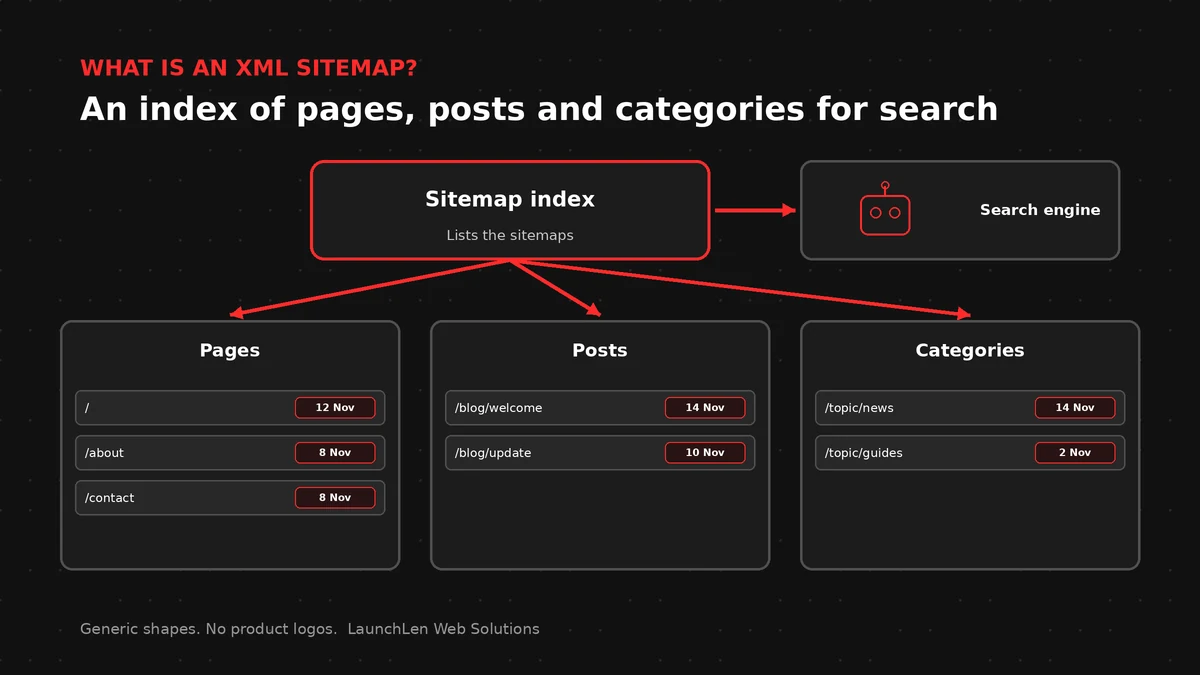
- Include your main pages, service pages, blog posts and other useful content.
- Leave out test pages, thank-you pages, duplicates and anything set to noindex.
- Keep dates honest. Google says it uses the last-modified value “if it’s consistently and verifiably” accurate, and that it ignores the priority and change-frequency values (Build and submit a sitemap).
Very large sites can split their sitemap into several files and list them in a sitemap index, which is a sitemap of sitemaps.
What an XML sitemap can’t do
A sitemap helps search engines find pages. It doesn’t make them rank. Google is direct about this: “submitting a sitemap is merely a hint: it doesn’t guarantee that Google will download the sitemap or use the sitemap for crawling URLs on the site.”
A sitemap also won’t fix weak content, broken internal links or pages blocked from indexing. Those need attention on their own, and a technical SEO audit is a good place to find them.
XML sitemap SEO in WordPress
WordPress core can create XML sitemaps on its own. The WordPress core team’s announcement explains that “by default, sitemaps are created for all public and publicly queryable post types and taxonomies, as well as for author archives and of course the homepage of the site” (WordPress core sitemaps).
The same announcement notes that the robots.txt file WordPress generates will point to the sitemap index, so search engines can find it.
SEO plugins can replace the core sitemap with their own and add finer controls, such as leaving out certain post types.
Common sitemap mistakes to check
A sitemap is only useful if the list is accurate. Checks worth running include:
- Addresses that redirect or return errors. The sitemap should list the final, working address of each page.
- Noindex pages. A page you’ve asked search engines to leave out shouldn’t also be listed as one to find.
- Test or staging addresses. Only live pages belong in the live sitemap.
- More than one sitemap tool. If a plugin and WordPress core both publish a sitemap, it’s worth confirming which one search engines are being sent to.
These are quick checks, and they’re part of any careful technical review.
How to submit your sitemap to Google
You can tell Google where your sitemap is in a few ways. Google’s build guide lists:
- Search Console. Submit it in the Sitemaps report, which lets you “see when Googlebot accessed the sitemap and also potential processing errors.”
- robots.txt. Add a line pointing to your sitemap address.
After a redesign or a website migration, check the Sitemaps report again. Old addresses in the sitemap can send search engines to pages that no longer exist.
FAQ
Where do I find my WordPress sitemap?
On a WordPress site using the core feature, the sitemap index is linked from the robots.txt file. If an SEO plugin manages your sitemap, its settings show the address.
Is an XML sitemap the same as an HTML sitemap?
No. An XML sitemap is a file for search engines. An HTML sitemap is a normal page that lists links for human visitors.
How often should I update my sitemap?
On WordPress, you don’t need to edit it by hand: Google’s guide to building a sitemap explains that if you use a CMS such as WordPress, “it’s likely that your CMS has already made a sitemap available to search engines.” Your job is to check now and then that the list is right and that Search Console reports no errors.
Let’s work together on your project
Want your site set up so search engines can find what matters? We’re LaunchLen Web Solutions Inc.
As our WordPress Development page explains, every WordPress build includes the technical foundations, including an XML sitemap and structured data. When you want ongoing search work, our SEO Services page covers it.
Serving local businesses across Canada and the US, delivered remotely.
Book a free consultation to get started.


DROP US A LINE
Connect with LaunchLen Web Solutions Inc.
Ready to take the first step towards unlocking opportunities, realizing goals, and embracing innovation? We're here and eager to connect.

To More Inquiry
+1 226 899 4813

To Send Mail