Prompt Injection: The Security Risk Every AI Chatbot Owner Should Know


SEO and Growth Marketing

- 31 Oct, 2026
- 10 Views
- 0 Comment
By LaunchLen Web Solutions Team
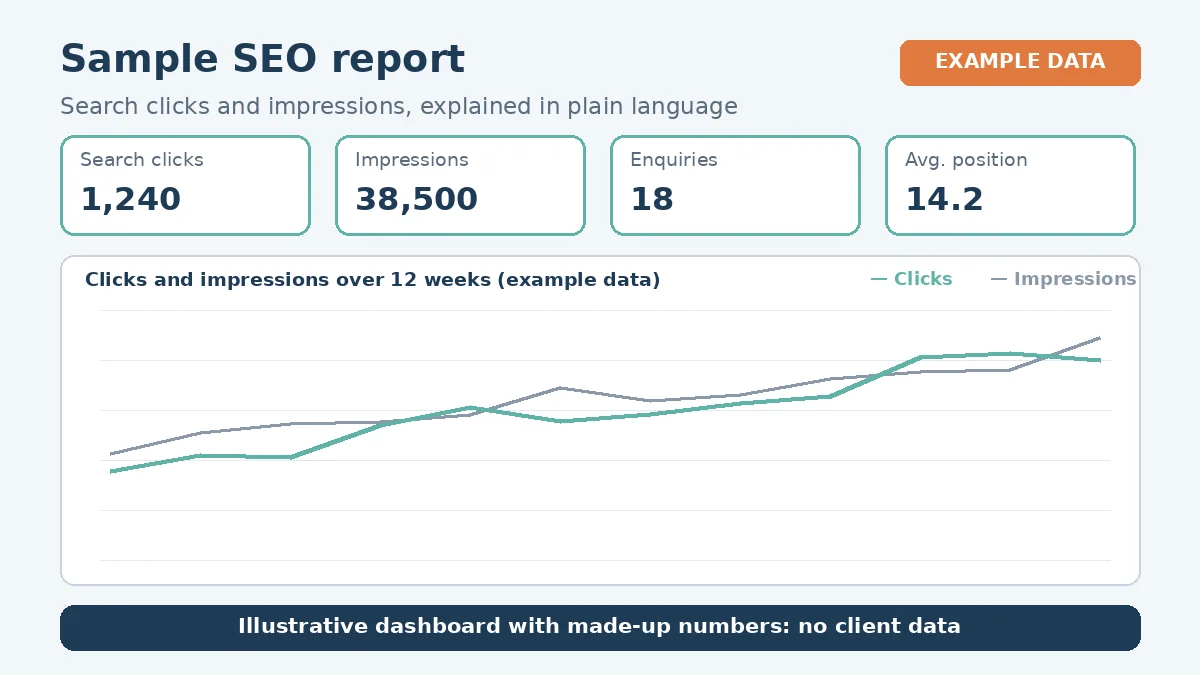
An SEO report can be full of charts and still leave you asking, “So is this working?” Good SEO reporting answers that question in plain language. It shows what changed, why it matters to your business and what comes next.
This post explains how SEO reporting with LaunchLen Web Solutions Inc. can work: what we can measure, how rankings fit in, how AI search shows up in the data and how reporting can be set up with you.
Why reports should answer business questions
Traffic numbers on their own don’t pay the bills. A report can start from the questions you actually care about:
- Are more of the right people finding us? Not just more visitors, but visitors searching for what you sell, where you sell it.
- Are they taking action? Calls, form submissions, bookings or other enquiries that come from search.
- Is the work paying off? Which changes seem to be helping, and which haven’t moved anything yet.
- What should we do next? A short list of priorities, with the reasoning behind each one.
That’s also why we try to avoid vanity metrics: numbers that look impressive but don’t connect to your goals. A spike in visits from searches unrelated to your business can look good on a chart and mean very little.
Google’s own advice on hiring an SEO suggests asking, “How do you measure your success?” and checking whether recommendations cite official Google documentation (Google Search Central, Do you need an SEO?). A useful report should make both answers easy to see.
What we can measure in search and analytics
Search visibility data is a natural starting point. Google Search Console, for example, is Google’s tool for site owners. Google says its Performance report shows “important metrics about how your site performs in Google Search results,” including clicks, impressions, click-through rate and average position, and which queries bring traffic to your site (Search Console Help, Performance report).
From that kind of data, a report can include:
- Clicks and impressions over time, to show whether visibility and visits are growing.
- Queries, grouped by service or topic, so you can see which searches you appear for.
- Pages, to show which pages earn search traffic and which don’t yet.
- Click-through rate, which can flag pages that appear in results but rarely get clicked.
Search tools show what happens in the results, and an analytics tool can show what visitors do once they arrive. Google notes that alongside Search Console, you could track conversions and time spent on your site in other tools, such as Google Analytics (Google Search Central, AI features). SEO tracking is your choice: you can use Google Analytics or any tool or platform you prefer. Where your tracking allows, a report can connect organic search visits to enquiries.
How we get access to your search and analytics data can be agreed with you before reporting starts. Google advises granting an SEO read access to Search Console rather than write access when they’re auditing your site (Google Search Central, Do you need an SEO?).
Rankings in context, with no promises
Rankings matter, but they’re easy to misread. Search Console’s average position is “the average position of the topmost result from your site,” and Google notes that you might not see your site when you run the same query yourself, because results are “specific to the time, place, device, and recent history of the person searching” (Search Console Help, Performance report).
So rankings can be reported in context:
- As trends, rather than as a single snapshot.
- For the search terms that matter to your business, not every phrase your site happens to appear for.
- Alongside clicks and enquiries, so a ranking change is read against what it means for visits.
What we won’t do is promise a ranking. Google says plainly that “no one can guarantee a #1 ranking on Google” and warns against SEOs that claim to (Google Search Central, Do you need an SEO?).
Tracking AI search visibility
More people now see AI-generated answers at the top of Google’s results. Google says the same SEO best practices apply to AI Overviews and AI Mode, with no additional requirements to appear in them (Google Search Central, AI features). Our post on GEO and AI Overviews for local businesses covers what that means for your content.
For reporting, Google says sites appearing in AI features are included in the overall search traffic in Search Console, reported in the Performance report within the “Web” search type (Google Search Central, AI features). That means AI Overview and AI Mode traffic can be part of the totals a report shows, but isn’t broken out on its own there.
So AI search visibility can be reported honestly, with its limits stated. A report can note manual spot checks of key questions, with the caveat that results vary by person, place and time. It can also track whether your pages answer the questions customers ask, which is the part you can influence.
How reporting and review can work
Which tracking tools you use is your choice. How often we report, the format and who receives the report can be agreed with you at the start, based on the scope of the work and what’s useful to your team. Our SEO and AI search optimization services page notes that frequency is agreed at the start.
Whatever the frequency, a report can include:
- What changed in the data since the last report.
- What work was done, and which changes it may relate to.
- What’s next, in priority order.
- Open questions that need a decision from you.
Here’s an illustrative example (not a real client): a local contractor sees impressions rising for service searches but few clicks. The report points to page titles that don’t match how customers search, and recommends rewriting them as the next step.
If a report surfaces technical problems, our technical SEO audit process explains what an audit can check.
FAQ
What should an SEO report include?
It can include search visibility and clicks, the queries and pages driving them, rankings in context, enquiries from organic search where tracking allows, the work done and the next priorities, all explained in plain language.
Can you show how much traffic comes from AI Overviews?
Not on its own. Google includes traffic from AI features in the overall “Web” search data in Search Console, so it can be part of the totals but isn’t reported as a separate line there.
Will you guarantee our rankings improve?
No. Nobody can honestly guarantee rankings, and Google warns against anyone who claims to. A report can show what changed and what we recommend next.
Working with LaunchLen
We’re LaunchLen Web Solutions Inc. Based in Kitchener, serving Waterloo Region and businesses across Ontario.
If your current SEO reports are hard to read, or you’re not sure what your search data is telling you, clear reporting is a good place to start. Tell us what you want your website to achieve.
DROP US A LINE
Connect with LaunchLen Web Solutions Inc.
Ready to take the first step towards unlocking opportunities, realizing goals, and embracing innovation? We're here and eager to connect.

To More Inquiry
+1 226 899 4813

To Send Mail