WordPress Migration: How We Help Protect Your SEO


Web Design and Development

- 23 Oct, 2026
- 1 Views
- 0 Comment
By the LaunchLen Web Solutions Team · Kitchener, Ontario · Last updated: October 23, 2026
Headless WordPress is a way of building a website where WordPress manages your content but doesn’t display it. A separate front end, such as one built with React, fetches that content and shows it to visitors. Your team keeps the familiar WordPress editor, and developers get more freedom over how the site looks and behaves.
That freedom comes with extra moving parts. This guide explains what “headless” means, how the pieces fit together, the real benefits and trade-offs, and how to tell whether your business site needs it. If you’re still weighing the two technologies, start with our comparison of React vs WordPress.
What headless WordPress means
A traditional WordPress site does two jobs. The back end stores your pages, posts and media, and the theme (the “head”) turns that content into the pages visitors see. Both live in the same system.
A headless CMS separates those jobs. The content system only stores and serves content; something else handles the presentation. When WordPress is used this way, it’s called headless WordPress or decoupled WordPress. The two terms are sometimes used interchangeably, though some people use “decoupled” for setups where WordPress still renders some pages itself.
In plain terms:
- Traditional WordPress: one system edits and displays the site.
- Headless WordPress: WordPress edits and stores content; a separate application displays it.
How WordPress and a React front end fit together
The link between the two halves is an API, a structured way for one program to ask another for data. WordPress includes one out of the box. According to the WordPress REST API Handbook, the WordPress REST API lets applications interact with a site by sending and receiving data as JSON, and it can be used to build a new interactive front-end experience or bring WordPress content into completely separate applications.
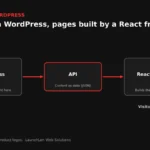
A headless WordPress with React setup can look like this:
- Editors write and publish in the WordPress admin as usual.
- The React front end requests posts, pages and other content from the WordPress REST API.
- The front end turns that data into pages, either on a server, ahead of time, or in the visitor’s browser.
Some teams add a GraphQL layer instead of, or alongside, the REST API, and some build the front end with a framework based on React. Example tools are listed in the sources below; they are examples only, not recommendations.
Benefits: speed, flexibility, multiple front ends
Speed and front-end control. Developers decide exactly what loads on each page. A well-built headless site can feel quick and app-like, but a poorly built one can still be slow; speed comes from the build, not the label.
Flexibility in design and features. The front end isn’t limited by a WordPress theme. Interactive tools, custom search or account areas can be part of the same application.
Multiple front ends from one source. Because content comes through an API, the same WordPress content can feed a website, a mobile app or another system. Editors update it once.
A familiar editor for your team. Staff who already know WordPress can keep using it. That’s one of the most practical reasons businesses consider headless WordPress over a fully custom CMS.
Costs in complexity: previews, plugins, SEO setup
Here “cost” means complexity and upkeep, not price. Headless adds work in several places.
Two systems to run. WordPress and the front end are hosted, updated and secured separately, and someone needs to understand how they connect.
Previews and editing. In a traditional site, editors preview a draft exactly as it will appear. In a headless setup, previews need extra configuration, and visual page builders may not carry over to the front end. How well this works can depend on your WordPress version, plugins and front-end framework, so check the current docs for each.
Plugins that touch the front end. Many WordPress plugins add features directly to the theme: forms, sliders, pop-ups, some SEO output. In a headless build, those features may need to be rebuilt in the front end or replaced.
SEO setup. Search engines can handle JavaScript sites, but the details matter. Google’s JavaScript SEO guidance explains that Google crawls, renders and then indexes JavaScript pages, and notes that server-side or pre-rendering is still a great idea because it makes a website faster for users and crawlers, and not all bots can run JavaScript. In a headless build, titles, meta descriptions, canonical URLs, structured data, sitemaps and redirects all need to be handled deliberately on the front end.
Security of the API. The WordPress REST API exposes content that is public on your site; private content generally needs authentication. Any custom endpoints or write access should be reviewed carefully.
Who should (and shouldn’t) go headless
Headless WordPress can make sense when:
- You need an app-like front end, interactive tools or a design a theme can’t deliver.
- The same content should feed a website and an app or another channel.
- You have, or can arrange, developer support for both systems over time.
- Your editors want to stay in WordPress.
A traditional WordPress site may suit you better when:
- The site is mainly service pages, a blog and contact forms.
- Your team relies on visual page building and instant previews.
- You depend on plugins that output features on the front end.
- You want one system to maintain.
Here’s an illustrative example: a professional services firm wants a public website plus a client portal with interactive tools. Keeping content in WordPress and building the portal and site front end in React can work well. A local trades business with service pages and a blog would likely be better served by a lean traditional WordPress site.
When we help with a project like this, we can agree the scope, deliverables and reporting with you before any build starts.
FAQ
Is headless WordPress good for SEO?
It can be, but it isn’t automatically better. Search performance depends on content, site structure and a sound technical setup. Server-side or pre-rendering, correct metadata, canonical URLs and sitemaps need deliberate setup on the front end.
Is WordPress a headless CMS?
WordPress is a traditional CMS by default, but its built-in REST API lets it work as a headless CMS. Content is managed in WordPress and delivered to a separate front end.
Do I need to rebuild my site to go headless?
The front end is generally a new build, but your existing WordPress content can stay where it is. Plan redirects, SEO checks and replacements for any plugins that display features on the front end.
Let’s work together on your project
Wondering whether headless WordPress fits your next website? We’re LaunchLen Web Solutions Inc., based in Kitchener, serving Waterloo Region and businesses across Ontario. We work with WordPress and can work with React and Node, and our WordPress development page explains how WordPress can run headless. If you’re also planning to add AI features to WordPress, we can talk that through too. Book a free consultation to get started.

DROP US A LINE
Connect with LaunchLen Web Solutions Inc.
Ready to take the first step towards unlocking opportunities, realizing goals, and embracing innovation? We're here and eager to connect.

To More Inquiry
+1 226 899 4813

To Send Mail