Interaction to Next Paint (INP): What It Is and How to Improve It


Case Studies and Guides

- 24 Oct, 2026
- 6 Views
- 0 Comment
By LaunchLen Web Solutions Team
New software is supposed to make work easier. Sometimes it ends up as one more login: bought after a good demo, half adopted, and quietly worked around with spreadsheets. A clear software selection process can make that outcome less likely.
This post explains how LaunchLen Web Solutions Inc. can run a requirements-first selection with you, meaning the process starts with your requirements, not with a product, and every option is judged against the same criteria. It covers requirements, shortlists and demos, data and integration checks, and the recommendation you receive.
Why a software selection process matters
Software choices can go wrong for ordinary reasons:
- Choosing from a demo. A polished demo shows what a product does well, not whether it fits how your team works.
- Unclear requirements. Without an agreed list of needs, the loudest opinion or the newest feature can win.
- Hidden effort. Data migration, integrations, training and ongoing administration are easy to underestimate.
- Privacy and security as an afterthought. Questions about where data goes are asked after the contract is signed.
- No owner. Nobody is responsible for rollout, so adoption stalls.
Our consulting services page describes our consulting as “practical and vendor-neutral in spirit”, and says we turn what we learn into “a plan you can act on, whether you build it with us, with your own team or with someone else.” A software selection follows the same approach.
Disclosure: LaunchLen has a referral relationship with Hostinger for hosting, VPS and self-hosted automation. Our recommendations stay based on your needs.
Writing requirements that matter
Good requirements describe the work, not the software. Gathering them can include conversations with the people who will use the system day to day, not only the people who approve the purchase.
A software requirements checklist can include:
- Must-haves: tasks the software has to support for the business to run
- Nice-to-haves: features that would help but aren’t deal-breakers
- Users and roles: who needs access, and what each person should be able to see or change
- Data: what information moves into the system, and what needs to come out of it
- Integrations: the tools it has to connect with, such as your website, accounting or email
- Constraints: budget priorities, timing, and any privacy or industry rules you need to meet
- Support and administration: who will manage the system once it’s live
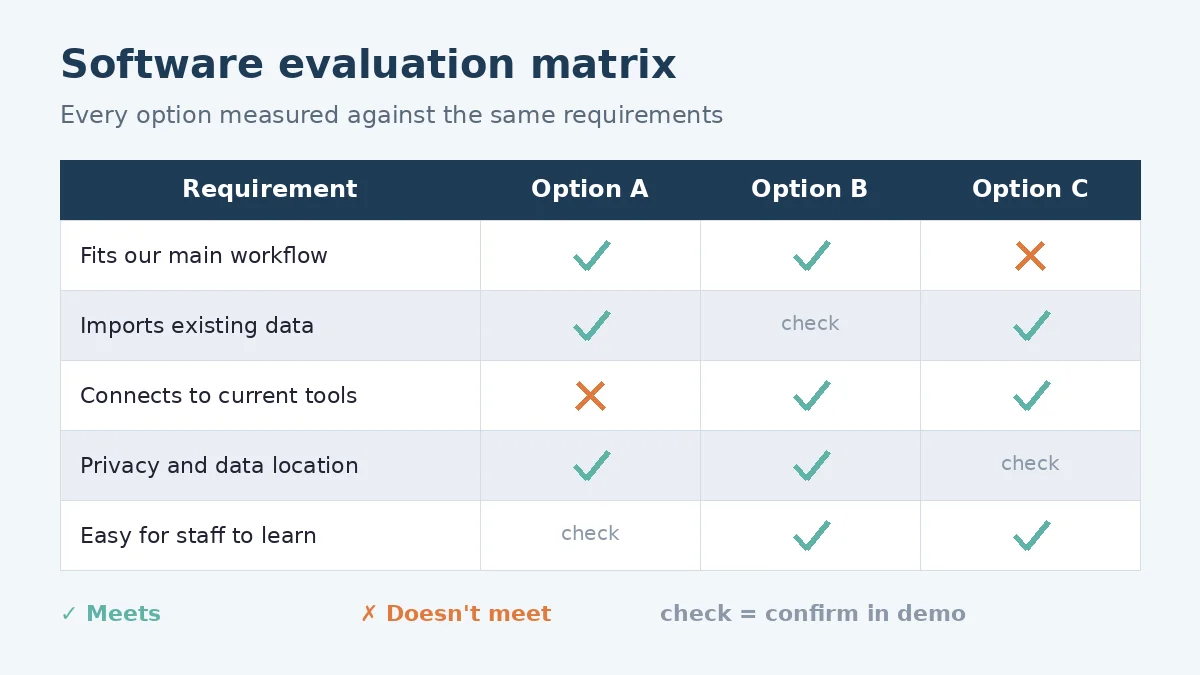
Each requirement can get a plain description and a priority, agreed with you. That list can become the software selection criteria every option is measured against. If you’re not sure what you run today, an IT assessment for small business can come first.
Shortlisting and running fair demos
With requirements in hand, the market can be narrowed to a shortlist of options that appear to meet the must-haves. Software vendor evaluation can be fairer when every vendor gets the same brief.
A fair demo process can include:
- Scripted scenarios. Each vendor is asked to show the same real tasks from your requirements, instead of their own highlight reel.
- Your data, where possible. A trial with sample records from your business shows more than a demo account.
- The right people in the room. Staff who will use the system daily can try it and ask their own questions.
- The same scorecard for every option. Notes are recorded against each requirement, so comparisons are like for like.
As an illustrative example, a professional services firm comparing booking tools might ask each vendor to show how a client reschedules an appointment, how staff see the change and how a reminder is sent. Seeing the same task side by side can reveal differences a feature list hides.
Checking data, privacy and integrations
Hidden effort and risk can sit here, so it gets its own step. Checks can include:
- Data in and out. Can existing records be imported cleanly, and can you export your data if you leave?
- Integrations. Does the software connect with the systems you named in your requirements, and how is that connection maintained?
- Access and security. Can access be limited by role, and do admin accounts support two-factor authentication?
- Where data is stored and processed. The Canadian Centre for Cyber Security recommends that organizations evaluate how outsourced IT providers can handle and access sensitive information, and evaluate the legal jurisdiction where those providers store and use it (Canadian Centre for Cyber Security, secure cloud and outsourced IT services).
Privacy law matters too. The Office of the Privacy Commissioner of Canada explains that PIPEDA requires organizations to take privacy into account when considering outsourcing, and that organizations must be satisfied the third party has policies and processes in place, including staff training and effective security measures (Office of the Privacy Commissioner of Canada, privacy and outsourcing for businesses). This is general information, not legal advice; please confirm your obligations with the official source or a qualified advisor.
If the software includes AI features, our AI readiness assessment checklist covers the extra questions about data and guardrails.
The recommendation and rollout plan
The selection can end with a written recommendation you can act on. It can include:
- The recommended option and the reasoning, tied back to your requirements
- Trade-offs and risks, including where the chosen option falls short
- Alternatives, in case negotiations or trials change the picture
- A rollout plan: data migration, integrations, training, and who owns the system
- Questions to settle before signing, such as data export, support terms and renewal conditions
The decision stays with you. We can agree the scope, deliverables and reporting with you at the start, including how many options are reviewed and who takes part in demos. You can build on the plan with us, with your own team or with another provider.
FAQ
What is a software selection process?
A software selection process is a structured way to choose business software. It starts with written requirements, narrows the market to a shortlist, compares options through demos and checks, and ends with a recommendation tied back to those requirements.
What does vendor-neutral mean in software selection?
In our process, vendor-neutral means we start from your requirements rather than a product, and every option is judged against the same criteria. The recommendation can explain its reasoning so you can check it yourself. Disclosure: LaunchLen has a referral relationship with Hostinger for hosting, VPS and self-hosted automation. Our recommendations stay based on your needs.
Do we have to use LaunchLen after the selection?
Not necessarily. How you can use the recommendation and rollout plan, including with your own team or another provider, can be agreed with you before the selection starts.
Working with LaunchLen
Based in Kitchener, serving Waterloo Region and businesses across Ontario.
If you’re about to choose new business software, start with the requirements. Tell us what the software needs to do and who will use it.
DROP US A LINE
Connect with LaunchLen Web Solutions Inc.
Ready to take the first step towards unlocking opportunities, realizing goals, and embracing innovation? We're here and eager to connect.

To More Inquiry
+1 226 899 4813

To Send Mail